Hi, thanks so much for the Network Scanner. It is great.
Just wondering if there is an option for displaying Windows versions? As in the new style... e.g. 1709, 1803 etc...
Thanks
All Forums
> Network Scanner
> Current topic
How to display Windows version
Started by jono
|
jono
How to display Windows version 31 May 2018, 14:56 |
|
|
Re: How to display Windows version 31 May 2018, 14:58 |
Admin Registered: 10 years ago Posts: 889 |
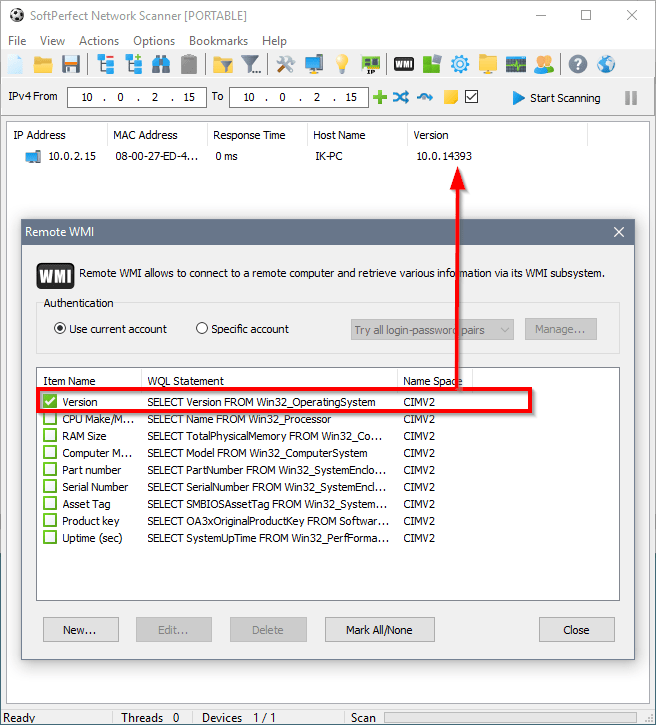
|
Re: How to display Windows version 12 June 2018, 10:17 |
Registered: 6 years ago Posts: 15 |
I use Remote Scripting for this. It still queries WMI, but I can manipulate the results to fit into the neat little compartments required by my Corporate Overlords.
This is paired in a Virtual Column with another query which grabs the OS Name, manipulates the raw data returned and produces dinosaur-shaped chicken nuggets.
Here's the OS Name query:
This is paired in a Virtual Column with another query which grabs the OS Name, manipulates the raw data returned and produces dinosaur-shaped chicken nuggets.
'Display OS Build Number

On Error Resume Next
strComputer = Input.Current

Set objWMIService = GetObject("winmgmts:" _
& "{impersonationLevel=impersonate}!\\" & strComputer & "\root\cimv2")

Set oss = objWMIService.ExecQuery _
("SELECT BuildNumber FROM Win32_OperatingSystem")

For Each os in oss
  If Err <> 0 Then
    Output.Write "-X-"
  ElseIf os.BuildNumber = 16299 Then
    output.write "1709"
  ElseIf os.BuildNumber = 15063 Then
    output.write "1703"
  ElseIf os.BuildNumber = 14393 Then
    output.write "1607"
  ElseIf os.BuildNumber = 10586 Then
    output.write "1511"
  ElseIf os.BuildNumber = 10240 Then
    output.write "1507 LTSB"
  Else
    output.write os.BuildNumber
End IF
Next
Here's the OS Name query:
'Display Operating System

On Error Resume Next
strComputer = Input.Current

Set objWMIService = GetObject("winmgmts:" _
& "{impersonationLevel=impersonate}!\\" & strComputer & "\root\cimv2")

Set oss = objWMIService.ExecQuery _
("SELECT Caption FROM Win32_OperatingSystem")

For Each os in oss
  If Err <> 0 Then
    Output.Write "-X-"
  ElseIf os.Caption = "Microsoft Windows 10 Enterprise 2015 LTSB" Then
    output.write "Win10"
  ElseIf os.Caption = "Microsoft Windows 10 Enterprise" Then
    output.write "Win10"
  ElseIf os.Caption = "Microsoft Windows 7 Enterprise " Then
    output.write "Win7"
  ElseIf os.Caption = "Microsoft Windows Server 2012 R2 Standard" Then
    output.write "Svr12R2"
  ElseIf os.Caption = "Microsoft Windows Server 2008 R2 Standard " Then
    output.write "Svr8R2"
  ElseIf os.Caption = "Microsoft Windows Server 2016 Standard" Then
    output.write "Svr16"
  Else
    output.write os.Caption
End IF
Next
|
|
Re: How to display Windows version 12 June 2018, 13:12 |
Admin Registered: 18 years ago Posts: 3 518 |

|
Re: How to display Windows version 16 June 2018, 04:23 |
Registered: 6 years ago Posts: 15 |
 Thanks! My grandson LOVES dinosaur-shaped chicken nuggets so they were on my mind.
By the way, VB isn't my strongest language. Is there a way to make these scripts use a sort of 'fail-over' on the strComputer variable?
Have it use Input.Column(PC Name) first, but if it encounters an error try again with Input.Current?
|
|
Re: How to display Windows version 16 June 2018, 19:33 |
Admin Registered: 18 years ago Posts: 3 518 |
I guess something like this should work. Try to connect with a host name, but if that fails, then again with the IP address:
On Error Resume Next
strComputer = Input.Column("Host Name")

Set objWMIService = GetObject("winmgmts:" _
& "{impersonationLevel=impersonate}!\\" & strComputer & "\root\cimv2")

If Err <> 0 Then
  Err.Clear
  strComputer = Input.Current
  Set objWMIService = GetObject("winmgmts:" _
  & "{impersonationLevel=impersonate}!\\" & strComputer & "\root\cimv2")
End If

Set oss = objWMIService.ExecQuery _
("SELECT BuildNumber FROM Win32_OperatingSystem")
...