NetGenius
Online User Manual
Getting started
As an Internet connection monitoring tool, NetGenius lets you watch the apps using your Internet in real-time and control their access. Their activity is recorded, and you can choose to prioritise, restrict or block Internet access for certain apps. This will help you to use your Internet traffic more efficiently, improve your security, achieve better privacy, and become the master of your Internet connection.
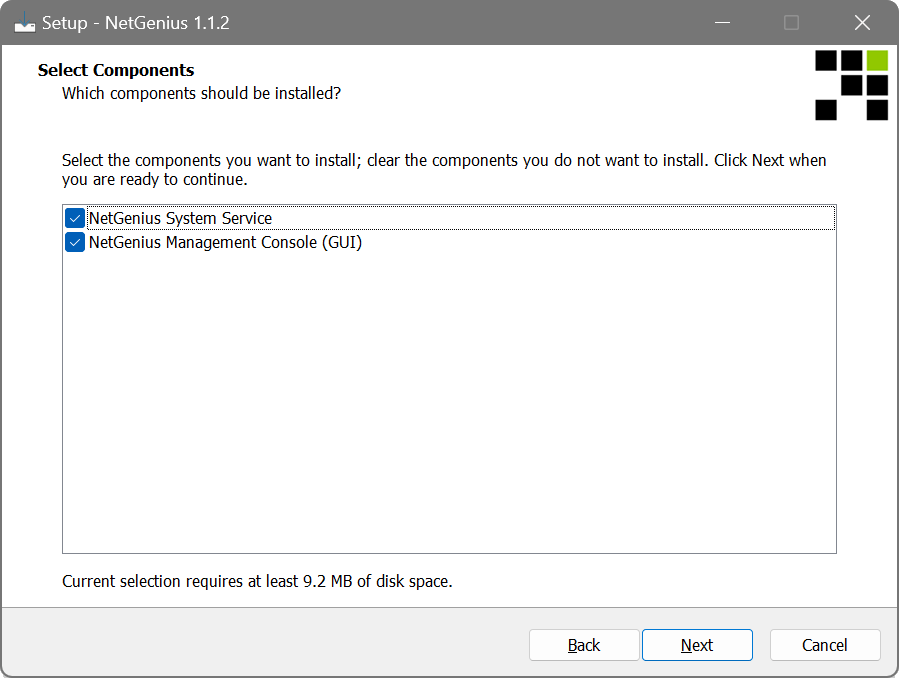
NetGenius consists of two major components: the System Service that does all the monitoring work, and the Management Console that enables you to interact with the service. During the installation you can choose which components to install, and normally you would need both to get started.
After installing and launching NetGenius, the main window will appear — this is where you can see the activity of your applications in real-time and choose what to do with them:
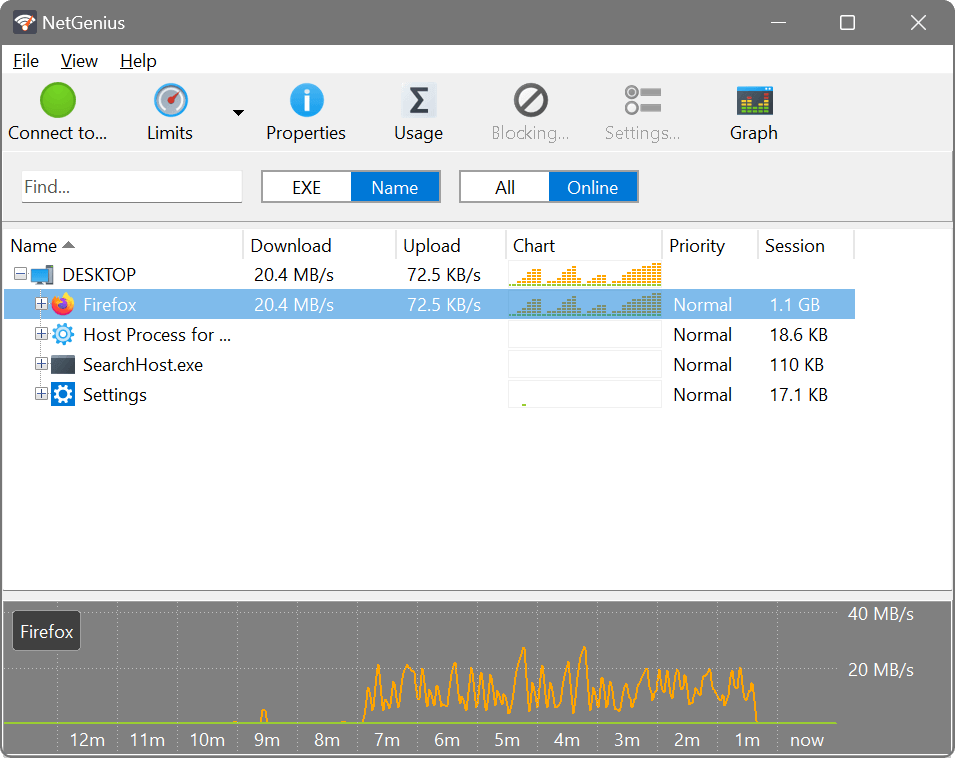
You may see some applications in the list immediately after the installation. However, to capture all applications, it is best to restart the computer.
To access the Limits, Properties, Usage, Blocking and Settings menu items, select the computer or the application name in the list. If you just want to know the Internet usage of each application, you don't need to do anything else.
Read on to find out what else NetGenius can do for you.
Main toolbar
- Connect to...
- Connects to NetGenius service installed on another computer. If you installed both NetGenius service and console on one computer, you don't need to press this button.
- Limits
- Sets restrictions (by pressing the button) or setting the priority (by pressing the arrow next to the button) for the item highlighted in the activity list below.
- Properties
- When an application or a process is highlighed in the activity list, pressing the Properties button shows additional information about that item.
- Usage
- Displays detailed traffic usage reports for applications and processes.
- Blocking...
- When a device is highlighed in the activity list, the Blocking button allows you to add an application or a path to the block list and thus deny it access to the Internet.
- Settings...
- When a device is highlighed in the activity list, the Settings button displays remote access parameters. If you are using NetGenius only on the current computer, you don't need to press this button.
- Graph
- Displays a graph and a list of applications with live data usage.
Prioritising important applications
All applications on your computer have to compete for bandwidth. This is normal, but some applications are bandwidth-sensitive and ping-sensitive, meaning they need the connection to be fast in terms of speed and latency. Examples of such applications include VoIP, games and collaboration suites.
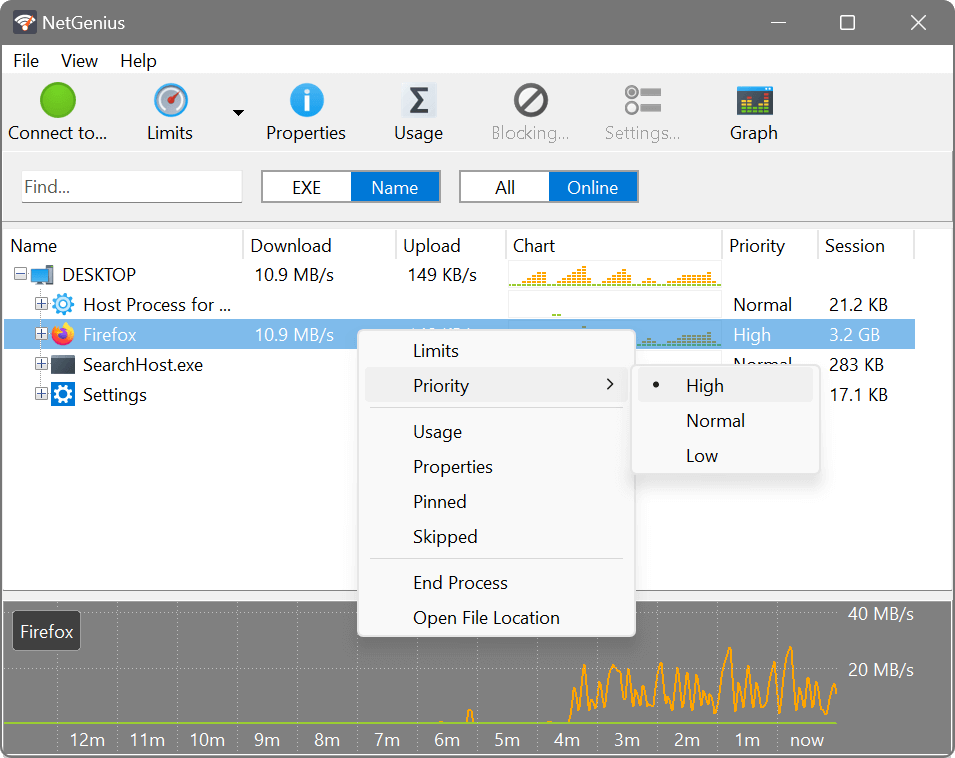
This is where prioritisation is very useful: you can assign a higher priority to important applications, and their data will be sent and received ahead of any other applications. This improves latency, also known as ping time, which is the delay before data transfer. When a higher priority application is active, any lower priority applications will have reduced bandwidth available to them. This improves bandwidth available to important applications, also known as speed. For example, you could assign a higher priority to Skype or your favourite game, and they should perform better than when they have to compete with other applications.
Likewise, you can deprioritise unimportant applications by assigning them a lower priority. In this case, their data will be sent and received behind any other applications, with effects opposite to prioritisation. For example, you could assign a lower priority to cloud backup programs or Torrent downloading applications. They will still run at full speed until a higher priority application becomes active. Once that happens, the low priority activity will be throttled until the more important applications are no longer active.
Priorities are fully automatic and you don't need to know any specific numbers. Simply select an application in the list and assign a higher priority to important applications or a lower priority to unimportant applications, and NetGenius will do the rest.
Download and upload limits
Unlike relative prioritisation, bandwidth limits are exact and serve as data transfer caps for applications. This can be useful if you want to prevent less important applications from occupying your entire connection even when there is no higher priority activity.
You can set a hard limit, for example 1 MB/s, on a downloading program, and its download speed will stay under this limit. In the example below we set a limit to Firefox, so that its downloads are capped, while the uploads are not:
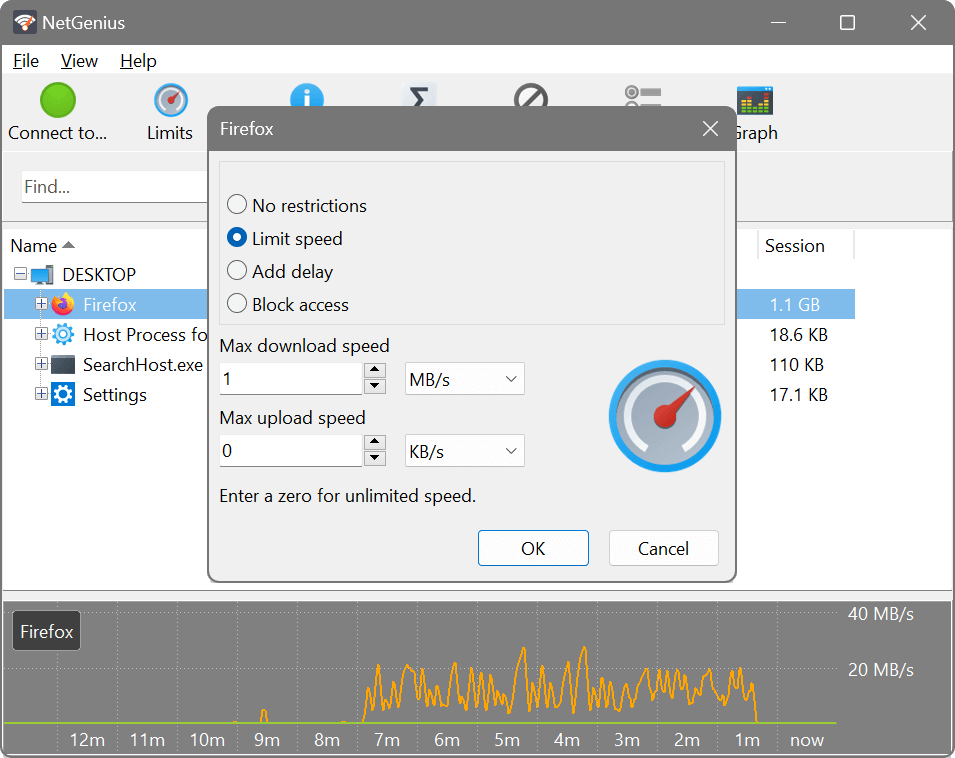
The limits apply on per-application and per-process basis. This means that if you launch several instances of a limited app, or the app is running multiple copies of its process, each of them can take up to the set limit.
Download and upload delay
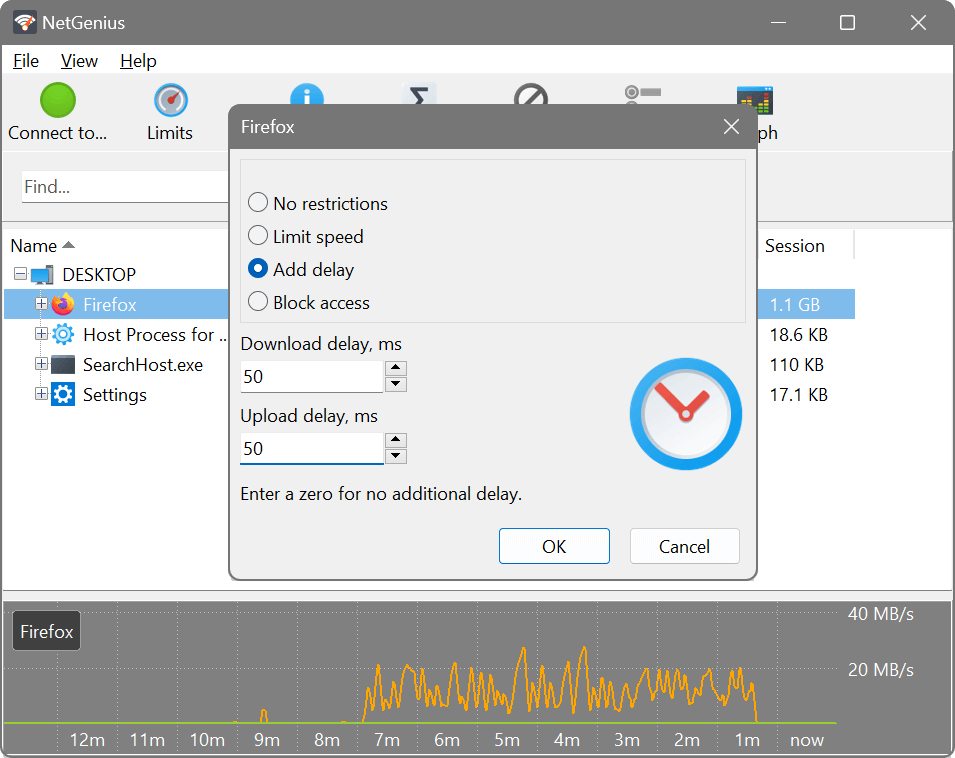
It is possible to artificially increase latency for an application. This is mainly useful in online games, as some games give you advantage if your latency or ping time is high. If you play games a lot, you probably know that and will try this feature:
Blocking unwanted applications
NetGenius acts as a simple firewall allowing you to block access to the Internet for certain applications. If an application doesn't or shouldn't require Internet connection, or you don't want it to “phone home”, you can easily block it. This will save bandwidth and give you better privacy and security by preventing blocked applications from sending and receiving data from the Internet.
You can block an application by selecting it in the list and choosing Block access in its limits. NetGenius can also block an application before it makes an Internet connection and appears in the list: select the computer in the list, click the Blocking... button in the toolbar, and add the application file; or use Add Path... for blocking all files in a certain directory.
Usage reports over a time period
NetGenius collects per-application usage statistics and lets you see how much data was used by each app over a specified period:
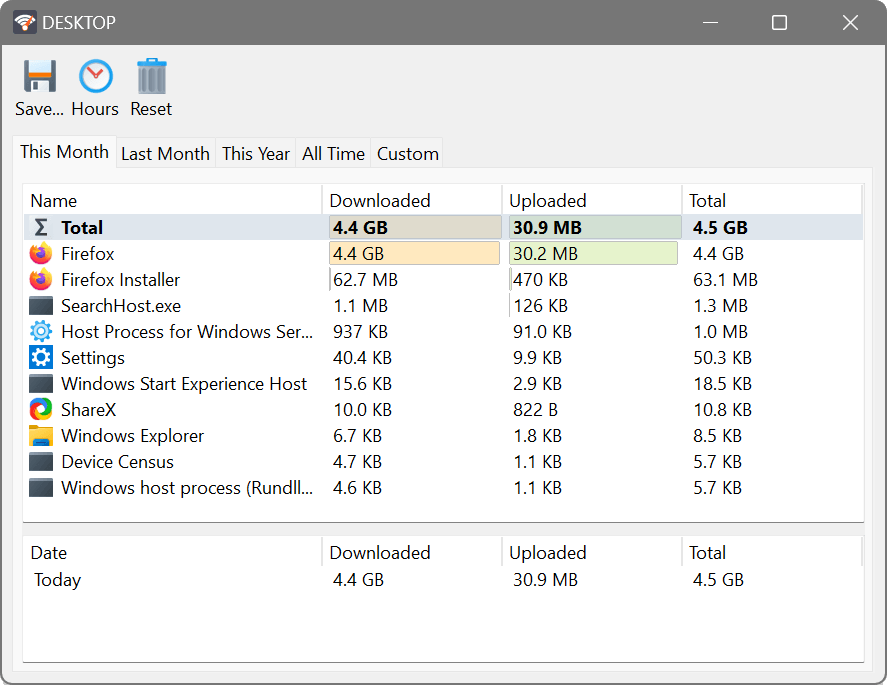
The usage figures are recorded on a per-hour basis, allowing you to see how much data was used during each hour of the selected day. Processes marked as ‘Skipped’ are excluded from monitoring: they are still shown in the list of active processes, but will not contribute to charts and usage records.
Managing multiple computers
If you have more than one Windows PC, you may want to record the usage and manage applications on all of them. NetGenius components make this easy to do: you could install the System Service on all the computers you want to manage, and install the Management Console on the computer you want to manage from. Then you can connect from the Management Console to the System Service on those PCs and manage them as if you were sitting in front of them. This setup can be used to manage the computers of other family members, such as cutting off kids Internet when it's bedtime.
Taskbar extension and floating graph
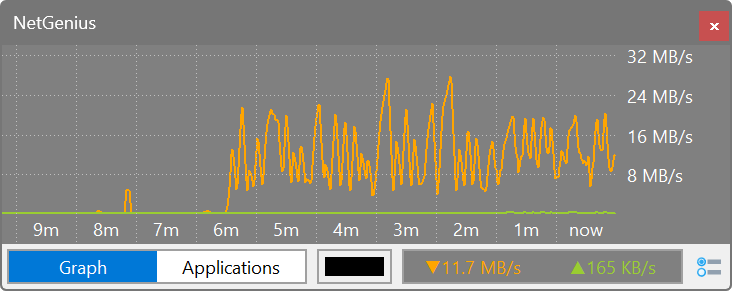
NetGenius can display a compact usage graph in the taskbar notification area, and a standalone floating graph that supports transparency and can be pinned anywhere on the screen. The taskbar graph can be enabled by right-clicking NetGenius icon in the notification area and selecting Display Speed in Taskbar.

The floating graph can be opened by clicking the Graph button in NetGenius main menu. The behaviour of this graph can be further customised via the Settings button in the bottom right corner.
Tips & tricks
- De-selecting the Automatically start NetGenius Management Console option during NetGenius installation will prevent its console from loading at Windows startup and its taskbar extension from displaying the traffic data. You will nevertheless still be able to access the console by launching its file from NetGenius program folder.
- The All/Online switch changes the main window list between displaying the applications that have an active Internet connection at this moment, and all processes currently running in your system, including those that never access the Internet.
- To see which applications accessed the Internet in the past, simply click Usage and select the time period you are interested in.
- To make a certain application always shown in the Online list, even when it is not actively accessing the Internet, right-click it and choose Pinned. All pinned apps are displayed underlined.
End User Licence Agreement (EULA)
This software and the included documentation is copyright SoftPerfect Pty Ltd, Australia. All rights are reserved. The software may be used, installed or copied only in accordance with the terms of the licence described in the following paragraphs.
DISTRIBUTION TERMS
The evaluation version of the software may be freely distributed, provided that the original distribution package is not modified in any way.
EVALUATION VERSION
This is not free software. You are hereby licensed to use this software for evaluation purposes without charge. The evaluation version may be of a limited duration, or have some features limited or disabled. To use the software without these restrictions, you need to purchase a licence.
GRANT OF LICENCE
The software is licensed, not sold. Upon purchase of a licence, SoftPerfect grants you a non-exclusive, non-transferable right to use the software and all its features according to the terms of this EULA and the purchased licence type as described in the Licence Types section.
LICENCE TYPES
- Single Device Licence grants the purchaser, or agents of the purchaser, rights to install and use the software on one device only (e.g. computer, server, USB flash drive or virtual machine) at any given time. The licence can be reinstalled on the same device at any time, or deleted from one device and then moved to another. It can be used on any operating system compatible with the software. To install and use the software on more than one device simultaneously, you must purchase the corresponding number of single device licences or one of the special licences listed below.
- Multiple Licence Pack grants the purchaser, or agents of the purchaser, rights to simultaneously install and use the software on up to as many devices as is stipulated by the quantity in the pack. For example, the “Up to 10 Devices” pack allows installing and using the software on up to ten devices at the same time. Each device licence within the pack is identical to a single device licence. The licence pack can be used across multiple devices running different operating systems compatible with the software.
- Site Licence grants an organisation, or agents of an organisation, rights to install and use the software on an unlimited number of devices within one organisation site, including any cloud-based installation and use performed from that site. An organisation site is defined as a location, or group of locations, used by the organisation that are all within 100 miles (160 kilometres) of each other.
- Worldwide Licence grants an organisation, or agents of an organisation, rights to install and use the software on an unlimited number of devices at an unlimited number of locations used by the organisation, including any cloud-based installations and use performed from those locations. If not listed, please contact us for the worldwide licence price.
- OEM Licence grants an organisation, or agents of an organisation, rights to use and distribute the software with their own hardware or software products. These products must provide substantial additional functionality to this software beyond mere rebranding, and not include any potentially unwanted programs.
Where applicable, additional licence subtypes include:
- Home Licence grants a private individual rights to install and use the software at home, that is in a place of residence, for domestic purposes with no intention to generate income.
- Business Licence grants an organisation (a company, corporation, firm, enterprise or institution, or part thereof) or a person rights to install and use the software in a commercial and non-commercial environment for the purposes of or in connection with running a business, supplying products or services to other organisations or individuals, or generating income.
DISTRIBUTION OF LICENCE KEYS
Except for the specific purposes described in the Grant of Licence and the Licence Types sections, licence keys issued by SoftPerfect may not be distributed by any person, organisation or their agents without written permission from the copyright holder.
MODIFICATIONS
Unauthorised modification, decompilation or reverse engineering of the software or any subset of the software without written permission from the copyright holder is strictly prohibited.
USE
This software is distributed “as is”. No warranty of any kind is expressed or implied. You use it at your own risk. In no event shall SoftPerfect or its agents be liable for any loss or inaccuracy of data, loss or interruption of use, or cost of procuring substitute technology, goods or services, or any other loss or damages. If, despite the foregoing, SoftPerfect is found liable for any damages, its total cumulative liability shall not exceed the amount paid by you for the software licence.
You may not use this software in connection with any illegal, fraudulent, infringing, harmful or offensive activity.
TERMS OF ACCEPTANCE
Installation or use of this software signifies your acceptance of the terms and conditions of the licence. If you do not agree with them, you must stop using and remove the software from your devices. SoftPerfect reserves all rights not expressly granted here. SoftPerfect also reserves the right to terminate this licence immediately if you fail to comply with these terms. Upon termination, you must cease all use of the software and uninstall it from your devices.
GOVERNING LAW AND JURISDICTION
This EULA shall be governed by and construed in accordance with the laws of the State of Queensland, Australia, without regard to its conflict of law principles. The parties agree that the courts of Queensland, Australia, shall have the exclusive jurisdiction to resolve any dispute arising from or in connection with this EULA.
Acknowledgements
This product includes GeoLite2 data created by MaxMind.