Retrieve ILO, iDRAC, or IMM IP addresses
11 posts · Closed
Dear SoftPerfect Team,
Is it possible to get the ILO IP address from HP, the iDRAC IP address from Dell, or the IMM IP address from IBM with your Network Scanner tool?
Could you please help me with this question?
Thanks,
Andreas
It should be possible. The newer implementations of ILO and iDRAC are based on the so-called Redfish API, which is essentially an HTTP-JSON interface.
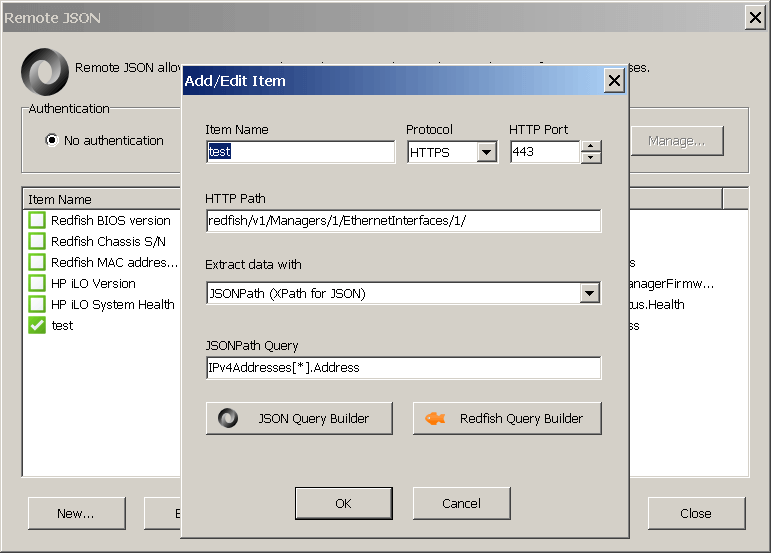
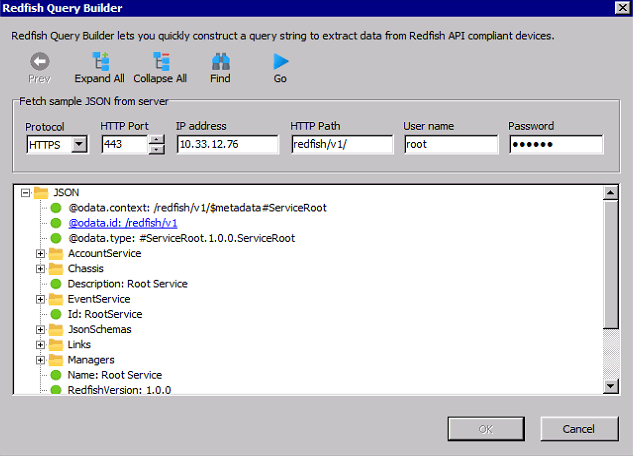
Below is a screenshot of Network Scanner's Remote JSON for extracting ILO IP address. There should be a similar way for iDRAC and IMM. You can use the Redfish query builder to explore the JSON tree and find in what node the IP address is.
Look under Remote XML. iDRAC is listed there. -WS
Hi,
Been trying to pull info from some Dell iDRAC servers using Redfish and no matter what I try it just get the same error over and over.
I get the response in the browser fine, any thoughts?
[image: https://i.ibb.co/WpcRDcD/netscan.gif]

It looks like your server expected a valid OData-Version header in the request, which the app did not send. It's strange it worked in the browser though.
Kindly try the new build that sends this header and let me know if it helped.
Tried and no good unfortunately.
Anything else you think I could try?
if I go to /redfish it gives back V1: /redfish/v1/
If I try /redfish/v1/ or anything deeper it returns "error.code 12" as before
If it makes a difference, tried on both Windows 10 and Windows 2008R2 with same results
and to Dell iDRAC
Hmm, apparently there is some other difference between what Chrome sends and what Network Scanner sends.
We'd really like to get to the bottom of this, if you are willing to help us with that. The best way would be getting some form of access to this server, i.e. via Team Viewer or /redfish/v1/ accessible via a public IP address. Granted that may not be possible, please try running the following commands and capture their output.
curl -v -L --insecure https://{ip-address}/redfish/v1/
or
curl -v -L --insecure https://{ip-address}/redfish/v1/Sessions/
It's probably best to continue this investigation in a private support ticket.
No problem, I opened a support ticket.
Hi,
Sorry for the late reply, the Network Scanner update published on 27 September works perfectly:
Thanks,
Ray