When deleting files, the Recycle Bin option is missing
4 posts · Closed
I created a RAM drive with the following properties:
Drive Letter
Image File Name
Save Contents to Image
Mount as Removable
Everything works, but I noticed that when I want to delete files from the RAM drive, I am not given the option of deleting to the Recycle Bin - "Are you sure you want to move this file to the Recycle Bin?".
The only option is "Are you sure you want to permanently delete this file?".
When I delete from the Desktop, everything works as expected and I see the Recycle Bin option.
Any ideas would be appreciated.
By default, Windows does not enable the Recycle Bin on removable drives, such as USB thumb drives. This is likely why you are experiencing issues with the Recycle Bin on your RAM disk when it is mounted as 'removable'.
You can fix it by doing one of the following two things:
- Mount the RAM disk without the Removable flag, which will allow the Recycle Bin to function normally on the RAM disk. For this, simply untick the "Mount as Removable" option in the Add/Edit Disk interface for your RAM disk.
- OR Enable the Recycle Bin on all drives, including removable ones by modifying the Windows registry.
How to enable the Recycle Bin on all drives using the registry:
- Press Win + R, type regedit, and press Enter to open the Registry Editor.
- Navigate to the following key: HKEY_CURRENT_USER\SOFTWARE\Microsoft\Windows\CurrentVersion\Policies\Explorer
- Right-click on the Explorer key, select New - DWORD (32-bit) Value.
- Name the new value RecycleBinDrives and set its value to ffffffff hexadecimal.
- Restart your computer for the changes to take effect.
Alternatively you can use these REG files to do the same registry modifications faster.
Hello
I was delayed in responding to you as when I tried the first option (without the Removable flag), whether coincidental or not, caused a crash necessitating several reinstalls of MS Office 365.
Now I was just about to implement the second option when I noticed that registry key only goes to
HKEY_CURRENT_USER\SOFTWARE\Microsoft\Office
rather than
HKEY_CURRENT_USER\SOFTWARE\Microsoft\Windows\CurrentVersion\Policies\Explorer
What should I do?
Joe
The correct path is
HKEY_CURRENT_USER\SOFTWARE\Microsoft\Windows\CurrentVersion\Policies\Explorer
Here are step-by-step instructions on how to make the Recycle Bin work with removable drives:
- Extract REG files from this ZIP archive.
- Double-click the REG file named "Enable Recycle Bin for Removable Drives" and merge it with the registry.
- Reboot the PC.
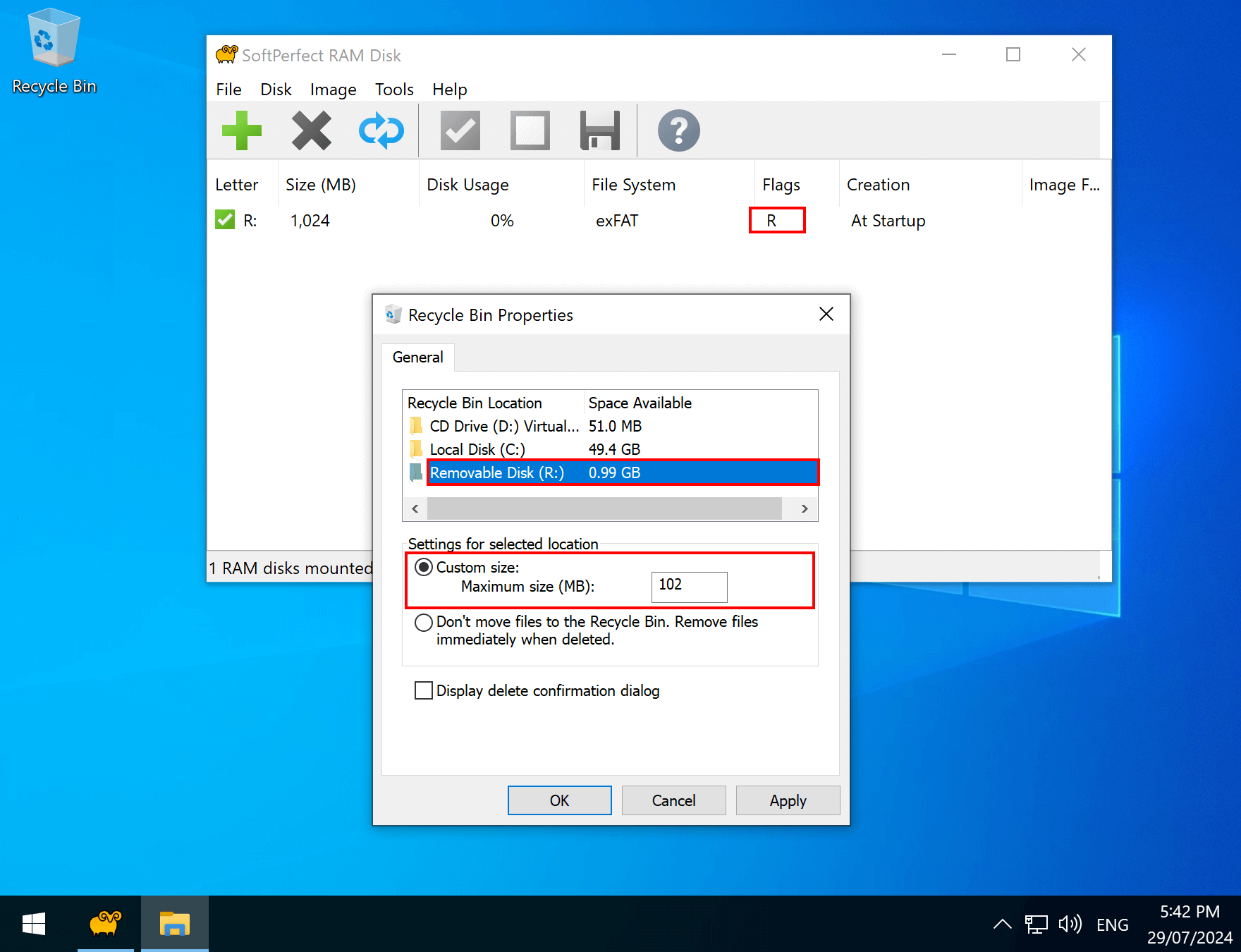
- Right-click the Recycle Bin and open its properties. Now you should be able to enable it for removable drives, including the RAM disk, as shown in the screenshot below.