<label></label> is missing
<folders/> is empty but folders are existing
One file is existent but the tag is missing
All Forums
> RAM Disk
> Current topic
Missing data in XML export
Started by Marcus
|
Missing data in XML export 27 August 2023, 02:19 |
Registered: 8 months ago Posts: 4 |
|
|
Re: Missing data in XML export 27 August 2023, 10:32 |
Admin Registered: 18 years ago Posts: 3 519 |
Most likely you have a RAM disk associated with an image file. In this case a disk label or folders will not be exported in XML because this information is stored in the image file and is not a part of the disk configuration.
For a regular volatile RAM disk, it should work flawlessly and exactly as you expect. For example, this configuration:
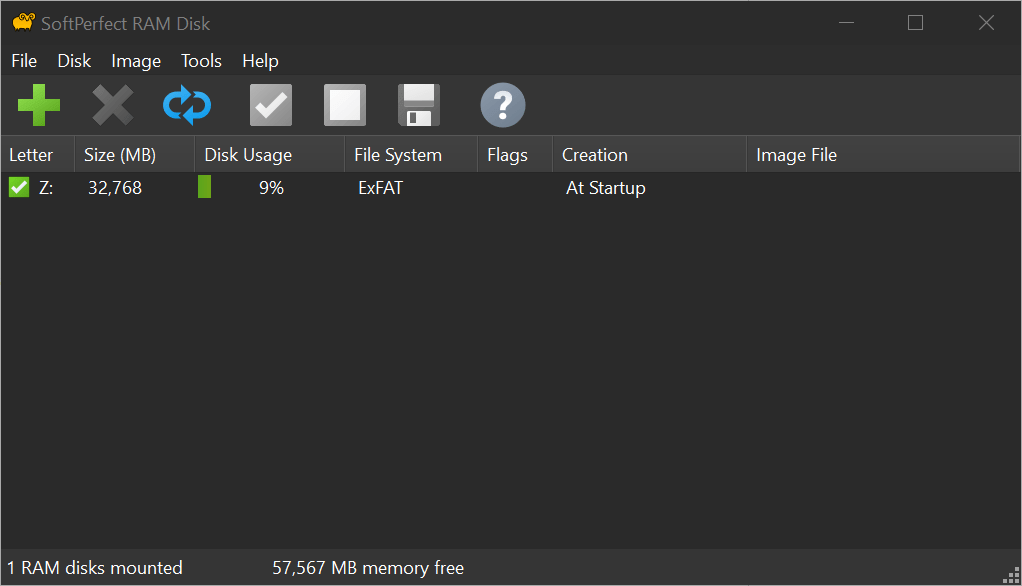
Becomes the following XML:
For a regular volatile RAM disk, it should work flawlessly and exactly as you expect. For example, this configuration:
Becomes the following XML:
<?xml version="1.0" encoding="UTF-8"?>
<ramdisk>
  <mount/>
  <boot>
    <item>
      <image>
        <filename></filename>
      </image>
      <folders>
        <name>Documents</name>
        <name>Downloads</name>
        <name>Cache</name>
        <name>Temp</name>
      </folders>
      <filesystem>4</filesystem>
      <size>32768</size>
      <savetoimage>False</savetoimage>
      <autoflush>False</autoflush>
      <flushtime>0</flushtime>
      <clustersize>0</clustersize>
      <letter>Z</letter>
      <removable>False</removable>
      <label>RAM</label>
      <compressed>False</compressed>
      <hddemulation>False</hddemulation>
      <numanode>0</numanode>
      <specnuma>False</specnuma>
    </item>
  </boot>
</ramdisk>
|
Re: Missing data in XML export 27 August 2023, 18:56 |
Registered: 8 months ago Posts: 4 |
Thanks Andrew,
I am now working without Image, it is easier. The only thing I used together with Image was to have an Z:\tmp.txt file with some contents at the beginning. My workaround is to copy C:\etc\tmp.txt -> Z:\tmp.txt on the fly when I first access Z:\tmp.txt.
Maybe you think about an option to do copy actions like the folder creation, for example the XML result:
<files>
<copy>"C:\etc\tmp.txt" "\tmp.txt"</copy>
</files>
Regards Marcus
I am now working without Image, it is easier. The only thing I used together with Image was to have an Z:\tmp.txt file with some contents at the beginning. My workaround is to copy C:\etc\tmp.txt -> Z:\tmp.txt on the fly when I first access Z:\tmp.txt.
Maybe you think about an option to do copy actions like the folder creation, for example the XML result:
<files>
<copy>"C:\etc\tmp.txt" "\tmp.txt"</copy>
</files>
Regards Marcus
|
|
Re: Missing data in XML export 27 August 2023, 19:10 |
Admin Registered: 18 years ago Posts: 3 519 |
Sorry I am a little confused with what you are trying to achieve. The XML files are used to transfer a RAM disk configuration from one computer to another. There is really no point in having "copy" commands in it.
If you want to copy some files to a volatile RAM disk upon login, this can be done via Tools - Applications - Add. The RAM Disk app will execute all programs listed there when all RAM disks are mounted. Say, you could create a batch file that copies all files you need to a RAM disk and have it launched by the RAM Disk app once all RAM disks are ready.
If you are trying to achieve something else, please let me know and I will recommend the best way to do it.
If you want to copy some files to a volatile RAM disk upon login, this can be done via Tools - Applications - Add. The RAM Disk app will execute all programs listed there when all RAM disks are mounted. Say, you could create a batch file that copies all files you need to a RAM disk and have it launched by the RAM Disk app once all RAM disks are ready.
If you are trying to achieve something else, please let me know and I will recommend the best way to do it.
|
Re: Missing data in XML export 28 August 2023, 04:47 |
Registered: 8 months ago Posts: 4 |
