Display hostname in Source column
4 posts · Closed
When I enable the rate limit and quota for each source, I can see the IP and the throughput.
The IP address is displayed in the "Source" column. Is it possible to see the hostname as well?
The current version of Bandwidth Manager does not display host names next to IP addresses. The main reasons for that were:
- Not all devices have a host name, and thus retrieving it would require a separate task to reverse-resolve each IP address.
- IP addresses are dynamic in their nature: a device with IP address X.X.X.X may map to one host name today, and a different device tomorrow. The correct mapping would require the process (1) to be repeated every N hours.
That said, it is a useful feature and we could implement it in the next release.
That would be great!
For example: we could leave a column for the IP as is, and add an optional hostname column for the addresses that can be resolved.
We have added host name information to the source or destination column (whichever is used in tracking). It may take a couple of minutes from the moment the service starts to resolve the names.
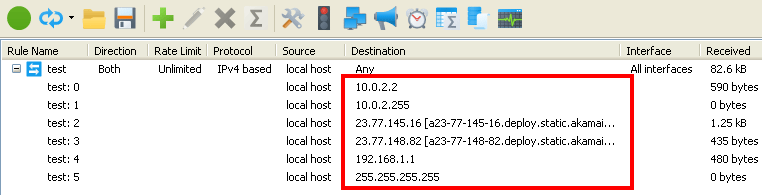
You can download the new version from Bandwidth Manager product page.