Incorrect data usage when using Windscribe VPN
4 posts · Closed
When using the Windscribe VPN service, NetWorx reports data usage wrongly. Also, the dialup box is showing connection time of just a few minutes instead of hours (not a big issue).
On the internet, other people mention the same problem about NetWorx wrongly logging when using Windscribe. Is there a solution?
This happens because Windscribe installs its own virtual adapter. So if you have set NetWorx to monitor All Connections, the traffic is recorded twice, resulting in double usage figures.
To resolve this issue:
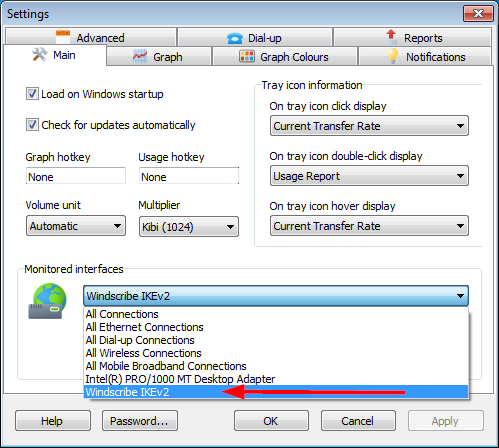
- Either choose your specific network adapter under Monitored interfaces (generally this option is preferable, as it works regardless VPN being connected or not);
- Or choose the Windscribe's adapter Windscribe IKEv2 as shown in the screen shot below (this option monitors the VPN connection only, and nothing will be recorded when VPN isn't used).
Hello, but this option is not good because if someone uses "skip local traffic" it will not work. Can it be done so that it also works with the option of bypassing local traffic?
It's impossible to ignore LAN traffic and to choose a specific adapter to monitor at the same time.
The reason for this is that when the "Ignore LAN traffic" option is on, the connection information is captured at a higher level in the system, before it reaches down to a specific network adapter. That's why the adapter selection is disabled when this option is on.