VMware MAC address error when bridging interfaces
5 posts · Closed
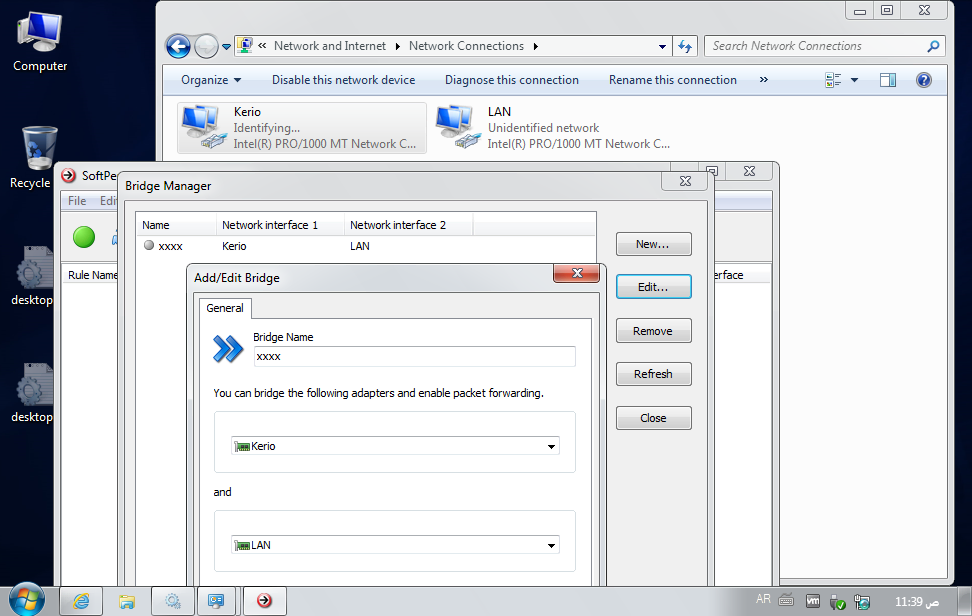
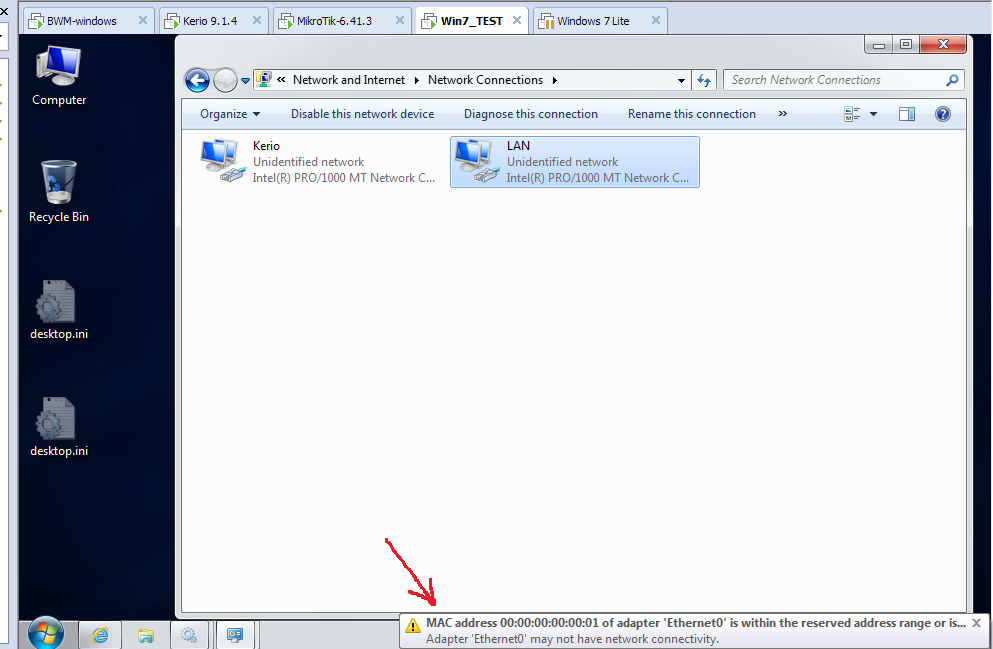
I was using BWM on Windows XP hosted on VMware and made BWM in bridge mode. I did this setup for years and all worked fine. Now I upgraded to Windows 7 32-bit with the same exact setup, but when I just want to bridge 2 interfaces I got this message from VMware:
(( Adapter 'Ethernet0' may not have network connectivity. MAC address 00:00:00:00:00:01 of adapter 'Ethernet0' is within the reserved address range or is in use by another virtual adapter on your system.
Adapter 'Ethernet0' may not have network connectivity.... ))
I got this message for both Ethernet0 and Ethernet1. There's no connectivity problem, everything works fine, but my DHCP starts to give IPs sooo slowly or not at all (Hanewin DHCP server installed on the same VMware machine of BWM).
From logs of managed CISCO switch connected to BWM machine I got these logs:
-----------------
2018-Apr-14 15:16:52 Informational %ARPINSP-I-PCKTLOG: ARP packet dropped from port gi6 with VLAN tag 1 and reason: packet verification failed SRC MAC 14:d1:1f:de:18:f4 SRC IP 192.168.10.11 DST MAC 00:0c:29:d3:dc:59 DST IP 192.168.10.4
2018-Apr-14 15:16:47 Informational %ARPINSP-I-PCKTLOG: ARP packet dropped from port gi4 with VLAN tag 1 and reason: packet verification failed, aggregated (1)
2018-Apr-14 15:16:39 Informational %ARPINSP-I-PCKTLOG: ARP packet dropped from port gi6 with VLAN tag 1 and reason: packet verification failed SRC MAC 54:35:30:98:8b:eb SRC IP 0.0.0.0 DST MAC 00 :00:00:00:00:00 DST IP 10.0.42.171
2018-Apr-14 15:16:34 Informational %ARPINSP-I-PCKTLOG: ARP packet dropped from port gi4 with VLAN tag 1 and reason: packet verification failed, aggregated (1)
2018-Apr-14 15:16:24 Informational %ARPINSP-I-PCKTLOG: ARP packet dropped from port gi6 with VLAN tag 1 and reason: packet verification failed SRC MAC f4:cb:52:53:db:bc SRC IP 10.0.44.170 DST MA C 00:00:00:00:00:00 DST IP 10.0.44.2
2018-Apr-14 15:16:18 Informational %ARPINSP-I-PCKTLOG: ARP packet dropped from port gi4 with VLAN tag 1 and reason: packet verification failed, aggregated (1)
2018-Apr-14 15:16:14 Informational %ARPINSP-I-PCKTLOG: ARP packet dropped from port gi6 with VLAN tag 1 and reason: packet verification failed SRC MAC c4:36:6c:59:ec:58 SRC IP 169.254.179.212 DS T MAC 00:00:00:00:00:00 DST IP 10.0.43.195
2018-Apr-14 15:16:05 Informational %ARPINSP-I-PCKTLOG: ARP packet dropped from port gi6 with VLAN tag 1 and reason: packet verification failed SRC MAC c4:36:6c:59:ec:58 SRC IP 169.254.179.212 DS T MAC 00:00:00:00:00:00 DST IP 10.0.42.243
2018-Apr-14 15:16:00 Informational %ARPINSP-I-PCKTLOG: ARP packet dropped from port gi6 with VLAN tag 1 and reason: packet verification failed, aggregated (1)
-----------------
Looks like something is wrong with Broadcast address 00:00:00:00:00:01 that VMware is complaining about after bridging 2 interfaces by BWM. Please HELP :)
What does ipconfig /all launched in the VM show?
Windows IP Configuration

   Host Name . . . . . . . . . . . . : SPEED_WEB
   Primary Dns Suffix  . . . . . . . :
   Node Type . . . . . . . . . . . . : Hybrid
   IP Routing Enabled. . . . . . . . : No
   WINS Proxy Enabled. . . . . . . . : No

Ethernet adapter Kerio:

   Connection-specific DNS Suffix  . :
   Description . . . . . . . . . . . : Intel(R) PRO/1000 MT Network Connection #2
   Physical Address. . . . . . . . . : 00-0C-29-32-46-8A     <----- #Kerio interface (even if configured with static IP the problem happen)
   DHCP Enabled. . . . . . . . . . . : Yes
   Autoconfiguration Enabled . . . . : Yes
   Autoconfiguration IPv4 Address. . : 169.254.124.217(Preferred)
   Subnet Mask . . . . . . . . . . . : 255.255.0.0
   Default Gateway . . . . . . . . . :
   NetBIOS over Tcpip. . . . . . . . : Enabled

Ethernet adapter LAN:

   Connection-specific DNS Suffix  . :
   Description . . . . . . . . . . . : Intel(R) PRO/1000 MT Network Connection
   Physical Address. . . . . . . . . : 00-0C-29-32-46-80    <----- #LAN interface
   DHCP Enabled. . . . . . . . . . . : No
   Autoconfiguration Enabled . . . . : Yes
   IPv4 Address. . . . . . . . . . . : 10.0.42.222(Preferred)
   Subnet Mask . . . . . . . . . . . : 255.255.255.0
   Default Gateway . . . . . . . . . : 10.0.42.2
   DNS Servers . . . . . . . . . . . : 10.0.42.2
   NetBIOS over Tcpip. . . . . . . . : Enabled

Tunnel adapter isatap.{1EDB8A7A-DCF8-4D38-B673-5777F3EE7130}:

   Media State . . . . . . . . . . . : Media disconnected
   Connection-specific DNS Suffix  . :
   Description . . . . . . . . . . . : Microsoft ISATAP Adapter
   Physical Address. . . . . . . . . : 00-00-00-00-00-00-00-E0
   DHCP Enabled. . . . . . . . . . . : No
   Autoconfiguration Enabled . . . . : Yes

Tunnel adapter isatap.{2CC03714-8232-4865-8D16-07C04456DA2F}:

   Media State . . . . . . . . . . . : Media disconnected
   Connection-specific DNS Suffix  . :
   Description . . . . . . . . . . . : Microsoft ISATAP Adapter #2
   Physical Address. . . . . . . . . : 00-00-00-00-00-00-00-E0
   DHCP Enabled. . . . . . . . . . . : No
   Autoconfiguration Enabled . . . . : Yes
-----------------
** see 2 attached screenshots
the setup is:
Cisco switch ---> virtual win7 BWM ---> virtual Linux Kerio control ---> ADSL routers
next post i'll send ipconfig /all from (windows XP) that is running stable with the same setup.
Here is virtual VM Windows XP ipconfig (working stable with bridging and same network setup):
Windows IP Configuration

        Host Name . . . . . . . . . . . . : SPEED-WEB
        Primary Dns Suffix  . . . . . . . :
        Node Type . . . . . . . . . . . . : Unknown  ### this was (Hybrid) on win7 if this means anything to you :)
        IP Routing Enabled. . . . . . . . : No
        WINS Proxy Enabled. . . . . . . . : No

Ethernet adapter LAN:

        Connection-specific DNS Suffix  . :
        Description . . . . . . . . . . . : VMware Accelerated AMD PCNet Adapter

        Physical Address. . . . . . . . . : 00-0C-29-D3-DC-59
        Dhcp Enabled. . . . . . . . . . . : No
        IP Address. . . . . . . . . . . . : 192.168.10.4
        Subnet Mask . . . . . . . . . . . : 255.255.255.0
        IP Address. . . . . . . . . . . . : 10.0.45.4
        Subnet Mask . . . . . . . . . . . : 255.255.255.0
        IP Address. . . . . . . . . . . . : 10.0.44.4
        Subnet Mask . . . . . . . . . . . : 255.255.255.0
        IP Address. . . . . . . . . . . . : 10.0.43.4
        Subnet Mask . . . . . . . . . . . : 255.255.255.0
        IP Address. . . . . . . . . . . . : 10.0.42.4
        Subnet Mask . . . . . . . . . . . : 255.255.255.0
        Default Gateway . . . . . . . . . :

Ethernet adapter Kerio:

        Connection-specific DNS Suffix  . :
        Description . . . . . . . . . . . : VMware Accelerated AMD PCNet Adapter

        Physical Address. . . . . . . . . : 00-0C-29-D3-DC-63
        Dhcp Enabled. . . . . . . . . . . : No
        IP Address. . . . . . . . . . . . : 192.168.10.5
        Subnet Mask . . . . . . . . . . . : 255.255.255.0
        IP Address. . . . . . . . . . . . : 10.0.45.5
        Subnet Mask . . . . . . . . . . . : 255.255.255.0
        IP Address. . . . . . . . . . . . : 10.0.44.5
        Subnet Mask . . . . . . . . . . . : 255.255.255.0
        IP Address. . . . . . . . . . . . : 10.0.43.5
        Subnet Mask . . . . . . . . . . . : 255.255.255.0
        IP Address. . . . . . . . . . . . : 10.0.42.5
        Subnet Mask . . . . . . . . . . . : 255.255.255.0
        Default Gateway . . . . . . . . . : 10.0.42.2
                                            10.0.43.2
        DNS Servers . . . . . . . . . . . : 8.8.8.8
---------------------
** There is NO Tunnel adapter isatap at windows XP:
Description . . . . . . . . . . . : Microsoft ISATAP Adapter
Physical Address. . . . . . . . . : 00-00-00-00-00-00-00-E0
It is still hard to say what may be wrong. I would probably recommend to disable the tunnelling interfaces just in case, by launching in command prompt:
netsh interface ipv6 6to4 set state state=disabled undoonstop=disabled
netsh interface ipv6 isatap set state state=disabled
netsh interface teredo set state disabled
Then there may be a chance that VLAN-tagged traffic lands on Kerio or LAN interface. Try capturing a session with Wireshark on both interfaces and see if there is any 802.1Q entries like this. Bandwidth Manager wasn't too thoroughly tested with VLAN-tagged frames:
[image: https://i.imgur.com/urpaTl1.png]

If frames are not VLAN-tagged, then use Wireshark to find out what frames are sent out with incorrect MAC address of 00:00:00:00:00:01. This may shed some light as to where they come from, but I have to admit it's not an easy issue to solve. The easiest way might be just to keep running everything on Windows XP.