How to add a delay for a specific IP address range
3 posts · Closed
How to add a delay for a specific IP address range?
There seem to be filter options for IP address range, but I cannot understand what I need to set in the General tab. The delays get added either to all addresses, even those not in the specified range, or to none at all.
I'm testing with ping, but generally would need to delay TCP packets.
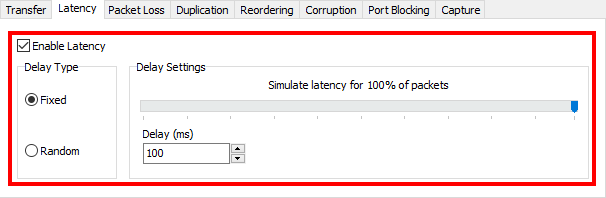
This should be pretty simple. Firstly set a latency to be emulated, e.g. 100ms each way:
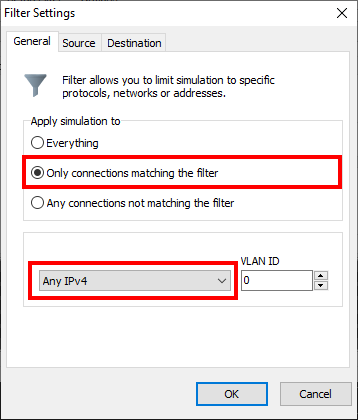
Then set up a filter that only applies to matching connections:
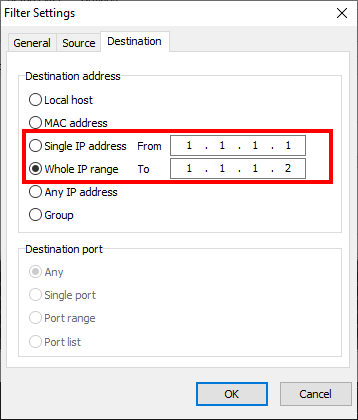
Then set Source to Any IP address and destination to your IP address range:
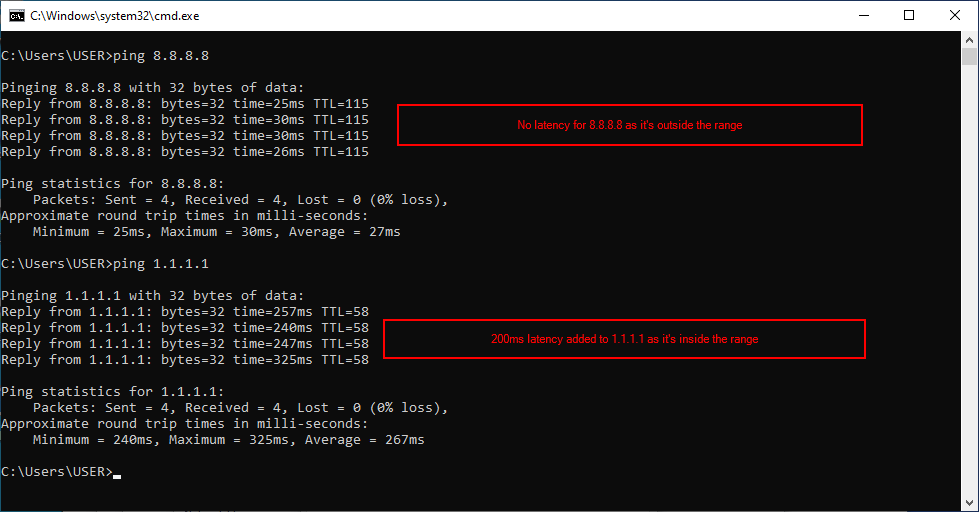
After that, ping an address within that range and an address outside of it.
Thanks for this.
It turns out my problem was caused by using a VPN connection and not selecting its virtual adapter. But it seems that after a while Connection Emulator messed up something for my physical adapter, making it unusable, uninstalling the Connection Emulator resolved the issue, not sure what's up with that.