Bridging in a Hyper-V virtual machine, cannot ping through the bridge
4 posts
Hello,
My setup is as follows:
[Server being tested]<------>/Isolated vSwitch/<------>[Server running Conn Emu]<---->/External vSwitch/
I am testing on WS2019 HyperV - both servers are virtualised and running on the same host.
All connected virtual network adapters on the servers are on the same VLAN.
I have enabled bridging in Connection Emulation.
Chosen one of the bridged interfaces and started Connection Emulation.
I cannot ping the server being tested. I cannot ping from the server being tested.
Should what I have described work??
Thanks,
Richard.
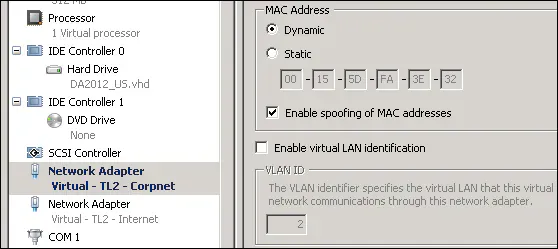
It's probably MAC address spoofing. The machine running Connection Emulator works as a transparent bridge, so it forwards frames whose source MAC address isn't its own, and Hyper-V drops those unless MAC address spoofing is allowed. That alone would explain why hosts on either side of the bridge can't even ping each other.
Check that it's enabled on the VM's network adapters. In Hyper-V Manager it's under VM Settings → Network Adapter → Advanced Features → Enable spoofing of MAC addresses, as in the screenshot.
Hello Andrew,
Perfect. That works. Thank you.
It’s a bit obvious now I think about it - bridge = 2 port switch!
I was thinking something along those lines myself but had forgotten about that setting.
Perhaps something to put in your knowledgebase?
Thanks,
Richard.