HTTP requests fail on local network when emulator is active
3 posts · Closed
Hi,
We are experiencing a very strange behavior while using Connection Emulator. Let me describe the scenario:
- In the Connection Emulator we only have Transfer Rate of 2 Mbps and Latency of, for example, 30 ms
- We have multiple servers on the same network/subnet with a latency under 1 ms
- We have other servers outside on a different network with latency of about 20 ms
The problem that we are observing:
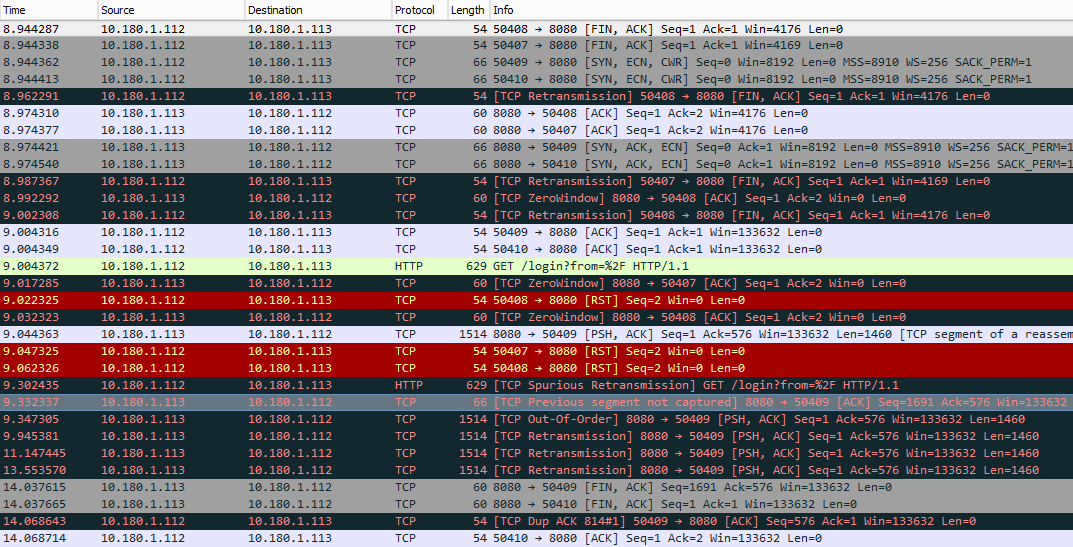
While we activate the connection emulator communication with the browser (IE and Chrome), packages start failing with "TCP Retransmission", "TCP Zero Window", "TCP Spurious Retransmission", "TCP Out of Order" (all these coming from TCP dump from Wireshark) and at the end the browser fails to open the page, and this only happens with HTTP resources located in the same network; from the same browser, just in another tab we can connect to other web resources located in different networks without any problem. What is also very interesting is, for example, if I am executing a ping between the two local computers, this continues working; if I try to access the other computer using Remote Desktop, it works; it is only with these HTTP requests.
The layout is very simple: we have a Windows server with IP 10.180.1.112 trying to access an HTTP resource on IP 10.180.1.113 (same network) and another web resource in 10.97.173.78 (remote network). There is no proxy in the middle or anything that could cause any issue; basically, any HTTP resource in the local network is not accessible while we use the emulator.
Here is where we try to connect to the HTTP resource in the local network while we do not have the emulator running:

Here is where we try to connect to the HTTP resource in the local network while we have the emulator running with the errors I mentioned above:
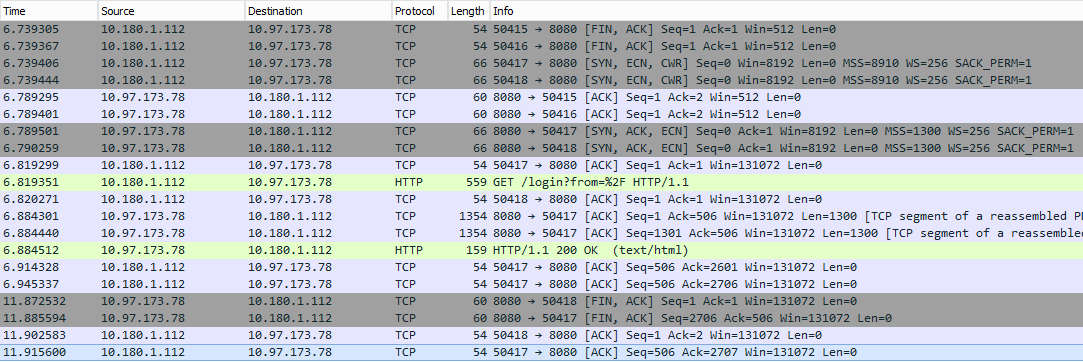
Here is what happens while we connect to an external resource and we have the emulator running:
Here is the XML with the configuration we are using in the connection emulator:
<?xml version="1.0" encoding="utf-8"?>
<simulator-profile>
  <general>
    <rates>
      <item>
        <name>14.4 Kbps (modem)</name>
        <rate>14400</rate>
      </item>
      <item>
        <name>33.6 Kbps (modem)</name>
        <rate>33600</rate>
      </item>
      <item>
        <name>48.0 Kbps (modem)</name>
        <rate>48000</rate>
      </item>
      <item>
        <name>56.0 Kbps (modem)</name>
        <rate>56000</rate>
      </item>
      <item>
        <name>64 Kbps (single channel ISDN)</name>
        <rate>64000</rate>
      </item>
      <item>
        <name>128 Kbps (dual channel ISDN)</name>
        <rate>128000</rate>
      </item>
      <item>
        <name>256 Kbps (DSL, Frame Relay)</name>
        <rate>256000</rate>
      </item>
      <item>
        <name>384 Kbps (DSL)</name>
        <rate>384000</rate>
      </item>
      <item>
        <name>768 Kbps (DSL)</name>
        <rate>768000</rate>
      </item>
      <item>
        <name>1.5 Mbps (T1, DSL, Cable modem)</name>
        <rate>1500000</rate>
      </item>
      <item>
        <name>2 Mbps (DSL, cable modem)</name>
        <rate>2000000</rate>
      </item>
      <item>
        <name>10 Mbps (DSL, cable modem, LAN)</name>
        <rate>10000000</rate>
      </item>
    </rates>
    <direction>2</direction>
    <rateindex>11</rateindex>
    <cardindex>2</cardindex>
  </general>
  <latency>
    <enabled>true</enabled>
    <type>0</type>
    <delayfrom>30</delayfrom>
    <delayto>500</delayto>
    <impact>100</impact>
    <correlation>0</correlation>
  </latency>
  <loss>
    <enabled>false</enabled>
    <impact>1</impact>
    <type>0</type>
    <burstlo>1</burstlo>
    <bursthi>1</bursthi>
  </loss>
  <duplication>
    <enabled>false</enabled>
    <impact>1</impact>
    <type>0</type>
  </duplication>
  <reordering>
    <enabled>false</enabled>
    <impact>1</impact>
    <gap>1</gap>
  </reordering>
  <corruption>
    <enabled>false</enabled>
    <impact>1</impact>
    <type>0</type>
    <berval></berval>
    <time>0</time>
  </corruption>
  <capture>
    <enabled>false</enabled>
    <before></before>
    <after></after>
    <writemode>0</writemode>
  </capture>
  <blocking>
    <enabled>false</enabled>
    <portlist></portlist>
  </blocking>
  <groups/>
  <filter>
    <enabled>false</enabled>
    <protocol>0</protocol>
    <vlanid>0</vlanid>
    <source>
      <address>
        <type>3</type>
        <address-1>0.0.0.0</address-1>
        <address-2>0.0.0.0</address-2>
        <mac>000000000000</mac>
        <groupid>-1</groupid>
      </address>
      <port>
        <type>0</type>
        <items/>
      </port>
    </source>
    <destination>
      <address>
        <type>3</type>
        <address-1>0.0.0.0</address-1>
        <address-2>0.0.0.0</address-2>
        <mac>000000000000</mac>
        <groupid>-1</groupid>
      </address>
      <port>
        <type>0</type>
        <items/>
      </port>
    </destination>
  </filter>
</simulator-profile> Honestly that's one of the most mysterious network issues I have seen. My best guess would be that MS Edge and Chrome play with TCP retransmission timeouts in LAN connections.
To narrow this issue down, I'd recommend to try a couple of variations:
- With the emulator running, try fetching the local page on 10.180.1.113 using curl or wget. If that works fine, the culprit is probably in some play with timeouts like I guessed above.
- Whether curl/wget work or not, try setting the emulator's speed limit to Unlimited and start reducing latency towards zero.
Please share your observations.
Any findings on this issue?
I see similar stuff....