TNormalProcess error when starting a connection
18 posts · Closed
Hi,
We just purchased a licence for Connection Emulator and I installed it. It starts well, but when I choose a connection and press the Start button I get an error "Error occurred in TNormalProcess. TNormalThread failed to setup system event", and do not see data flow on the graph.
Can you help?
Thanks
It looks like you still have some left-overs from an older version on your computer.
Try this: completely uninstall the Connection Emualtor application and reboot, then install the latest version of the Connection Emualtor again. Everything should work well after that.
I have the same issue after going back from 1.8 to 1.5.5. Already tried to uninstall, reboot and reinstall but no success. Any other recommendations?
What version of Windows are you using there? If it's Windows 10, it's only supported since version 1.6.1.
I am seeing this same error. I have also done the 'uninstall/reinstall' trick and that did not fix the issue.
Could you please tell us the following:
- Version of Windows you are using.
- Version of the Connection Emulator you had installed before (assuming you are updating it).
- Version of the Connection Emulator you have installed now that produced the error.
I'm having the same error (Win10) and I want to stay on version 1.7.10. Any way to fix it?
As said above, most likely you still have some left-overs from another version on your computer. Try completely uninstalling the Connection Emualtor application and rebooting, then installing the version you want.
Hi,
I am seeing this issue as well. It seems I cannot start the emulation within a virtual machine.
Things I have tried:
- E1000E network adapter
- vmxnet3 network adapter
- a clean installation (process mentioned above)
- installing version 1.8
My virtual machine is running Windows Server 2016 and the version I am using/licensed for is 1.7.10.
Can you please shed some light on what the error actually means? Perhaps we can help troubleshoot further.
David
Sorry I don't have other ideas if you have tried all of the above. We encountered this error during development when there was an older driver in the main EXE - DLL interface - Network Driver chain, so it seems to be a mismatch between the DLL and driver versions.
Would you be able to try setting up version 1.8 on a new VM with E1000E and freshly installed Windows Server 2016? Let me know if this works.
It will not work with vmxnet3, but that's a separate issue - it will not see any network adapters. In the meantime, I will check this with the developer for any updates for the DLL/Driver components (these are third-party components).
Hey Andrew,
Did you receive a response from the developer regarding the updated DLLs?
We have a new build with updated drivers available for download on our pre-release page. Below you can see that build running on Windows 2016 Server in a VMWare VM.
If the issue persists, please try using the Connection Emulator on a fresh installation of Windows, as advised above. This will ensure no leftovers from older versions are present.
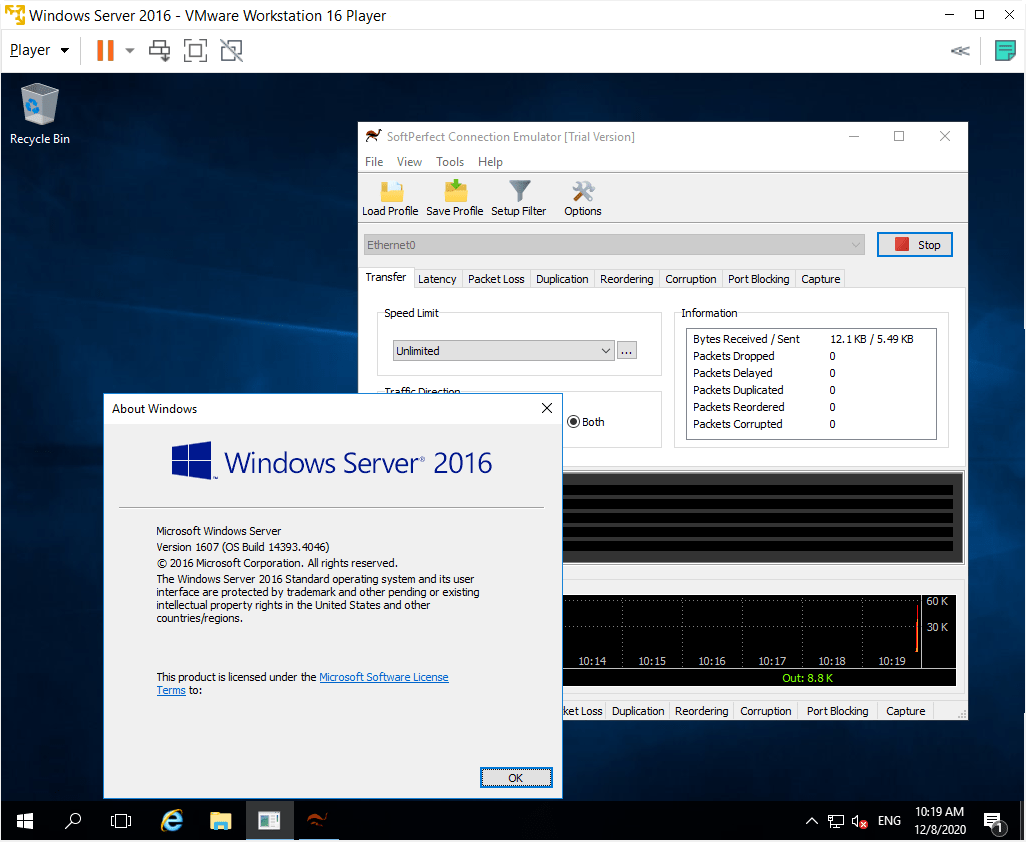
Good news! I can confirm the linked version is working perfectly. No errors experienced and the latency/jitter emulations are working well.
I can also confirm this was tested on a VMXNET3 configuration as well. I haven't yet had a chance to go back to the E1000E network adaptor.
Regards,
David
Fantastic, thank you for letting us know!
Hello, I have the same issue. I am using v1.7.9 on Windows 10.
Have you tried completely uninstalling the Connection Emualtor, rebooting, and then installing the latest version, as advised above?
Version 1.7.9 is almost two years old. This issue has been fixed in the latest version. Please try the current release of the Connection Emulator and see if it solves the problem for you.
It works, but I have lost my purchase license because I bought a new PC and I got a license from my friend but it was till 2019 and that's why I was using 1.7.9. I purchased a license from [Redacted: Privacy] that wasn't gonna expire is there any way I can find it again?
Purchasing licences from someone else is actually violating the User Agreement, to which you have agreed when you installed the software. Namely:
EULA wrote:
The software is licensed, not sold. Upon purchase of a licence, SoftPerfect grants you non-exclusive, non-transferable right to use the software and all its features according to the terms of this EULA...
The only partial exception is a dedicated software reseller, but even in that case the reseller purchases the licence for a particular user from the very beginning, and in that case all questions about licencing must be directed to that reseller, not to us.
In addition, the licence you mentioned was purchased with 1 year of version updates, not unlimited, and those expired in January 2019.