Feature requests for Port Mapper and Network Scanner
8 posts · Closed
Having been playing around with Port Mapper and Network Scanner today, I'd love to see them share some features, or perhaps even merge them into one app!
For example, being able to see the logged on user in Port Mapper, and send a message.
Or in NetScanner, being able to see the switch hostname and interface number alongside the connected device.
This would facilitate being able to see which port a particular user was connected to more easily, amongst other benefits.
It would be great to be able to shut/open ports and maybe even change VLAN.
More personal preferences would be to see a tabbed display view where I can set tabs for different IP ranges (in Scanner) or for different racks comprising multiple switches (in Mapper). This would make viewing a larger estate a little easier, IMO.
But I love both apps!
I am afraid it's not really possible to combine these applications. Not only they serve different purposes, they are also written in different languages (Port Mapper is written in a cross-platform way, whereas Network Scanner is tied to Windows).
Having said that, both Network Scanner and Port Mapper have extensive command-line support and can be configured to launch third-party applications. For example, you could easily configure Network Scanner to run Port Mapper against a specific IP address and vice versa.
I will certainly look into that!
Thanks for your tips!
Andrew wrote:
Having said that, both Network Scanner and Port Mapper have extensive command-line support and can be configured to launch third-party applications. For example, you could easily configure Network Scanner to run Port Mapper against a specific IP address and vice versa.
Could it therefore be possible for Network Scanner to return the MAC address of connected devices from a non-local network, i.e., L3? Currently, when I scan a non-local IP range, I get the MAC address of the switch instead of the MAC address of the IP I am scanning. Given that Port Mapper is able to obtain this information, would it be possible for the two apps to work together even if via CLI?
Yes, it's possible - please see this article: Configuring SNMP MIB query for MAC address resolution.
Basically, before running a scan, Network Scanner queries ARP caches from the configured router(s). Then when scanning, it matches the IP-to-MAC lookup tables to resolve MAC addresses outside the current subnet.
At the moment only SNMPv2c and SNMPv1 are supported, though we can easily add SNMPv3. You may also have to set the Router SNMP MIB query option to priority 1, to ensure it's prioritised over a regular ARP lookup.
It just gets better and better! I did wonder about SNMPv3 when I saw the program options. I also discovered the Scripting option and noticed the IP & Mac Script which worked for PCs!
These apps are so powerful!
I noticed the SNMP MIB settings are global, and as a router IP may be different per subnet, would you consider being able to add the router's IP for the particular range into the bookmark settings?
Our intention is to bookmark all of our scopes, so being able to query the subnet Router would facilitate the resolution of IP/MAC details.
We have just added SNMPv3 support in MAC address resolution with SNMP. The new builds can be downloaded here.
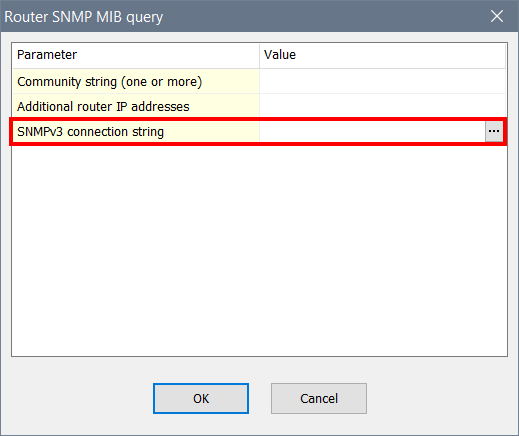
Regarding having own router settings per subnet, that's a little challenging to do in the current implementation. Instead you could either:
- List all your routers there, in which case the app will fetch ARP caches from all of them. There is no downside to that, except for a longer time spent before scanning, to fetch the mappings; or
- Create individual config files for each subnet. In this case you can configure specific routers to be used, as well as any other settings specific to each subnet.
Thanks Andrew... I think I favour the separate config files, so we could have one for each Rack we have (approx 85), then have a single router entry in each one.
Cheers