NetGenius reports inflated traffic for NordVPN
2 posts · Closed
Hi, please comment on my situation. NetGenius reports traffic usage of 160GB per session for NordVPN, though I only have a 40GB per month subscription with my ISP. I suspect it is the VPN that causes this, because all other applications and processes in NetGenius list have realistic traffic usage numbers.
I've got NetGenius installed (default settings) on my notebook, and the notebook connects to the internet via the hotspot of my mobile phone, which is connected (also by VPN) to the mobile provider. I do not see anything in the manual about this.
P.S. I like the NetGenius product. It's clean, simple and very efficient in reporting traffic - a very nice tool for the layman and very reasonably priced.
It is a common issue with VPN clients, because they intercept network connections from other apps, encrypt them and then send within a secure tunnel. This causes repeated counting of the same traffic.
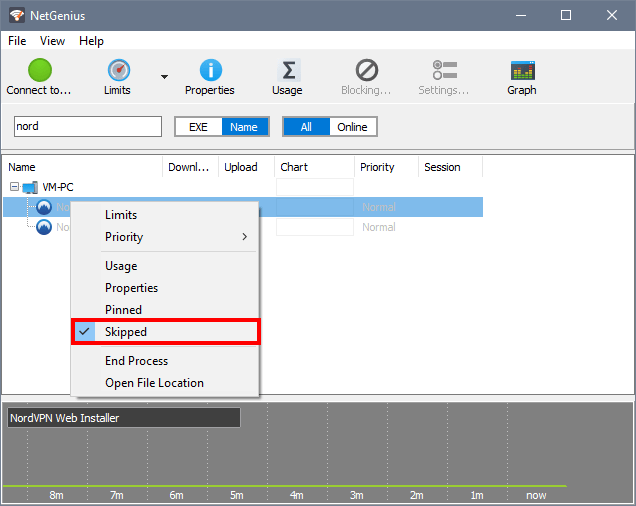
You may be able to fix this issue by disregarding NordVPN traffic. For that, switch to All processes at the top of NetGenius window, then select each of the NordVPN processes (entering 'nord' in the search box helps to find them quickly) and set its status to Skipped: