Export standalone floating graph data to CSV
2 posts · Closed
Hello,
I hope you are well.
I have just tested your NetGenius software, and it meets my analysis needs. There is a feature called "Standalone Floating Graph." My question is, is it possible to download the real-time displayed data into a CSV file? The goal is to have all this information in four columns: download speed, upload speed, date, hour, minute, second, and consumed data, ready for download.
If this feature is available in the paid version, please let me know.
Best regards
NetGenius does not have this feature, but we have a similar app called NetWorx that can do it.
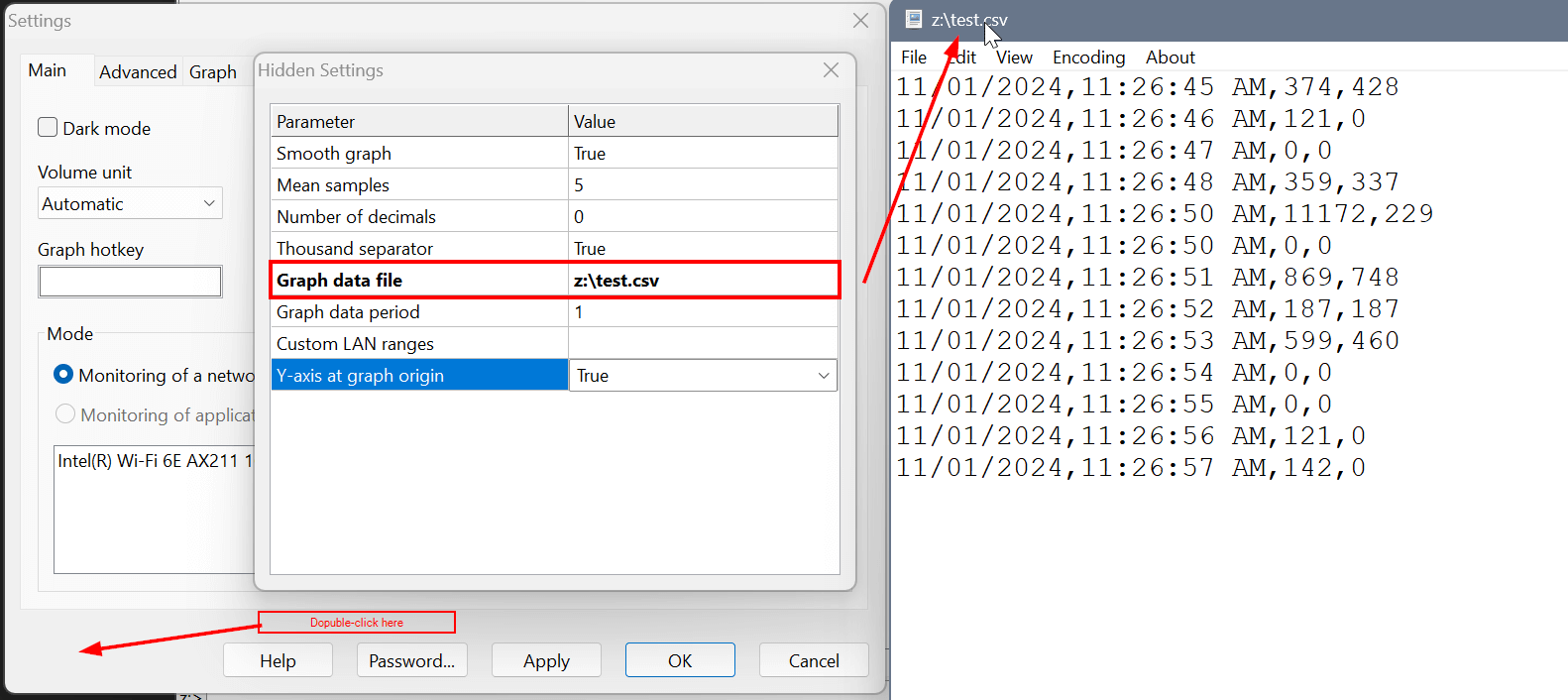
You can download NetWorx here, install it, access its hidden settings by double-clicking on the bottom-left corner of the Settings window, as shown on screenshot below, and then specify the path to your CSV file for the graph data. After that, NetWorx will be writing the current upload/download speed into a CSV file every N seconds, as set in 'Graph data period'.