Bandwidth usage monitoring for workgroup clients
7 posts · Closed
Hello
I need a software to give me the bandwidth usage of clients in a workgroup network.
My network does not have any particular monitoring devices such as routers. I need a solution to monitor the network with software utilization. Is there any software to calculate bandwidth on every individual PC and send the reports to the main PC?
Yes, there is. NetGenius should suit your requirements quite well. Simply install NetGenius service on every computer that you want to monitor, and you will be able to access all the reports from the main PC.
Thank you for the reply. I have a few more questions:
- How to set remote password for a client PC (with only NetGenius service installed, not GUI)?
- How to set nickname for client PCs on the main PC after connecting to each client (instead of PC name)?
- Is NetBIOS necessary for NetGenius? (we always disable NetBIOS in case of security issues)
The answers to your questions:
- Once the service has been installed, its default password is blank. You can then connect to the service from the main PC and set a new password. You can also connect to multiple services and set a new password at once. Simply selected all connected services in the user interface, then choose Settings and set a new password; and it will be set on all of them.
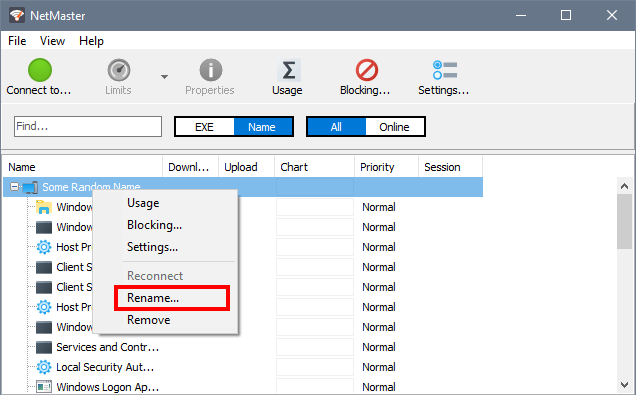
- There is no nickname support at the moment, but we have plans to add it.
- NetBIOS is not necessary and it is not used in any way.
Thank you very much! NetGenius seems to be a reliable and useful application. And I think the option to set nickname for each client will be very helpful.
Two more questions:
- Does NetGenius use encryption? Are the passwords secured?
- Does NetGenius service or GUI need registry permission? In a PC with a standard user, I added some clients in GUI, but after restarting the PC, I can't see any clients, as if noting saved in GUI.
We don't use encryption in NetGenius. All settings and the access password are kept in a local database in C:\ProgramData\SoftPerfect\NetGenius. The password is Base-64 encoded. For added security in a corporate environment you may want to revoke the Users group access to this folder.
No specific permissions are required to save the settings. I am not sure why in your case the GUI did not display the devices. Make sure that there is interference from other applications, like antivirus or some security software. If that is all good, try adding the devices again and then manually closing the GUI via File - Exit in the main menu. This should definitely save all settings and the list of connected devices.
We have added the Rename option for devices in the latest build: