Add country name and IP destination columns
2 posts · Closed
Hello. I bought NetGenius today (I also renewed NetScan and bought WiFi Guard). It's a nice lightweight utility. Quite an eye opener on how much tracking is done through the browser in terms of traffic. The country flag associated with each service connection destination is a nice touch.
I'd love to have a column that actually lists the country's name, as I don't know all of the country flags. It could be made available under View > Columns, and appear in the main GUI. A column with an IP of the URL/destination address would be a nice addition as well.
Thank you for your feedback. At the moment, the country flag icon is indeed rather a 'nice touch', as you said. It's just a small additional hint for those who are curious where their computer sends data to.
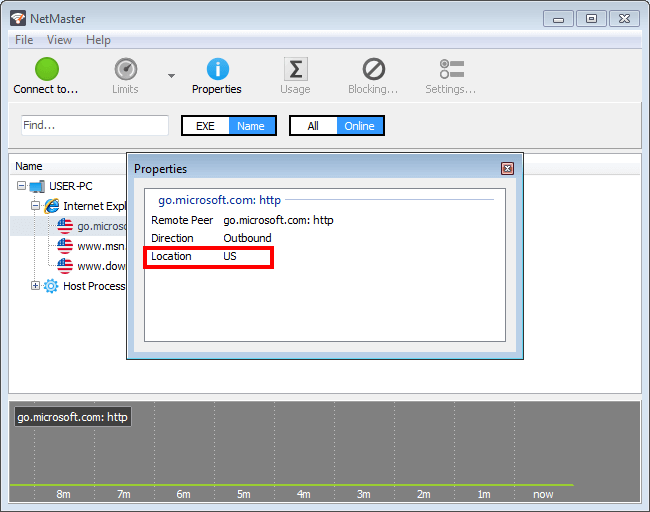
We will consider adding a separate Country column, but at the moment you can simply right-click any connection you are interested in, and choose Properties. In the popup box you will see a two-letter country code, which should be easier to recognise than a flag, as it are similar to the country domain an thus may be more familiar. Here is a sample screenshot of that window: