System tray icon no longer displays graph
2 posts · Closed
Dear support,
After I installed NetGenius, at first minimizing the application to the system tray resulted in a nice graph in the tray bar (with the up and down arrows), but now minimizes just to an icon without the graph. I don't know what I changed to cause this.
I am using a brand new ThinkPad E14 11th gen Core i5. I disabled hardware acceleration but have not reversed that setting to see if that was the cause. What could be the problem?
I can send you screen captures.
Kind regards,
Paul
The Netherlands
It sounds like the Taskbar Extension component of NetGenius is no longer showing. This may have been caused by a Windows update, or by some changes in settings.
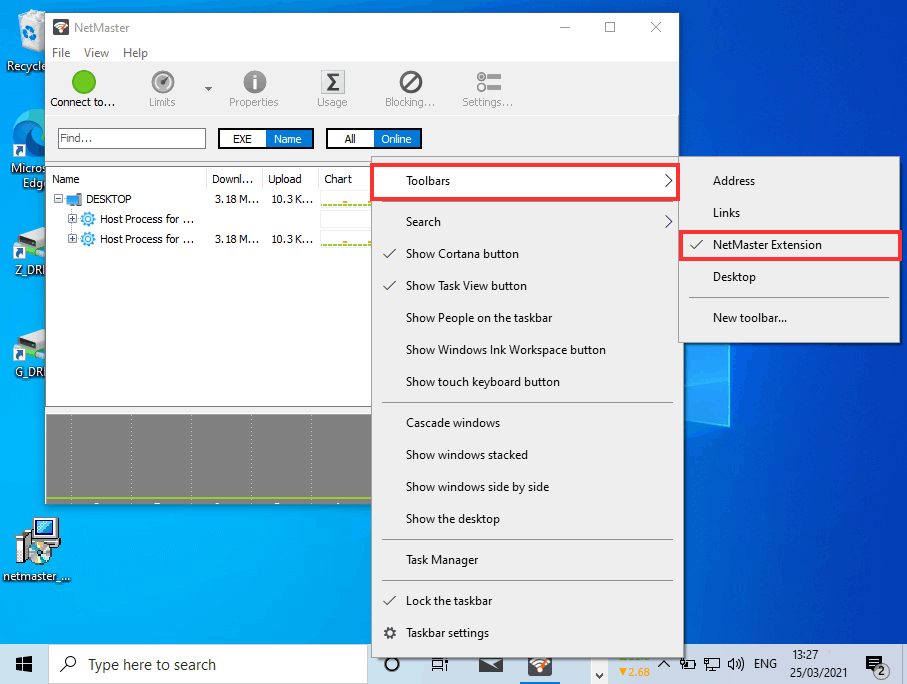
Try clicking an empty space on the Windows taskbar, then choosing Toolbars, and then checking NetGenius Extension, as shown below.
If for some reason NetGenius Extension is not in the list of toolbars, you may need to reinstall NetGenius. This will re-register the extension in the system, and you should be able to enable it via the Toolbars menu.