Error during installation
10 posts · Closed
Hello,
I am getting this error on install:
Exception EAbort in module NGCore.exe at 00000000003FAC27. Operation aborted.
I thought it might be a firewall issue. I am using Windows Firewall and Antivirus. I tried turning it off as best I could, and reinstalling. But getting the same error.
Any thoughts on what may be the issue?
OS: Windows 10
It seems that for some reason the NetGenius service could not start within 1 minute. I recommend trying to start the installed service manually. For that click Win + R, type "services.msc", then locate NetGenius service and try starting it. Let us know what happens when you start it manually.
Another thing that may help to find the cause of this problem is to check if there is an error message recorded in the database. Please compress the C:\ProgramData\SoftPerfect\NetMaster folder into a ZIP file and send it to us. Please note that it's under ProgramData, not Program Files. You may need to enable the display of hidden folders to be able to access it.
Thank you for the reply.
I get this warning message when trying to start the service.
The NetGenius Traffic Processing service on Local Computer started and then stopped. Some services stop automatically if they are not in use by other services or programs.
But weirdly, I rebooted once, still had the problem. Then rebooted again and it was working fine for the first time. Then rebooted again and get the same error.
I am very confused. This is a brand new computer, ASUS. Is it possibly BIOS issues? Or firewall or antivirus thing?
The requested folder: [NetGenius.zip]
Unfortunately there was nothing useful in the log. However, since you said it worked fine once after a reboot, it may be another service or start-up activity that conflicts with NetGenius.
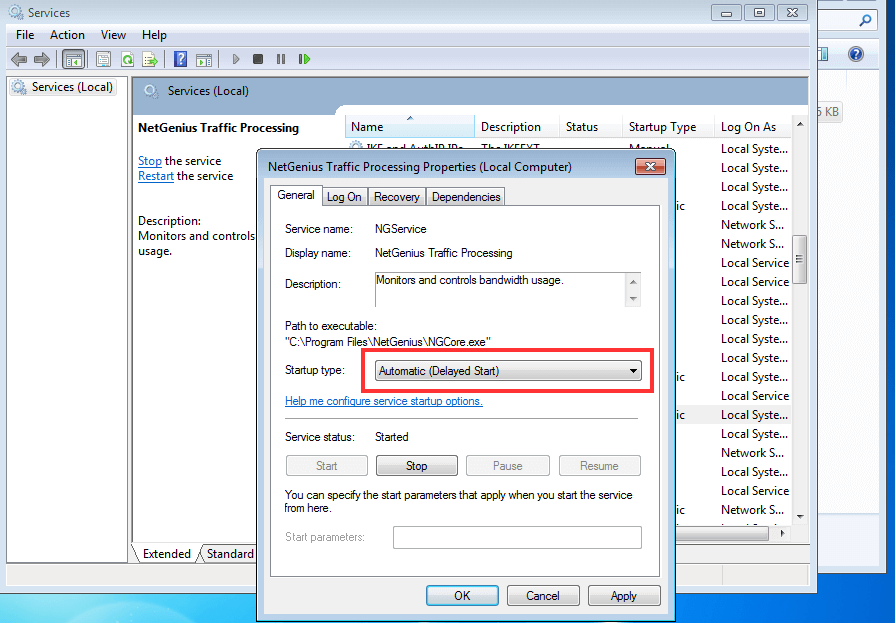
Try going to the Services control panel and changing NetGenius service Startup type to Automatic (Delayed Start). This will start the service a little later after a reboot and hopefully fix the issue.
Thank you!
I tried it, but it did not help. Maybe I should go through the list, turn off services one by one, and see if I can find the conflict?
Found. When I stopped the running service "Dante Via Manager", I was able to run NetGenius. So this must be a conflict with DANTE.
Dante Via takes Dante Audio and allows Dante Audio in and out of the computer to the DANTE network.
Dante is an audio protocol for Ethernet:
www.audinate.com/products/software/dante-via
www.audinate.com/products/software/dante-controller
Any ideas on what my be conflicting?
Thank you for the information. It is indeed the case: somehow Dante service conflicts with NetGenius network driver.
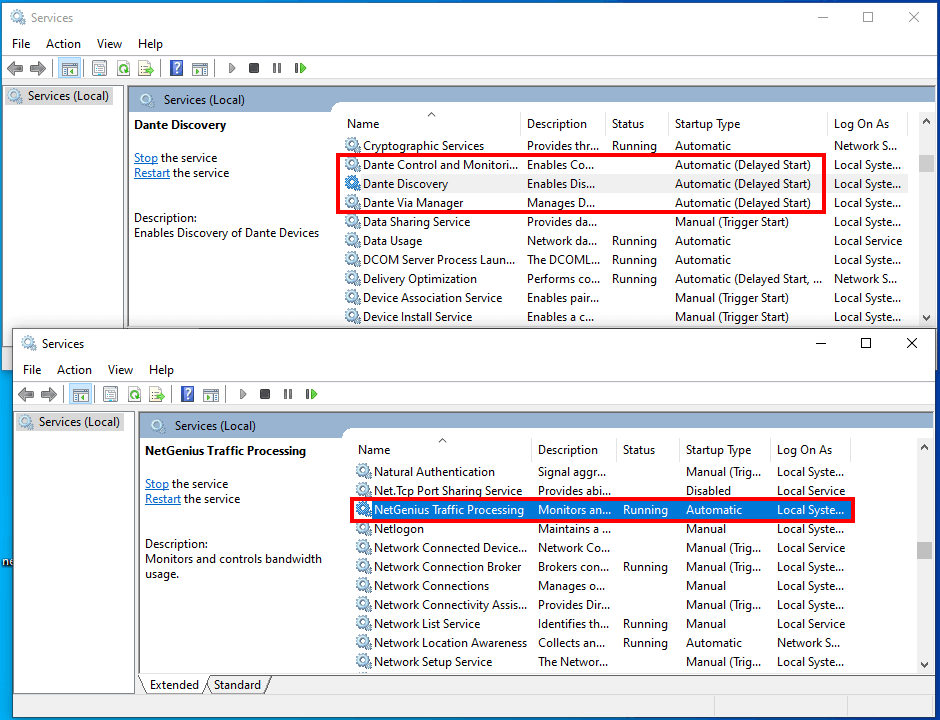
It seemingly depends on the order they are started in. We were able to set Dante services to be launched as delayed, while NetGenius service starts without delay. Rebooted a few times for testing, and everything worked well every time.
Please try configuring the three Dante services to be delayed and NetGenius service not to be delayed. This way our NetGenius will start before Dante and both seem to work fine then. Below is a screen shot of this configuration.
It may take us a while to get to the bottom of this issue, but this should be a valid workaround for the time being:
Thanks for the details. There must be more to the conflict as I was not able to pass audio traffic over Dante with NetGenius installed. I had to uninstall both NetGenius and Dante, then reinstall Dante to get it back working.
It does look like a complex issue. I recommend postponing using NetGenius until we get the bottom of this conflict. This may take a while, and it is unfortunately not guaranteed that we will be able fix it.
Yes, no problem. I went back to NetWorx already.
I will use NetGenius on my laptop. Thank you for making it.