Display graph on desktop with transparency
13 posts · Closed
I have NetWorx and keep its graph displayed on the desktop with a transparency of 50, as it gives a quick and easy way to see the recent network usage, because on a 4K monitor the taskbar info is really small and hard to read. It would be great if NetGenius could display the graph in a similar way.
We will check if this can easily be done, but if not, you can keep using NetWorx for this purpose.
By the way, at the moment we're merging NetWorx for macOS and NetWorx for Windows into one product. Some old features like dial-up will be removed, others will be enhanced and unified between these platforms. Here is work in progress:
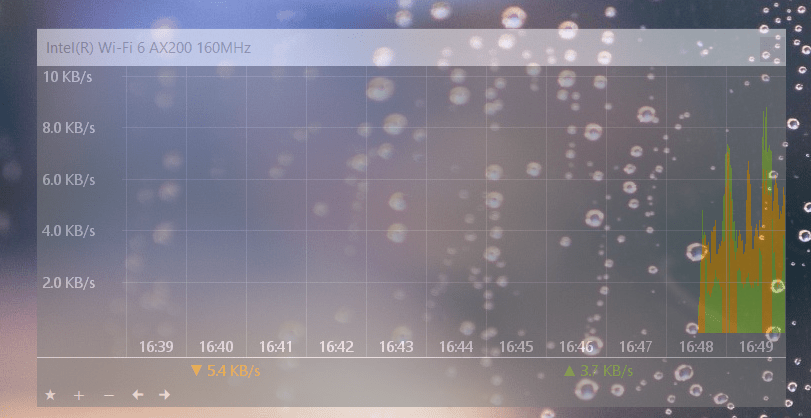
One other note: on Windows 11 the Taskbar has no toolbars (sadly), so there's no quick view of the current network usage. A transparent window on the desktop with that info is one option for providing that sort of info without having the full app window open.
Hi,
I would appreaciate to have this transparent graph feature migrated from NetWorx into NetGenius.
Windows 11 does not have the taskbar toolbars anymore. I am like blind now.
Thanks.
Best regards,
Stefan
Sure, that's a good point. We will add a floating graph and post a download link here.
Excellent.
Will it become a standard option in NetGenius?
Yes and it's almost ready. Here is a sneak peek at what's coming:
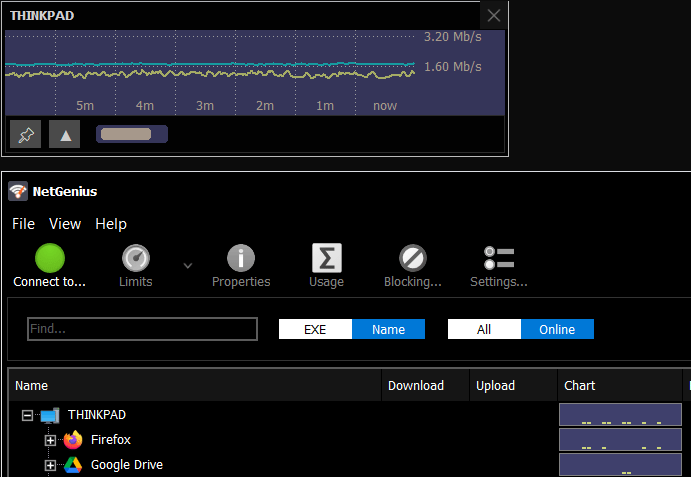
You can now download and try the preliminary version. This is not the final release yet. We are still planning to add a global hotkey.
If you have any comments or suggestions, please share them here.
That's excellent news, I'm running it now. One suggestion - is it possible to add the current u/l and d/l rate in text (maybe in the graph title bar)? That would be a big help.
Nifty.
Running it now.
Works great.
Thank you for the suggestion. We have added upload and download rates to the graph window.
Update: the new version is now ready and can be downloaded from NetGenius product page.
Excellent!!! Thank you for fixing what Microsoft has broken (tu):-D
Awesome!
Can we please have a transparency setting for the graph window?
Update: Sorry - I see there's a slider for transparency. Was a little bit obtuse to not discover that.