How to set wildcard to read installed apps from registry
4 posts · Closed
I need to read the registry to check all installed apps with name and version.
The WMI class Win32_Product is not showing all programs.
registry key = "SOFTWARE\Microsoft\Windows\CurrentVersion\Uninstall"
Parameter DisplayName, DisplayVersion
How do I have to set the wildcard?
Wildcards are only supported in key name, but not in parameter name.
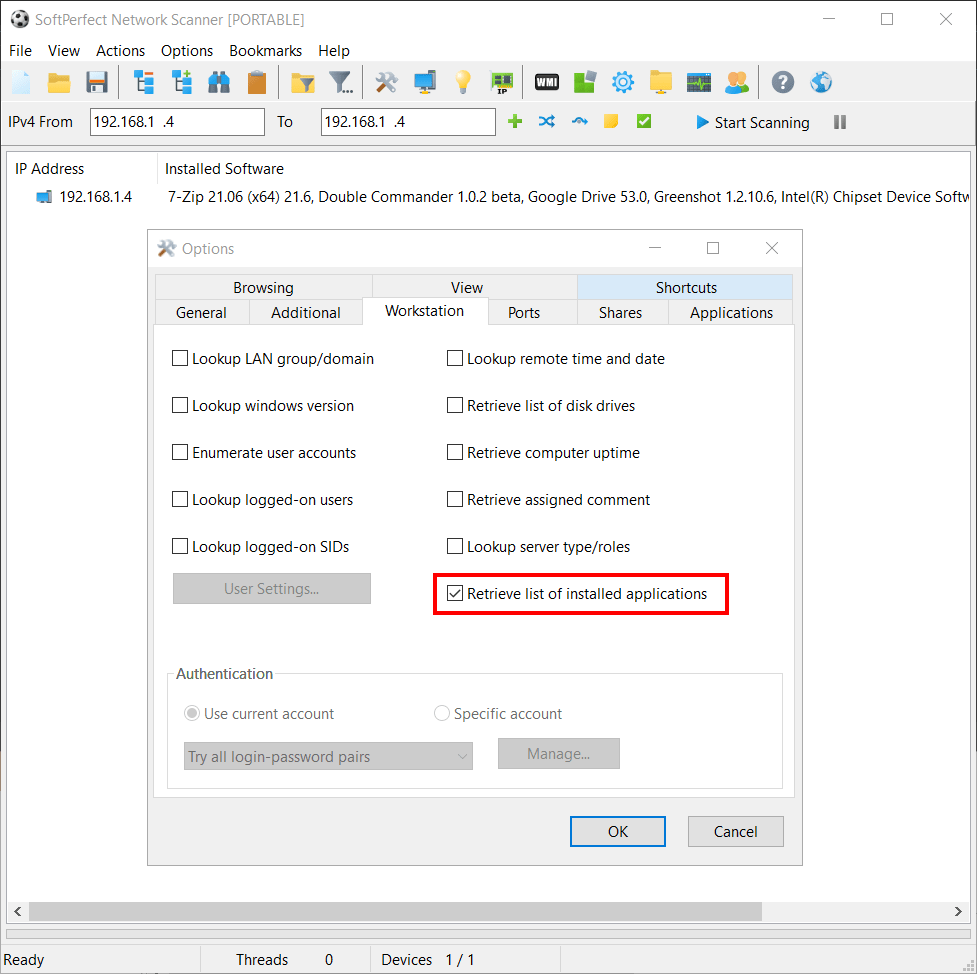
To get a list of all installed apps and their versions from the above registry key, simply tick Retrieve list of installed applications option:
On 64-bit systems the key 'HKLM:\SOFTWARE\Wow6432Node\microsoft\Windows\CurrentVersion\Uninstall' is used.
Is it possible to read both keys?
That's a good point, thank you for mentioning it! Please try these new builds. The application will now read both the keys and combine the result:
- HKLM\SOFTWARE\Microsoft\Windows\CurrentVersion\Uninstall
- HKLM\SOFTWARE\Wow6432Node\Microsoft\Windows\CurrentVersion\Uninstall