Highlighting different small ranges in the network range
2 posts · Closed
Hello.
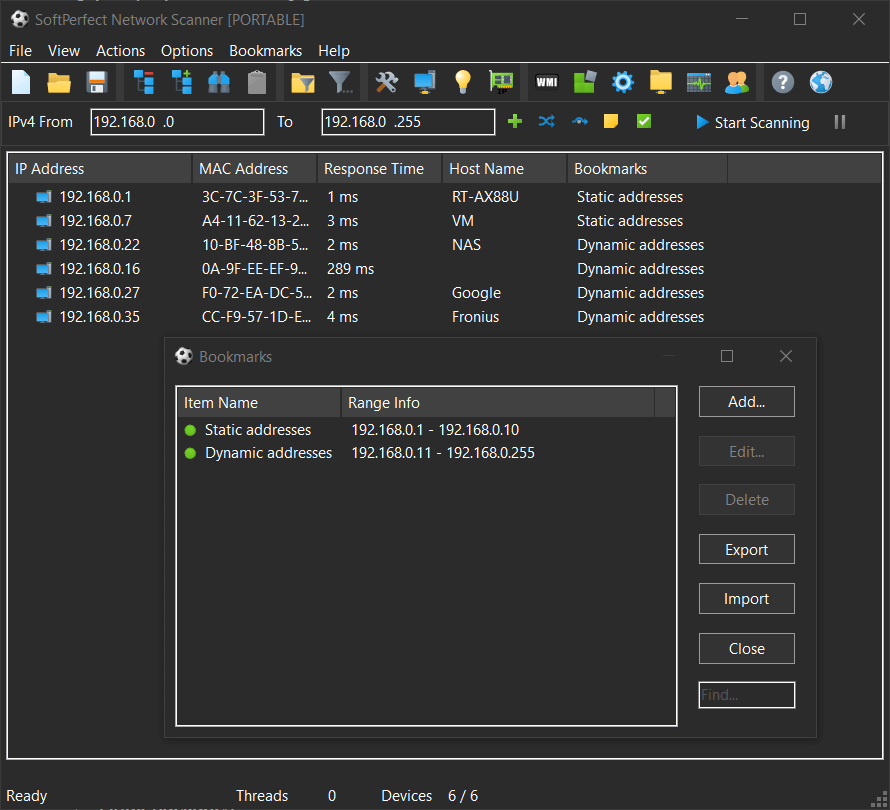
I am trying the newest version and I miss a function for highlighting different small ranges in the complete network range for faster recognition.
For example:
Server range
DHCP range
Reserved IPs for special computers
The existing filter only allows to set one condition (equal, less than, ...), so I cannot use it for my purposes. I'd like to be able to identify a specific network by a special feature like MAC address of the router or something that I can manage different networks with the same address range.
Is this a feature you could add in the future?
Greetings, ob
Identifying networks is not simple or reliable, as components of the network may change or be missing at any time. The best approach would be to have multiple configuration files, and then select a specific config for the network you are currently working with.
However, if you do wish to distinguish the ranges, this can be done via the bookmarks mechanism: simply define those IP address ranges as bookmarks and then tick Show in Output under the Bookmarks item in the main menu. This will bring up an additional column showing to which bookmark(s) each IP address belongs: