Scanning specific IP addresses in multiple ranges
2 posts · Closed
I wanted to perform scanning of specific IP addresses in each range. For example, there are 5 IP ranges:
192.168.0.0/24
192.168.1.0/24
192.168.3.0/24
192.168.4.0/24
192.168.5.0/24
And I want to scan only 0.1, 0.2 and 0.255, i.e. total 3 IP addresses in each range.
I tried this by setting the following:
From 192.168.0.1
To 192.168.5.1
But it's not working the way I need: scan just 1 IP in all 5 ranges.
It would be great if you could let me know if there is a solution. If not, can this be part of a feature release where I can define specific IP addresses to scan and it will scan only those IPs in all the subnets.
Thanks.
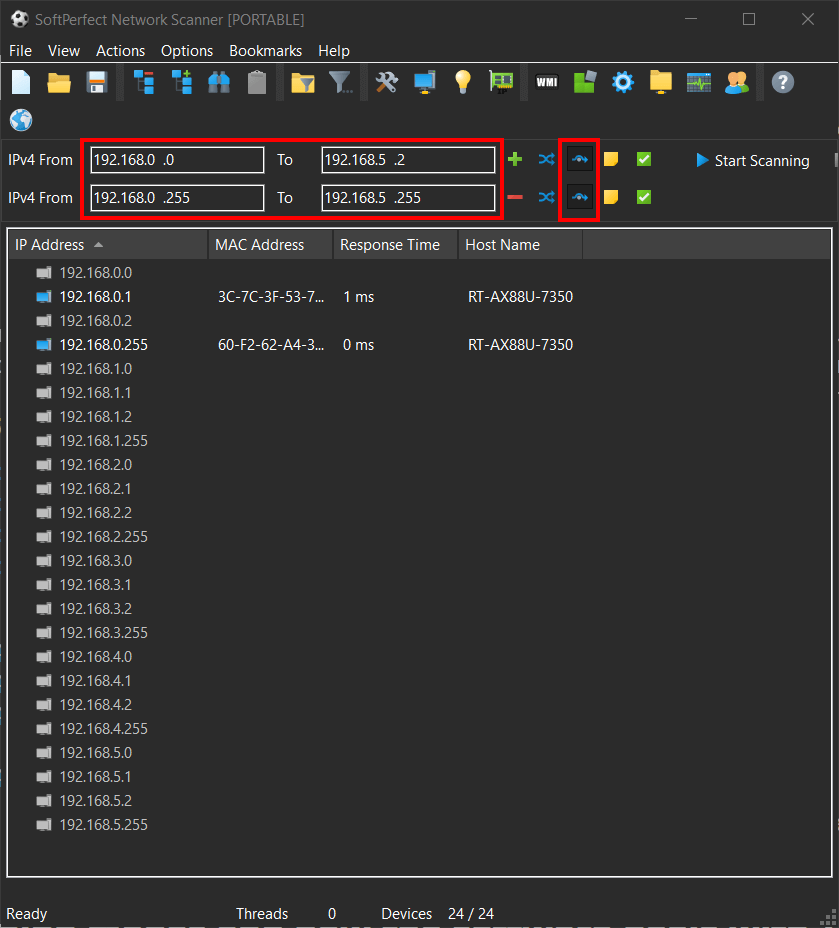
Yes, that's easily possible via using the non-contiguous mode. You can simply enter two ranges and enable that mode. Network Scanner manual has a section in the "IP address range and automatic detection of network configuration" chapter explaining in detail how the non-contiguous mode works.
Also, in order to scan .0 and .255 addresses, please tick "Ping network and broadcast addresses" under Options - General.