Host appears to be offline when opening HTTP session
5 posts · Closed
Good day, it's me again,
I am not sure if it is a feature or a bug. I have times when I select 1 or multiple IP addresses and I open a HTTP session (browser), then I get the window saying "Host (IP address) appears to be offline". When I press "Skip", it skips, thus not opening a browser with the IP address. When I press "Continue", a browser is opened with the IP address in it loading the page. Is there a reason for it? Why does NetScanner say the host is offline while I can select the host because the same NetScanner just scanned the host?
Is there a way to say "Always continue", or have no window at all saying "The host appears to be offline"?
Thank you in advance.
This may be the case when you open a device that is rather slow at responding to ICMP and ARP requests.
When you attempt to open or connect to a device, the NetScanner app quickly checks if the device is online by sending an ARP, ICMP and/or NetBIOS request and waiting for half configured ping timeout (500ms by default). If no reply is received during that time, the Host is Offline dialog is shown.
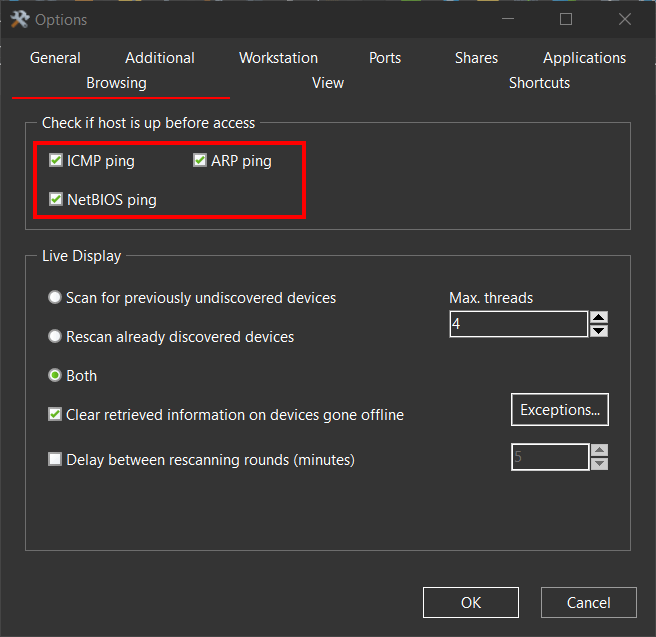
You could simply disable the online check altogether by unticking all checkboxes under "Check if host is up before access" in Options - Browsing:
Good day,
Thank you for your quick answer as always. I'll monitor it and get back to you.
Have a nice day.
So far so good. Seems like the solution!! Thanks
Have a nice weekend!
Thank you for letting us know. It is very nice to hear that everything is working fine.