How to get the Used Space column
9 posts · Closed
Is it possible to somehow get the "Used Space" column or with the difference between "Free Space" and "Total Space"?
Thank you in advance
At the device level you can use Remote Scripting. Choose Options - Remote Scripting - New and add the following script:
' Function to convert a size string into megabytes
Function ConvertToMB(sizeString)
    Dim numberPart
    Dim unitPart
    Dim valueInMB

    ' Split the size string into the numeric and unit parts
    numberPart = CDbl(Split(sizeString, " ")(0))
    unitPart = UCase(Trim(Split(sizeString, " ")(1)))

    ' Convert the size to MB based on the unit
    Select Case unitPart
        Case "MB"
            valueInMB = numberPart
        Case "GB"
            valueInMB = numberPart * 1024
        Case "TB"
            valueInMB = numberPart * 1024 * 1024
        Case Else
            valueInMB = 0
    End Select

    ConvertToMB = valueInMB
End Function

' Function to format a size in MB into a more readable string
Function FormatSize(sizeInMB)
    Dim formattedSize

    ' Convert and format the size based on its magnitude
    If sizeInMB < 1024 Then
        formattedSize = sizeInMB & " MB"
    ElseIf sizeInMB < 1024 * 1024 Then
        formattedSize = FormatNumber(sizeInMB / 1024, 2) & " GB"
    Else
        formattedSize = FormatNumber(sizeInMB / (1024 * 1024), 2) & " TB"
    End If

    FormatSize = formattedSize
End Function

' Function to find the difference between two size strings
Function FindDifference(size1, size2)
    Dim sizeInMB1
    Dim sizeInMB2
    Dim differenceInMB

    ' Convert both sizes to MB
    sizeInMB1 = ConvertToMB(size1)
    sizeInMB2 = ConvertToMB(size2)

    ' Calculate the absolute difference
    differenceInMB = Abs(sizeInMB1 - sizeInMB2)

    ' Format and return the difference
    FindDifference = FormatSize(differenceInMB)
End Function

Function IsNotEmpty(str)
    If Len(str) > 0 Then
        IsNotEmpty = True
    Else
        IsNotEmpty = False
    End If
End Function

freeSpace = Input.Column("free space")
totalSpace = Input.Column("total space")
If IsNotEmpty(freeSpace) And IsNotEmpty(totalSpace) Then
    Output.Write FindDifference(freeSpace, totalSpace)
End if
Sample output:

Wonderful! This is what was needed.
But why is there no data after "Rescan Device" - "Used Space" if the device is turned off? At the same time, the freespace and totalspace columns have same meanings.
Can you explain how you got Free Space and Total Space values?
Drada wrote:
But why is there no data after "Rescan Device" - "Used Space" if the device is turned off? At the same time, the freespace and totalspace columns have same meanings.
Sorry that's not something we can reproduce. I have done Rescan device - Used space and it simply turned grey:

What is happening in your case?
Mat wrote:
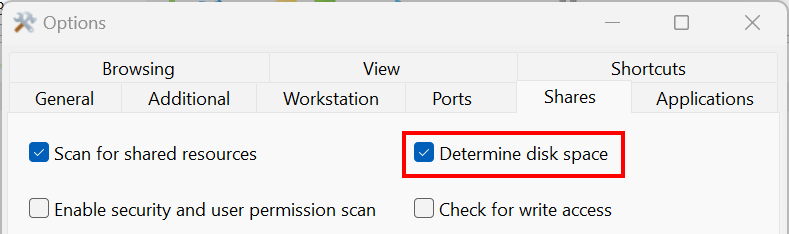
Can you explain how do you got Free Space and Total Space values?
There is a setting under Settings - Shares that retrieves disk space information on shared folders:
Andrew wrote:
Sorry that's not something we can reproduce. I have done Rescan device - Used space and it simply turned grey:
I have a saved scan of a network that is currently unavailable.
And I want to display the "Used Space" column.
It should be in the saved scan. If you load the XML file and the "Used Space" column is present (if not, please enable it by adding the script mentioned above), the used space information should be loaded and displayed.
Unfortunately no. If the XML is saved without "Used Space", then when opened, the "Used Space" column is empty.
Maybe I'm doing something wrong or the program settings need to be changed?
If the XML is saved without the "Used Space" attribute, I'm afraid it will not appear.
This is per the application's design, where the script is executed during scanning. If the device is not scanned, nothing will be displayed.