Missing plus sign to view remote disk drives
2 posts · Closed
Either I've done something or something has changed.
In the past, when I scanned my local network, all the computers (5) would have a plus sign (+) next to them in the display screen, on the left. When I clicked on the plus, I could see the other computers' disk drives, etc.
After an update (maybe?), I can no longer do this, and all the other computers on the network no longer have a plus next to them.
Perhaps I ticked the wrong box and can't find it again, or??? Please advise.
It is difficult to pinpoint the exact issue without more details about your network configuration, but a good place to start would be to review your settings.
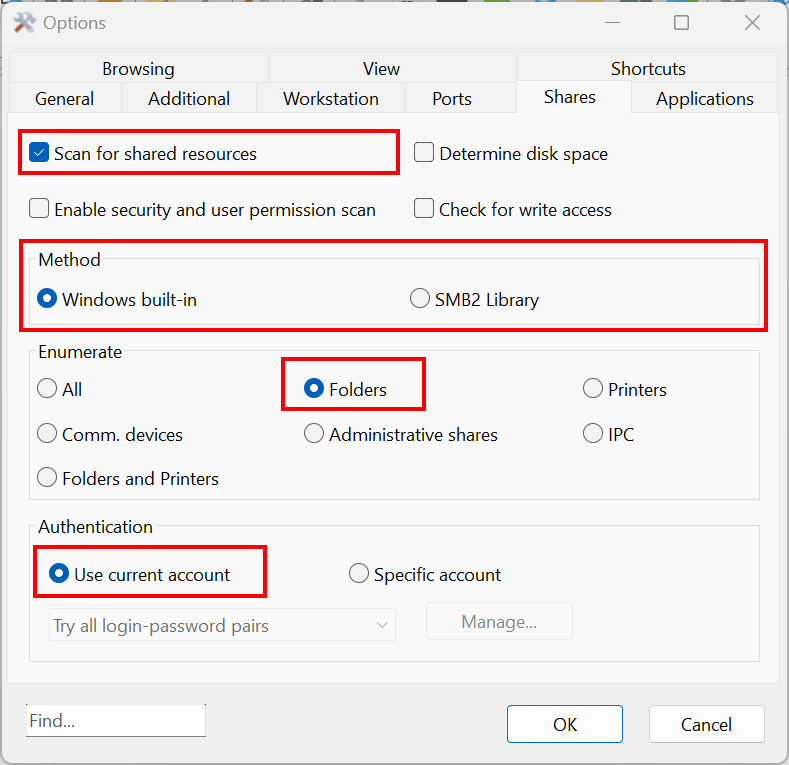
Please go to Options - Program Options - Shares and make sure your settings match those shown in the screenshot below. Specifically, ensure that "Scan for shared resources" is checked, "Method" is set to "Windows built-in," and "Enumerate" is set to "Folders."
If this doesn't resolve the issue, try switching the "Method" from "Windows built-in" to "SMB2 Library" or vice versa. This change might help in case there have been updates or changes to your network or other software that could have affected how shares are detected.