Display end-user-defined Applications Hotkey in context menu
5 posts · Closed
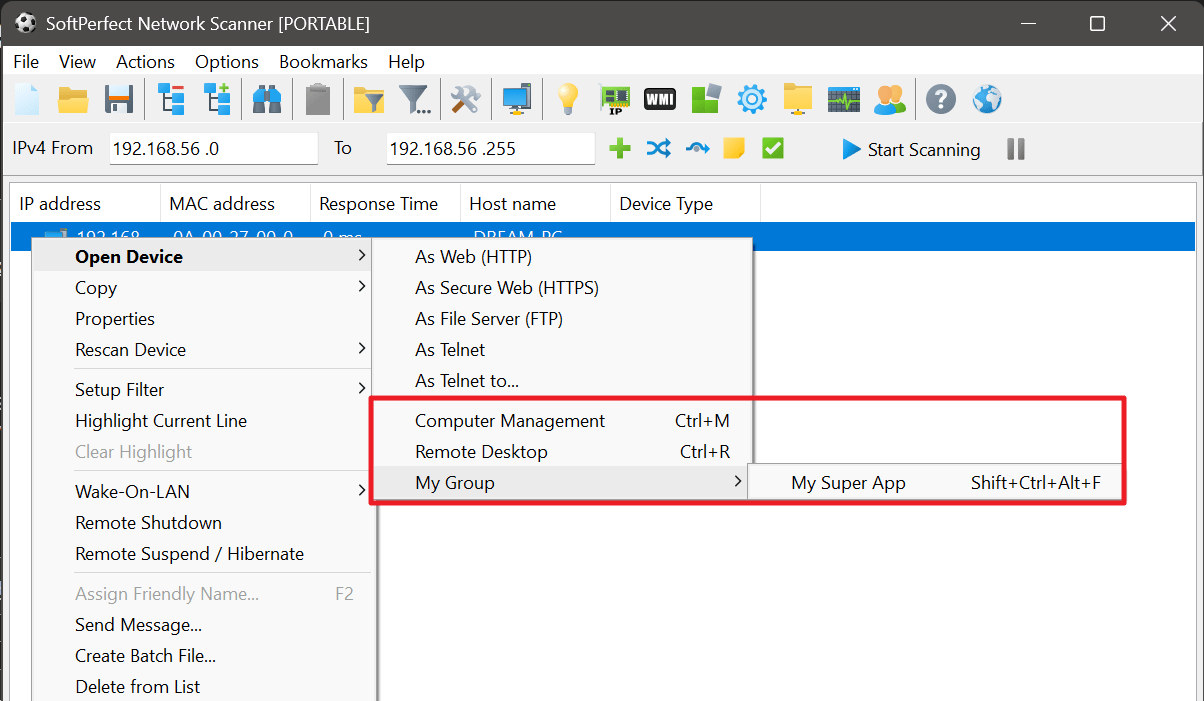
Is it possible to have the end-user-defined Applications Hotkey (Options - Program Options - Applications - Hotkey) displayed near the application name each time a mouse right click is pressed (Open Device - Applications...) over a scanned host? Like in the menus where you have "Assign Friendly Name... F2".
Thanks
This already should be the default behaviour, as shown below. Are you seeing something different?
Hi Andrew.
I was pretty sure that it was not working, at least for me, but right now, it is. I did fix some of my customs hotkeys that were duplicated with the system, such as Ctrl+N for the New Window feature, and others...
But right now, it is working. Sorry for the misunderstanding.
Sorry for off-topic, but how to create groups in applications like on the screenshot above?
It is actually possible to group both bookmarks and custom applications. Simply specify a vertical bar to create groups of items.
For example, try naming your bookmarks as:
Network A | Subnet 1
Network A | Subnet 2
or naming your applications as
FTP clients | FileZilla
FTP clients | Total Commander