Retain previous scan results and criteria automatically
2 posts · Closed
Along with SoftPerfect Network Scanner, I have been trying out MyLANViewer. Both great products are very helpful in getting me around some of the limitations of Windows networking (especially some annoyances that are perhaps related to the Windows Networking Master Browser).
After trying both utilities, however, I have found that MyLANViewer seems to offer more of what I need right out of the box (i.e. "defaulting" to leaving previous scan results in the output, even after closing and re-opening the app, and also offering quick and easy access to a simple and practical Workgroup Tab view with available shares, etc).
Despite this, I generally find the SoftPerfect app more visually intuitive and appealing, and for this reason, I would be happy to purchase it if it could only be configured to automatically remember and retain the previous network scan criteria and results in the output view without any input from the user (i.e. without any reconfiguring or rescanning). I've looked at various options and haven't been able to figure it out. Maybe MyLANViewer spoiled me because it basically does this right out of the box, which can be helpful for seniors with slow brains and poor eyesight.
Thank you for your time.
Rui
Thank you for the thoughtful feedback. We appreciate you taking the time to compare both tools and share your experience.
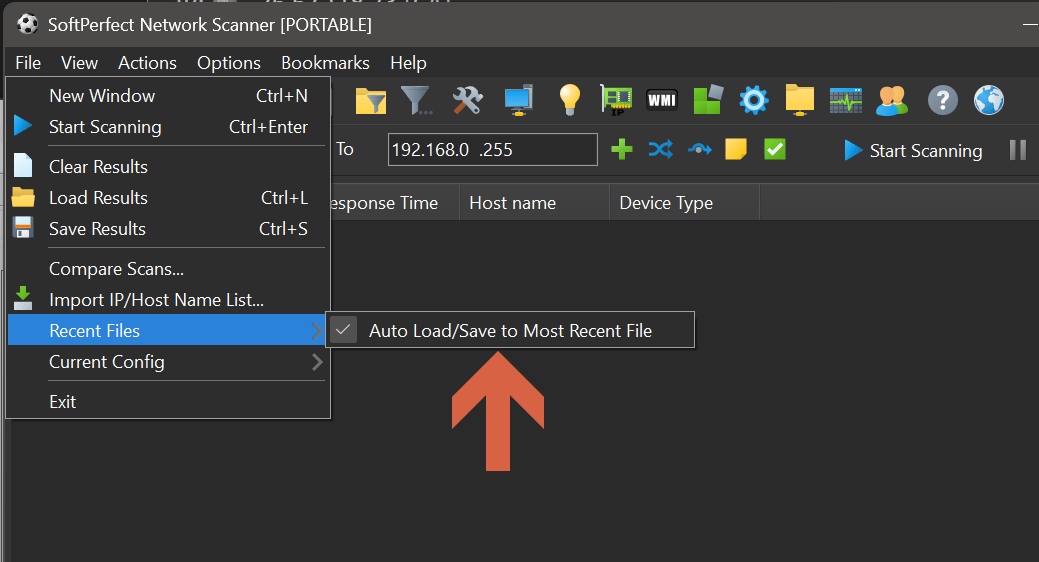
Good news: what you are after is actually easy to set up in our Network Scanner. You can have it automatically remember and reload the most recent scan results. Simply tick the Auto Load/Save to Most Recent File option in the File - Recent Files menu (as shown below), and save the scan results to your preferred location. You need to do this only once. After that, the Network Scanner app will reopen with the last scan already in place, without the need to reconfigure or rescan each time.
While we don't have a dedicated "Workgroup" tab like MyLANViewer, you can get something similar by going to View - Quick Host Filter - Shared Folders. It will show only the devices with shared folders, and you can even set a hotkey to toggle the filter on and off for convenience.