How to run a test script
7 posts · Closed
Hello. Greetings. I'd like to know if it's possible to run some kind of script testing from the app interface before running them in a scan.
I'd also like to know if it's possible to use variables defined in application windows within scripts. And if there's any support plan for other types of scripts, such as Python, in addition to VBScript and JScript?
Yes, you can run scripts directly from the editor by clicking the Run button for testing and debugging:
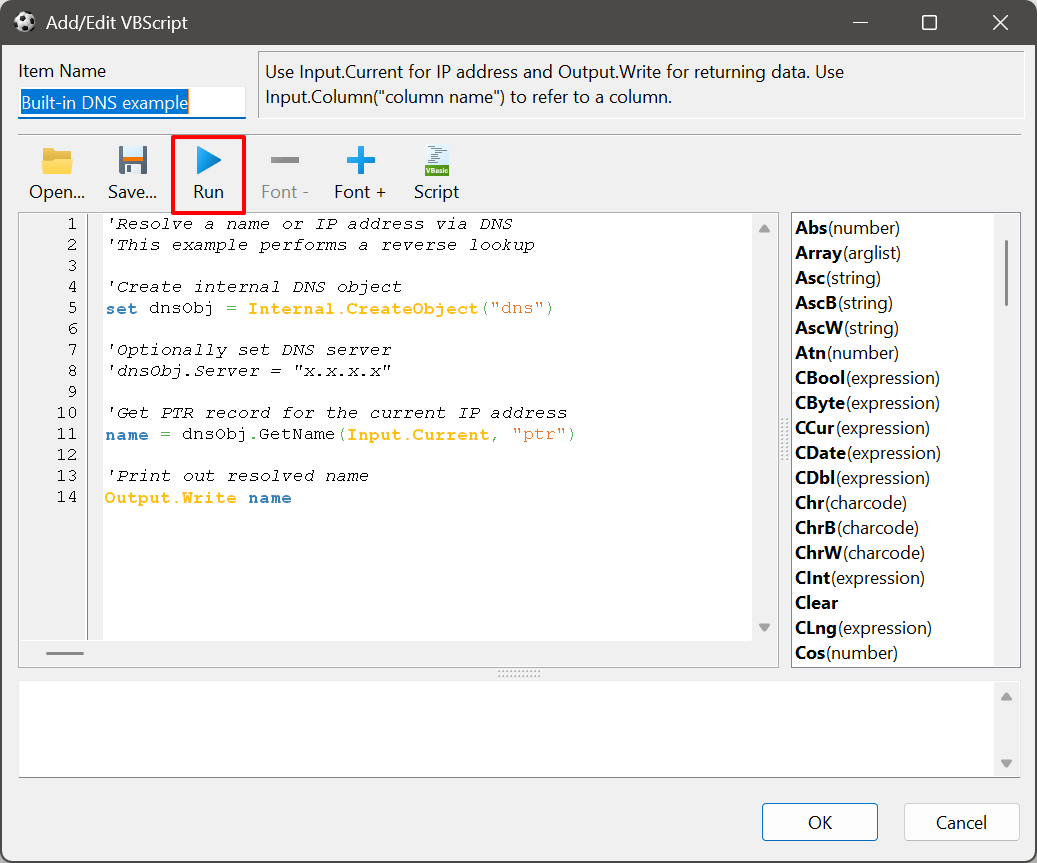
Regarding variables, they are not currently accessible from within scripts. However, we will be adding this capability soon and will post an update once it's available. It's probably a good idea to add access to environment variables too.
We're also looking into adding support for additional scripting languages like Python, as that would indeed be a valuable enhancement. Thanks for the suggestion!
Update: The latest builds now support access to both application-defined variables and system environment variables.
You can access them using the following syntax:
`For application-defined variables
Input.Environment("%VARNAME")

`For system environment variables
Input.Environment("VARNAME") I made a test with the new feature, but it did not work for me in the situations where more than one variable (variable nesting) was included.
Using the following script example:
Dim python_path, python_script_path

python_path = Input.Environment("%PythonPath")
py_script_path = "G:\PortableApps\Development_Utils\Scripts_Utils\Scripts\Python\Netscan_Hello_Sample_Script.py "

Set proc = Internal.CreateObject("process")
proc.execute(python_path + " " + py_script_path & Input.Current)

'Check ping exit code
If proc.ExitCode = 0 Then
  For Each line in proc.output
    Output.Write line
  Next
Else
  Output.Write "Exit code " & proc.ExitCode
End If
Test result:
Failed to execute "%PA_VAR\Portable Python-3.10.5 x64\App\Python\python.exe" G:\PortableApps\Development_Utils\Scripts_Utils\Scripts\Python\Netscan_Hello_Sample_Script.py 10.0.2.11: [error 0x2] The system cannot find the file specified.
The following is for application variable definitions (Input.Environment("%VARNAME"))
Variable definitions:
Variable = PythonPath
Value = "%PA_VAR\Portable Python-3.10.5 x64\App\Python\python.exe"

Variable = PA_VAR
Value = %Drive_Letter_VAR\PortableApps

Variable = Drive_Letter_VAR
Value = G:
Note: It did work for single variable like:
Variable = PythonPath2
Value = "G:\PortableApps\Portable Python-3.10.5 x64\App\Python\python.exe"
You're absolutely right, referencing an application variable from a script didn't resolve nested references to other application or environment variables. This has now been fixed in the latest build. Thanks for pointing it out!
By the way, we're working on native Python integration, and it will soon be possible to run Python scripts directly within the app, without relying on VBScript or capturing process output. Even better, unlike VBScript, this will be supported across all platforms.
Would it be possible to allow or make always available the Choose Location option button from Remote Python, and Nmap in need of a change?
In my personal situation I first chose a portable location, but then I decided to make a Python home folder redirection that now is not available anymore.
Sure, that's now done in the latest builds. You can now change the path to Nmap or Python at any time, even if one has already been found.