View ping statistics for a particular device
10 posts
Is there any way to see how many pings have been sent and what the success/failure count is for a particular device? We want to be able to tell if a device is having intermittent connectivity issues over a period of time and it would be useful to know how many pings have been sent, and how many succeeded/failed.
Thanks
That's an interesting idea.
Do you mean a ping success/failure counter across multiple scan rounds, i.e. when background scanning is enabled? For example, if the device responds during a round, we increment the success counter by 1; otherwise, we increment the failure counter by 1.
Or do you mean sending multiple probes within a single scan round and tracking how many succeed or fail?
The first option you suggested.
I think it would be good to know how many rounds/pings have gone out, how many passed and how many failed. Maybe even a traffic light system. At the moment you use a blue circle when devices reply. Maybe they could be green if they exceed a threshold of say 95% success, red if they never respond, and yellow for in-between (highlighting possible intermittent issues). These thresholds could be user configurable.
Thank you, that's very helpful. The approach we are considering is a small built-in history database that records every scan result: timestamp, IP, MAC, success or failure, and response time. From that single stream of data, the following would all become possible:
- Pings sent, succeeded and failed counters per device, as you described.
- Traffic light status on the device row — green above your configured success threshold, yellow in between, red for no response, measured over a rolling window. Both the thresholds and the window length would be user-configurable.
- Per-device history panel (via right-click) showing every IP the device has held, every hostname it has announced, success rate over time, and an RTT graph. This is particularly useful for identifying intermittent issues that manifest as latency spikes rather than outright failures.
- Reverse view by IP address — selecting an address shows every MAC that has ever responded at it. Helpful for static assignments and for diagnosing DHCP collisions.
- Stale candidates report listing devices not seen for a configurable number of days — the original wasted-IP reclamation use case.
Wow! That sounds great!. Thanks for the prompt responses (as always!).
I've only recently really started using your net-scanner, despite having it for a while. It is such a powerful product once one looks beyond the basics! I've also been using your Switch Port Mapper for a number of years, and recall you being very responsive in implementing some suggestions I made back then!
Cheers!
We've implemented history recording, in which every scan round records found devices in a compact form.
This easily enables simple first-seen, last-seen, and availability tracking (how many scans the device was online in).
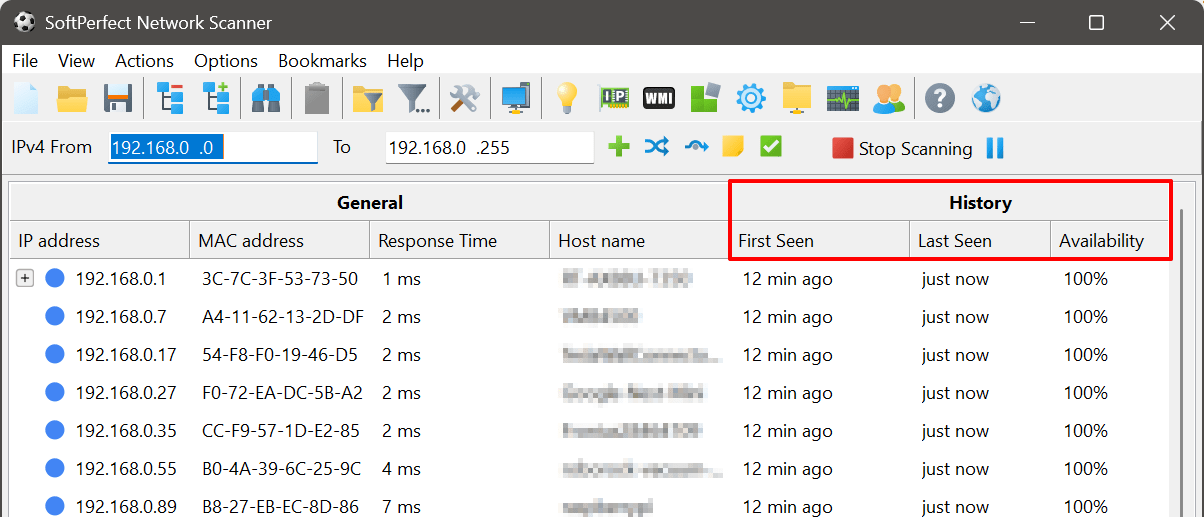
Next, we plan to derive additional reports and insights from the same dataset.
Main grid columns (per-device, one value per row)
These are inexpensive to calculate, as they are derived directly from a single device's history in addition to the existing First Seen, Last Seen and Availability metrics:
- New device — First Seen equals the current session. This can be highlighted or colour-coded as the most security-relevant signal.
- RTT trend — average RTT compared to recent history, helping identify gradually increasing latency.
Separate reports (aggregate and temporal analysis)
Inventory & change tracking
- New devices report — all devices first detected within a selected date range. This becomes the primary security and audit report.
- Disappeared devices — devices not seen for N days, useful for identifying decommissioned, offline or potentially stolen equipment.
- Network growth — device count trends over time, optionally grouped by network.
Reliability analysis
- Availability ranking — percentage uptime per device over a selected period, useful for identifying unstable infrastructure.
- Always-on vs intermittent — distinguishes permanently online devices (servers, infrastructure) from intermittently connected devices (phones, laptops), enabling automatic role classification.
Identity & addressing
- IP history / DHCP churn — MAC-to-IP history over time, highlighting devices that frequently change addresses.
- Hostname history — tracks hostname changes for each device.
If you have any ideas what else could be useful, please let us know. (v)
I seem to have a bit of a layout issue with the History column group: its Last Seen and First Seen columns are not adjoining. Device Type column is positioned between them.

It's just that an existing column was reused and two new ones added, but due to the architecture the new columns are added at the end.
You can simply drag the Last Seen column to the group where the First Seen column is, or vice versa.
I'll check if we can fix this discrepancy (tu)