High DPI display issues: icons become blurry or disappear when mouse passes over
3 posts · Closed
I am using Network Scanner on Windows 10 with a high DPI display (250% scaling on a 4K display). My only complaint is that the toolbar gets pretty small on my screen. I tried to make the toolbar a bit bigger by using the High DPI Scaling Override options, but the "System" option makes the UI blurry (this is typical for most applications).
So to get the interface to look good on this display, I have to override DPI scaling and use "System Enhanced" scaling for the main executable application file. However, while the application looks good on the high DPI display in this mode, the toolbar buttons disappear when my mouse passes over them and I cannot click them. When using other DPI scaling settings, this does not happen.
It is not too big of a deal, and I can just leave the scaling at its native behavior and live with the smaller toolbar buttons, but I thought I'd let you know in case the situation can be improved somehow.
Thank you for reporting and describing the issue with high DPI.
Some good news here: we have implemented vector icons in the Network Scanner that freely scale to any DPI without any blurriness or loss in quality.
Below are the comparison screenshots of the old and new UI. The new icons look a little different to the old set, but should be much more visually appealing at high DPI settings:
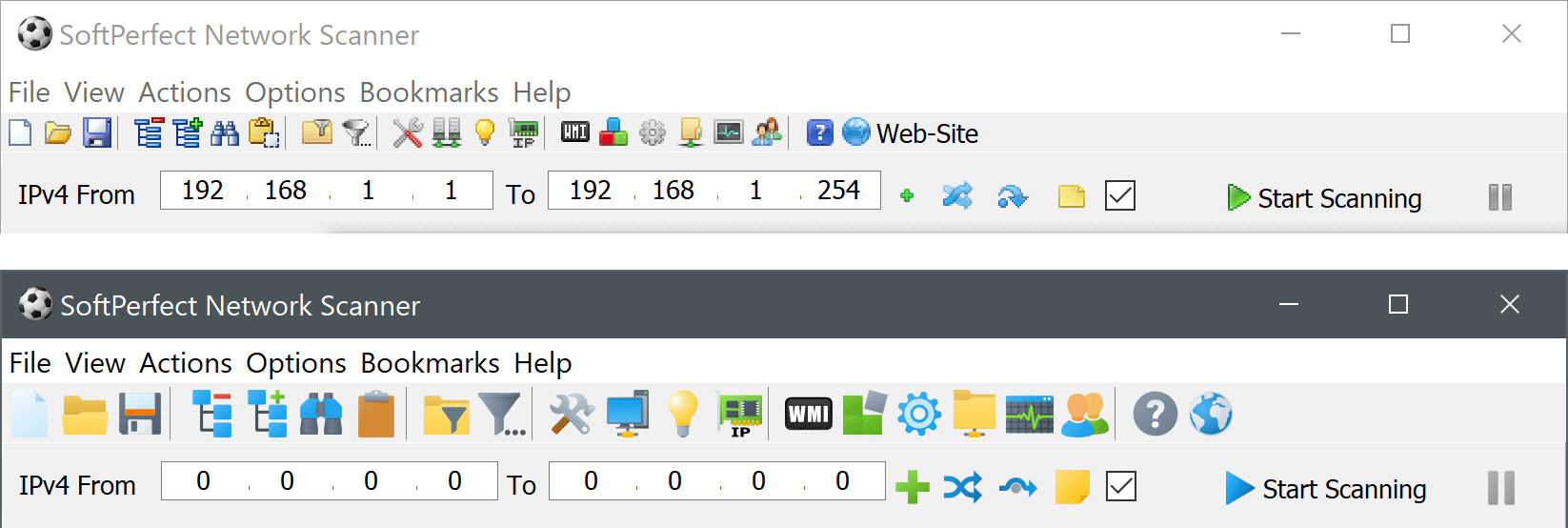
Please download the new version and let us know your thoughts.
It looks great! Scaling looks much improved, both with the icons, and with the status bar at the bottom of the screen.
Thanks so much for making the change.