Cannot enter IP/CIDR notation for single IP
5 posts · Closed
I keep forgetting to let you know that NetScan will not let me enter 162.213.122.82 /32 as a valid search. I have to put 162.213.122.82 to 162.213.122.82 to scan a single IP. Thanks -WindowsStar
That's because in a single-address CIDR block that IP address would also be the broadcast address.
This IP calculator likewise treats the IP address as broadcast.
You can simply tick the option shown below and /32 addresses should be accepted normally:
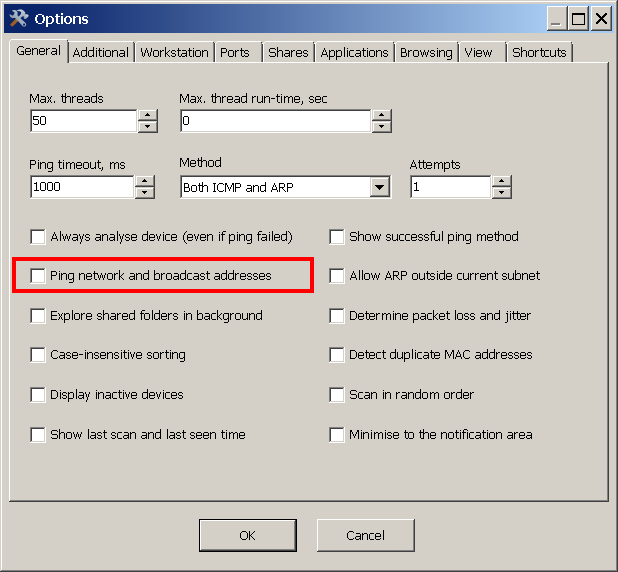
Yup, that works.
Thanks for the link. Picture worth a thousand words.
Got me thinking is there a more elegant way to handle this so someone doesn't' have to go back and forth checking the box? My thoughts are 162.213.122.82 /32 and a new ICON that indicates Single IP. But you may have a much better suggestion.
Example:
162.213.122.82 /32 (Add Range) (CIDR) Blank (Assign Comment) (NEW ICON) (Enable/Disable)
The button is sort of already there ;) Simply add your CIDR range:

Then click the arrows to convert it to a plain range, in which there is no broadcast address.
Should you need the CIDR back, just click the same button again:

:) That is the button I am using that doesn't work because I have to toggle the checkbox for broadcast/network scanning you mentioned. That is why I suggested the new icon. Right now it is three or four mouse clicks to turn it off ... then three or four to turn it back on. The new icon would do all the mouse clicks for single IP? Just a thought nothing that has to be changed... and again you may have a more elegant way of doing it.
Typically I don't scan broadcast/network and use CIDR exclusively. Now and then someone says a server is not working and I naturally enter IP /32 and NetScan gives me the error, I then turn off CIDR and enter the IP twice and scan ... then enter my next network and click the CIDR again to enter the /24 /23 /22 etc. Sometimes I forget and get the error because it will try to change to /32. I have to cancel and enter a range to get back to being able to click CIDR. Thanks -WindowsStar