VPN connections missing from network adapter list
3 posts · Closed
Hello,
A L2TP VPN connection is made with a DHCP assigned IP 192.168.0.119 by the embedded Windows 10 VPN client. The VPN Server provides a /22 Netmask 255.255.252.0, while Windows has mapped the Netmask into 255.255.255.255 while adding routes:
Destination	Netmask		Gateway		Interface	Metric
192.168.0.0	255.255.252.0	On-link		192.168.0.119 	26
192.168.0.0	255.255.255.0	192.168.0.11	192.168.0.119	26
192.168.0.119	255.255.255.255	On-link		192.168.0.119	281
192.168.3.255	255.255.255.255	On-link		192.168.0.119	281
The whole destination subnet can be reached and Windows is working correctly as designed.
The problem: Network Scanner does not show VPN connections in the network adapter list. Scanning via VPN only walks through the default subnet mask 255.255.255.0. It seems to ignore the IP routes targeting the VPN connection.
Network Scanner version 7.1.5 64-bit, Windows 10.
Regards
If the VPN adapter isn't shown in the list of adapters, you can still manually enter the required IP address and scan it normally, as shown below.
The Network Scanner itself doesn't make any routing decisions, and scanning those addresses should work the same way Windows works with them.
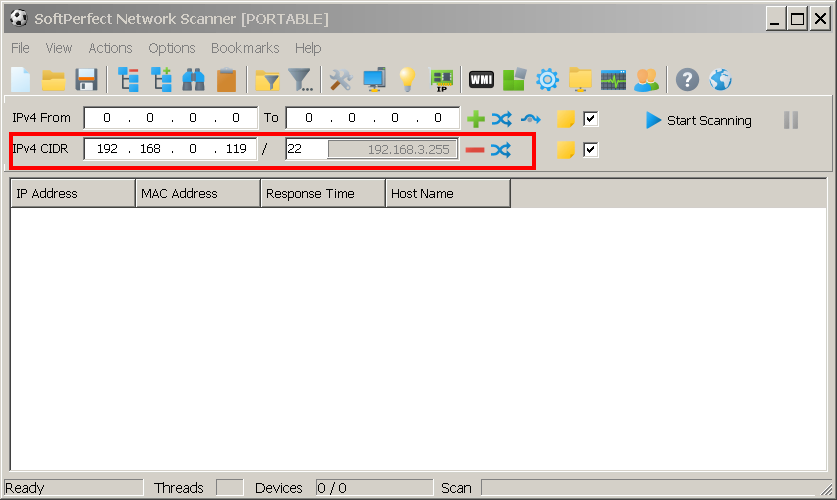
I scan networks connected via VPN all the time and it works perfectly. I scan /24 /23 /22 and /20 no problem. Just enter the IP range and scan. -WS