Identify virtual MAC addresses from WiFi Extender
4 posts · Closed
I have a WiFi Extender that issues virtual MAC addresses to devices on my network.
As friendly names map to MAC addresses, this results in many 'unknown' devices turning up that are in fact known. But because they appear on the network with a virtual MAC address from the extender, Network Scanner can't make the connection to the friendly name.
Is there any way to have Network Scanner interrogate MAC addresses to determine whether they are virtual?
The virtual MAC addresses all have the same starting values (02:0F:B5) so I know which devices showing up in the scan results have virtual MAC addresses; I just need a way to then 'drill through' to get the real MAC address so the friendly name matching then works.
I am not sure there is a reliable way because the extender hides those devices behind itself.
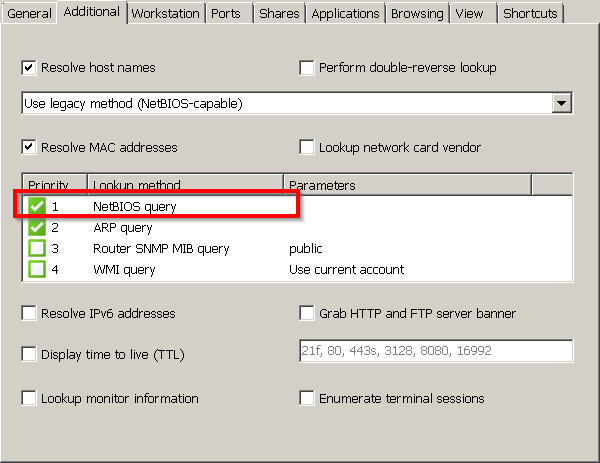
The way I can think of is to ask those devices directly. If those are Windows-based machines and file sharing is enabled there, the following setting should do the trick:
- Activate the NetBIOS query option
- Move it to the top of the list
As a result, before sending an ARP query that gets intercepted by the extender, the network scanner will send a NetBIOS packet. If the target device responds, the response will contain the device's real MAC address.
It is a mix of devices (Windows PCs and other IoT devices and hardware) unfortunately.
I'll try enabling the NetBIOS query and moving it up the priority order to see if it at least helps with visibility of Windows machines.
I recently bought a few Netgear extenders to go with my Netgear router. These show up with that 02:0F:B5.... MAC address. Each device behind them also have the same virtual address. I have configured each extender to have its own IP (assigned by my router). Navigating to that IP in my browser allows me to access the UI for the extender. From there, the extender can tell me which devices (actual MACs) are connected. I can then map that back to what shows up in the router's map.
That may help. At least, for future folks that stumble upon this thread. The OP posted 3 years ago....