Custom SNMP OIDs are never requested from the device
3 posts · Closed
I have several custom SNMP OIDs configured for devices; specifically, I am looking at APC PDUs, but I am sure the actual device isn't the problem and this would apply to any device.
The built-in, standard SNMP OIDs are requested and retrieved from the device without a problem:
<item>
        <checked>true</checked>
        <name>Hostname</name>
        <oid>1.3.6.1.2.1.1.5.0</oid>
        <community>$ecret,public</community>
        <showcomm>false</showcomm>
        <version>0</version>
        <seclevel>0</seclevel>
        <enctype>0</enctype>
        <username></username>
        <authpass></authpass>
        <datapass></datapass>
        <contname></contname>
</item>
But my custom SNMP is never even requested of the device.
Here is the configuration:
<item>
        <checked>true</checked>
        <name>APC PDU SN1</name>
        <oid>1.3.6.1.4.1.318.1.1.4.1.5.0</oid>
        <community>$ecret,public</community>
        <showcomm>false</showcomm>
        <version>0</version>
        <seclevel>0</seclevel>
        <enctype>0</enctype>
        <username></username>
        <authpass></authpass>
        <datapass></datapass>
        <contname></contname>
</item>
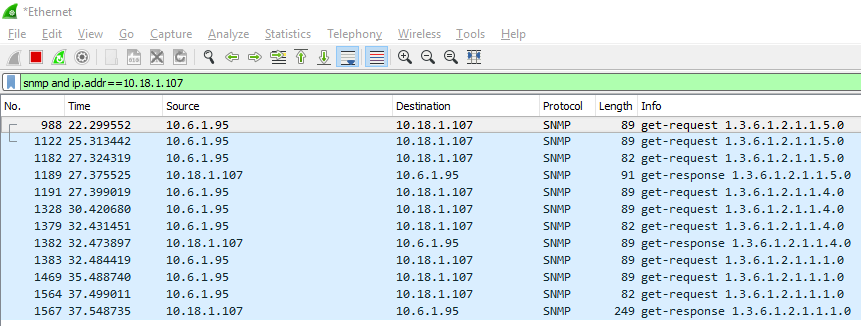
In my Wireshark capture, I never see that request being made, even after specifically telling Network Scanner to re-scan that field.
Attached is a screenshot of the Wireshark capture right after I initiated a re-scan of APC PDU SN1 for 10.18.1.107, my PC is 10.6.1.95. Notice it requests and gets a response for three OIDs, but not the one I asked it to update.
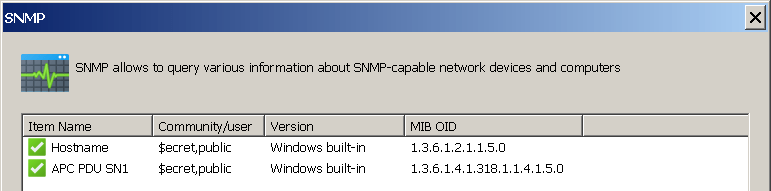
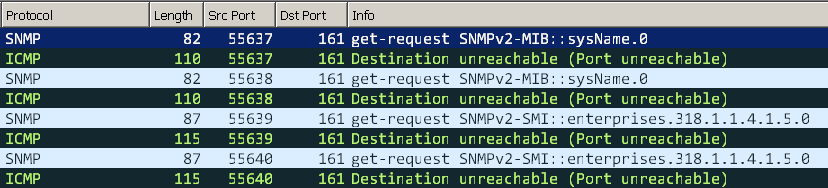
That's rather odd. I have imported your entries and I can see 4 requests sent (2 for each community per item):
Then Wireshark shows:
I recommend to try changing the SNMP version in these items from Windows built-in to SNMPv1 to rule out issues with Windows SNMP libraries. This will use our own implementation that doesn't depend on snmpapi.dll and mgmtapi.dll.
Also, make sure you are using the latest version of the Network Scanner, that is 7.1.7.
If still no luck, please submit a support ticket here and attach your complete config (it's okay to remove sensitive information like passwords).
I am using the latest version 7.1.7
Since it worked for you, I decided to delete and have netscan rebuild a default configuration, then add in the SNMP OIDs that I want to track. It is now working.
Upon your recommendation I did change the SNMP scanner to SNMP v1, though the built in Windows scanner is also working.
Thanks for the help,
Jason