Script returns multiple lines for a single machine
3 posts · Closed
Good morning!
I am attempting to run a script that returns the last reboot time. I found this script (author Alistair McMillan, 2011):
Option Explicit

' Declare variables
Dim colItems, objItem, objWMIService
Dim strBoot, strBootDate, strBootDay, strBootHour, strBootMins
Dim strBootMonth, strBootTime, strBootYear, strComputer, strMsg, strQuery

strComputer = "."

If IsEmpty(strComputer) Then
	WScript.quit()
ElseIf	strComputer = "" Then
	strComputer = "."
End If

' Connect to specified computer
Set objWMIService = GetObject( "winmgmts://" & strComputer & "/root/cimv2" )
Set colItems = objWMIService.ExecQuery( "Select * from Win32_OperatingSystem", , 48 )
For Each objItem in colItems
	strBootYear  = Left( objItem.LastBootUpTime, 4 )
	strBootMonth = Mid( objItem.LastBootUpTime,  5, 2 )
	strBootDay   = Mid( objItem.LastBootUpTime,  7, 2 )
	strBootDate  = DateValue( strBootDay & "-" & strBootMonth & "-" & strBootYear )
	strBootHour  = Mid( objItem.LastBootUpTime,  9, 2 )
	strBootMins  = Mid( objItem.LastBootUpTime, 11, 2 )
	strBootTime  = strBootHour & ":" & strBootMins
	strBoot = strBootDate & ", " & strBootTime
	strMsg  = strBoot
Next

' Display results
Output.write strMsg

'Done
'WScript.Quit(0)
The script returns the datetime of the last reboot of the computer running the script. I've been pouring over this and can't seem to find my error. Can anyone help?
(To clarify: the script reads the top three machines on my CSV correctly, then adds multiple lines for one machine repeatedly.)
This script obviously connects to the a computer's WMI subsystem and parses an output of the following expression:
SELECT LastBootUpTime FROM Win32_OperatingSystem
Normally that returns a string like this in the yyyymmddHHMMSS.mmmmmmsUUU format (see CIM_DATETIME description):
20190104140000.111597+600
So to figure out why the script fails at a specific machine, run the above WMI query against it to see what it returns.
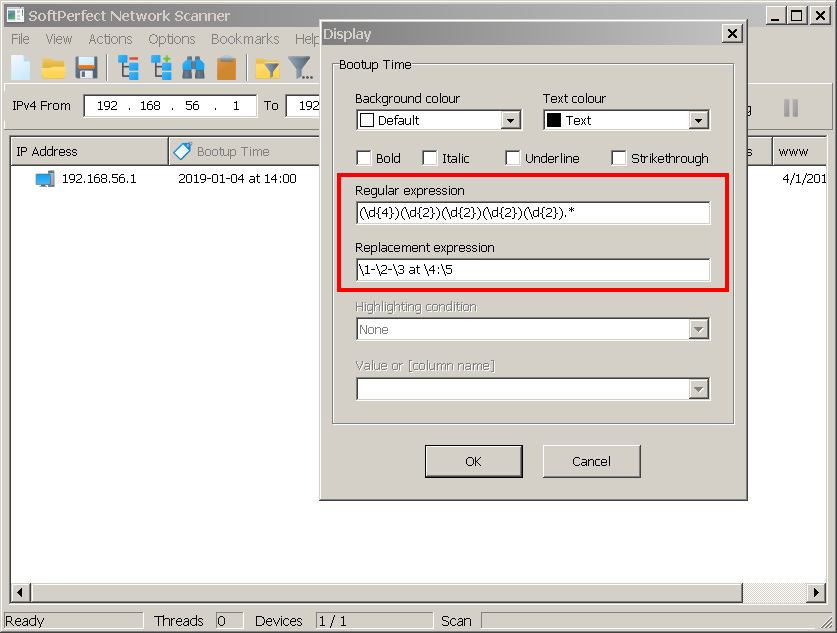
Alternatively, in the newly released version 7.1.9, you could perform a regex replacement to extract the data in a more readable format. For that head to Options - Remote WMI - New and add the above SELECT statement. It will return a raw timestamp value. Then apply the following regular expression to this column:
(\d{4})(\d{2})(\d{2})(\d{2})(\d{2}).*
Use this as the replacement expression:
\1-\2-\3 on \4:\5
These should give up the last boot-up time in a readable form:
Andrew,
Thanks so much! The RegEx method worked!