Different results between NetScan and command prompt
2 posts · Closed
Mike Guest
The following statement shows different results when run from NetScan and from command prompt:
cmd /k set "target=10.10.7.7" & set tmp=%temp% & echo %target% & echo %tmp%
From NetScan:
cmd /k set "target=10.10.7.7" & set tmp=%temp% & echo %target% & echo %tmp%

%target%
C:\Users\mike\AppData\Local\Temp\NetScanPortableTemp
From CMD window:
set "target=10.10.7.7" & set tmp=%temp% & echo %target% & echo %tmp%

10.10.7.7
C:\Users\mike\AppData\Local\Temp\NetScanPortableTemp
Andrew SoftPerfect
This issue is not connected to Network Scanner. It is just how the command processor evaluates environment variables. For example, open a new command prompt and type the above statement. It will result in something like this, where in the first set of commands the variable is not evaluated:
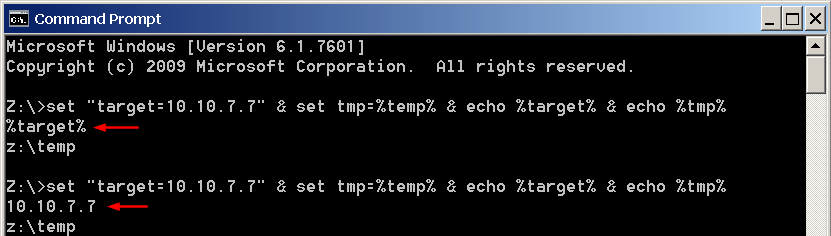
To work around this, you need delayed variable expansion and a different syntax, like this:
cmd /V /k set "target=10.10.7.7" & set tmp=%temp% & echo !target! & echo %tmp%
Here /V turns on the delayed expansion and !target! refers to a delayed-expansion variable. I also recommend using && instead of & to ensure the commands continue executing only if all prior commands succeeded.
This topic is closed.
It has had no new posts for over a year, so the software versions it talks about may be out of date.
Start a new topic in Network Scanner if you have a similar question.