Meaning of red circles with a white X on computer icons
3 posts · Closed
Donal Guest
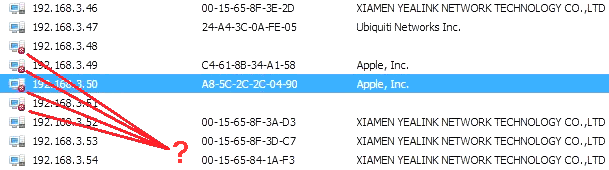
In the scan results, some computer icons have crossed red circles on them. What do these red circles with a white "X" mean?
Thank you
Ann SoftPerfect
The red circles mean there was an error while scanning those devices and the thread was killed. It could be a consequence of either:
- The user clicked the Force button in the Stop Scanning dialog. This is not recommended, as it forcibly terminates the thread and results in a memory leak. Devices with terminated threads are marked with the red circle.
- The user set a run-time limit in the settings, which lets threads run no longer than the set time period. For example, if the maximum run-time is set to 60s, after a thread has been running for 60s the application will attempt to finish it gracefully. Failing that, in double the time (120s) the thread is killed, likewise causing a memory leak and marking the device with a read circle.
In other words, a red circle indicates the thread was killed due to either of the above reasons.
Donal Guest
Thank you for that.
Best
Donal
This topic is closed.
It has had no new posts for over a year, so the software versions it talks about may be out of date.
Start a new topic in Network Scanner if you have a similar question.