Scan results showing incorrect IP range and asterisks
3 posts · Closed
I have NetScan v7.2 trial installed and have a few questions.
My computer's IP address is 192.168.0.21. In the scan range, when I was entering the start IP address I goofed and entered 160 instead of 168. Then I entered the "to" address and started the scan. In the scan results, I see several entries in 192.160.x.x range. Would I be correct to say that most likely these are connections that I really don't want? If so, how do I remove them or determine what has made the connections?
I also see a bunch of entries where everything is an asterisk. Why and how do I correct this? Suggestions would be appreciated.
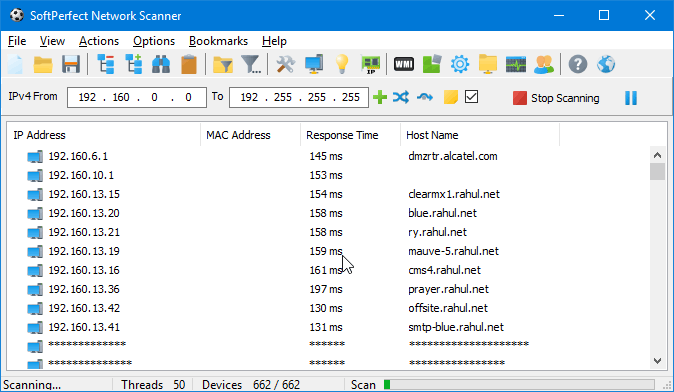
Enter 192.168.0.1 as the starting address and 192.168.0.254 as the ending address. To get rid of the stars you have to purchase the software. You can only see the first 10 devices with the free trial version. -WS
The 192.160.x.x entries you are seeing are regular servers and other devices on the Internet with those addresses. They are not in your network.
Local or private addresses fall into one of these ranges:
10.0.0.0 – 10.255.255.255
172.16.0.0 – 172.31.255.255
192.168.0.0 – 192.168.255.255
Anything outside these rages belongs to so-called routable addresses on the Internet, so scanning them basically means trying to scan some devices in the Internet.
Like suggested above, you should use 192.168.0.1 - 192.168.0.254 range to scan your home network.
Regarding the asterisks, they are a limitation of the free trial, which is unlimited in time, but is limited to displaying 10 devices.