Filtered scan CSV export shows error instead of data
4 posts · Closed
In a regular filtered scan, I hide almost all columns except displayName and mail to save the results in a CSV file. But when I check the file, it did not bring the required information but the following error:
displayName	mail
The remote server machine does not exist or is unavailable: 'GetObject'
The remote server machine does not exist or is unavailable: 'GetObject'
The remote server machine does not exist or is unavailable: 'GetObject'
The remote server machine does not exist or is unavailable: 'GetObject'
The remote server machine does not exist or is unavailable: 'GetObject'
The remote server machine does not exist or is unavailable: 'GetObject'
The remote server machine does not exist or is unavailable: 'GetObject'
The results CSV file should look like this:
displayName	mail
Pedro Perez   [email protected]
Juan Ferb   [email protected]
Maria Nin   [email protected]
Consuelo Chuld   [email protected]
Tito Velazquez   [email protected]
Roland Vega   [email protected]
Omar Ocasio   [email protected]
Pedro Rodrig   [email protected]
Marco Viera   [email protected]
These look like VBScript errors, which is strange because the scripts are only executed during scanning.
Are you saying that the displayed data are correct, but they are wrong when saved to a CSV file? Can you post some screenshots?
Yes, that's exactly what I'm saying. The displayed data in the scanner is correct, but is wrong after saving it to a CSV file.
Firstly I do a scan with all columns visible. Then I apply a filter to find out some clients. Then I hide all columns except name and mail. Then I save the results to a CSV file. I posted the exact error message and data that was displayed. Which screenshot do you need, so I could provide it to you?
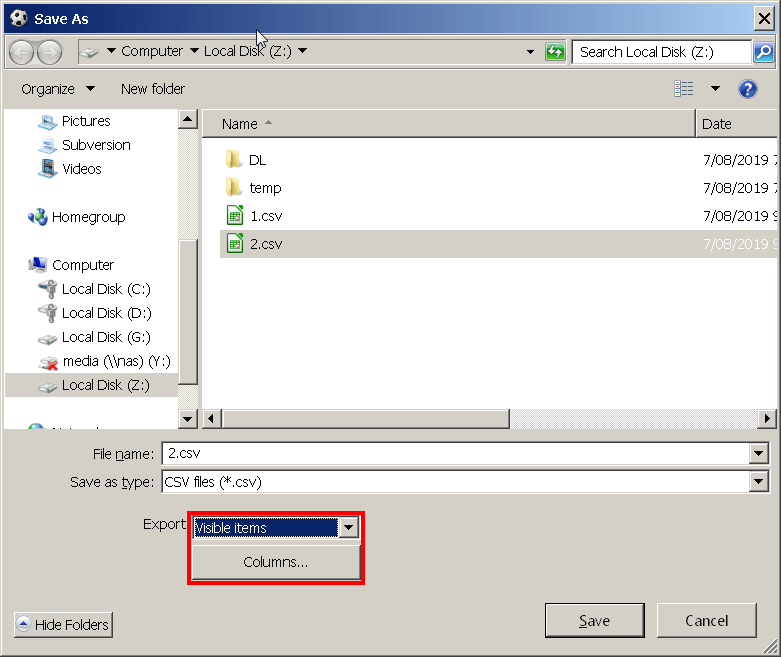
It sounds like you may be choosing All items when saving, rather than Visible Items. In that case hidden rows will be included as well (those that you have filtered out, which are probably the ones that contain errors).
We have also added a Columns button in the latest builds, so you can choose which columns go to CSV, text and HTML, without having to hide them manually.