Access Denied when querying TPM via WMI
6 posts · Closed
Good day, I am currently testing your Network Scanner software to detect if remote systems have TPM enabled. Every time I scan their computers, it says Access Denied for TPM only. Everything else gets detected.
I used the following input in the WMI Query Builder window:
Name Space : CIMV2\Security\MicrosoftTPM
WQL Statement: SELECT * FROM Win32_Tpm WHERE IsEnabled_InitialValue = True
As soon as I get this solved, I will be ordering a copy for our client, so we can scan their computers.
It looks like access to that namespace requires an encrypted connection (with PacketPrivacy enabled).
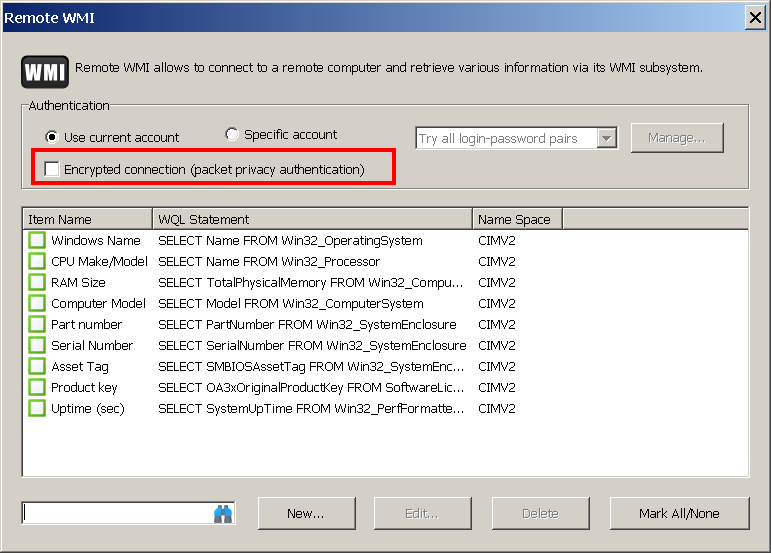
We added it in the latest release. Please try ticking the new Encrypted connection setting as shown in the screenshot below. It should now be able to extract TPM information.
Thank you!!!!! It worked. I got the new version, checked the encryption box, scanned and voila!!! No more access denied.
Fantastic! Thank you for the feedback.
I see above that someone used "SELECT * FROM Win32_Tpm WHERE IsEnabled_InitialValue = True" in Remote WMI.
However, I was not able to find the class "Win32_Tpm" in the namespace CIMV2's WMI Class section. If I switch to the namespace SECURITY, the application gives me an Access Denied error.
Please advise.
Thanks,
David
Generally speaking, Win32_Tpm is located in CIMV2\Security\MicrosoftTPM, not the Security namespace.
The most common reason for receiving an 'Access Denied' error when accessing either the Security namespace or the CIMV2\Security\MicrosoftTPM namespace is insufficient privileges. To access these namespaces, even on a local machine, the current user must be an administrator. Therefore, please ensure that you are running the application under an admin account.
Additionally, I recommend downloading the latest build, as we have implemented several improvements in this area. Specifically, the application will now retrieve sample data and a list of available classes, even for non-root namespaces.