How to get a proxy list with port numbers
4 posts · Closed
How do I get a proxy list with port numbers?
For example:
117.7.230.113:443
117.4.247.218:3128
117.240.151.237:39376
117.2.121.203:8080
117.200.48.90:8080
117.206.83.198:52071
116.68.160.114:8080
116.66.197.228:8080
115.124.94.60:8080
Network Scanner is not exactly a proxy discovery tool. Yet if you are simply scanning public addresses for certain open ports, this can be done as follows:
- Run a scan of an address pool, to check whether TCP ports of interest are open.
- Once the scan is completed, filter out devices without open ports: open Setup Filter (Ctrl + I), and there set "TCP Ports" as "Not Empty".
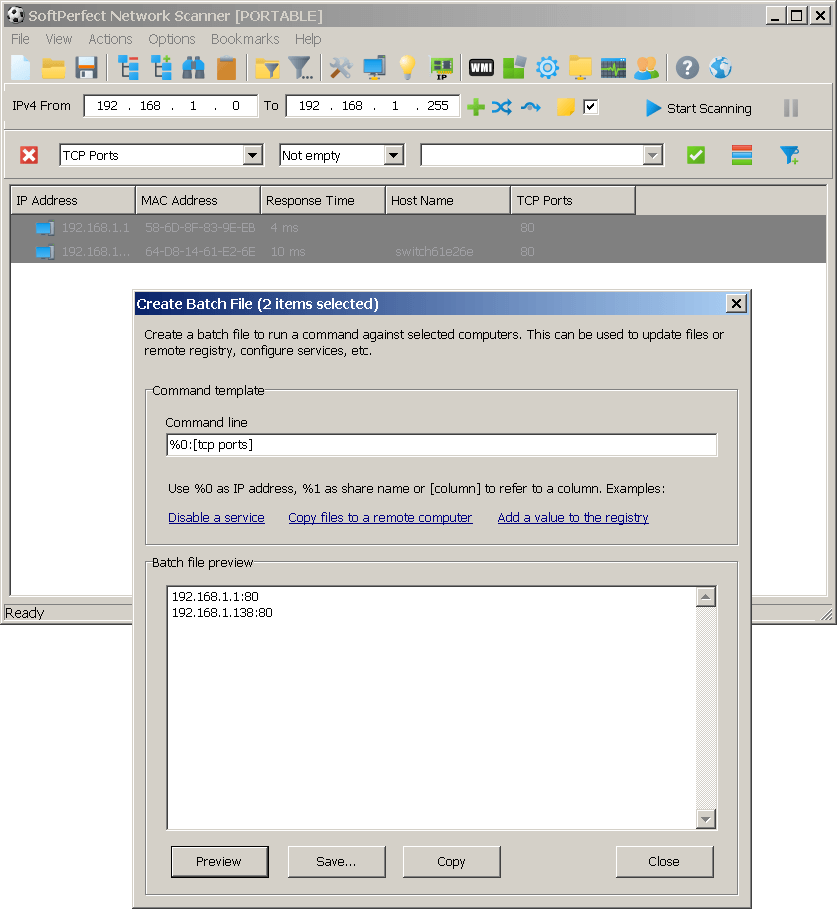
- Select everything (Ctrl + A), then choose Actions - Create Batch File in the main menu.
- Enter the below line as the command template and then click Preview.
%0:[tcp ports]
- This will generate a list of IP addresses with port numbers, which can then be saved.
Can this only be done in the paid version of the program? In my free demo I see stars/asterisks in the some scan results.
Also, to search for a proxy, does the function "Check for open TCP ports (one or more, comma or dash separated)" in Options>Ports have to be activated?
Yes, the asterisks are a limitation of the free demo version. You would need to purchase a licence to remove this restriction.
As I said before, our product is not exactly a proxy discovery tool. The setting you mentioned will find open ports, but those are not guaranteed to be proxy ports, or that they will accept proxy connections.
You could either use the Remote Script feature and
- use an instance of "MSXML2.ServerXMLHTTP.6.0";
- or call console curl with the necessary parameters and analyse its response.
Or you could just find a proxy discovery/testing tool, there should be a few out there.