Assign friendly name option is greyed out
5 posts · Closed
Hi, your NetScanner used to allow the assignment of friendly names, however, that feature is no longer working. When I right-click on a device, the Assign Friendly Name choice is shaded light gray, meaning this choice cannot be made. Why is this no longer working?
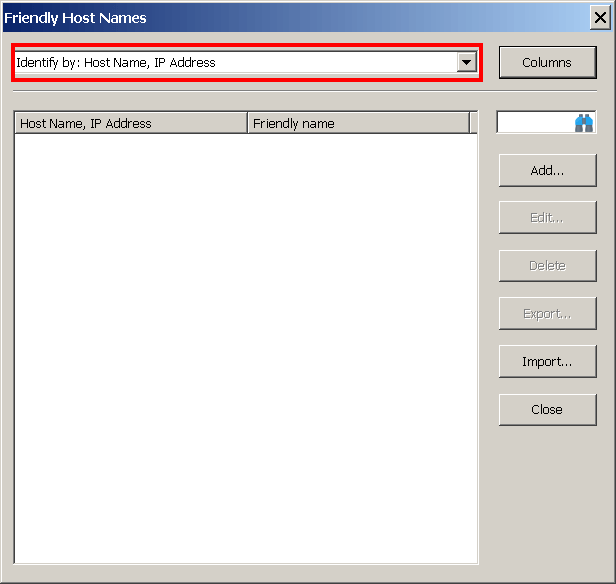
Please check the columns selected for "Identify by" in Options - Friendly Names (see below). Most likely you simply need to select some columns there, so the NetScanner knows which columns serve as the key for assigning friendly names.
Thanks!! I did exactly what you suggested and it works great now.
Have a great weekend and Go Giants! :-D
Best regards,
George
I don't see Friendly Host Names in Options in version 7.2.7. When I right-click on a device Assign Friendly Name is greyed out.
Is there a way I can assign a host name to a host name that is blank? Maybe with a file?
Thank you
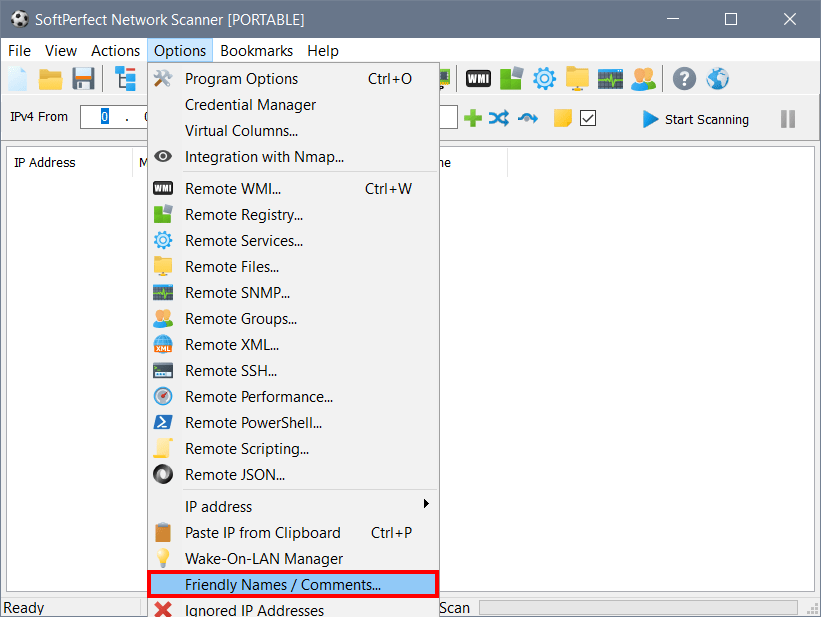
The setting you are looking for is Friendly Names/Comments under Options in the main menu, as shown below. Once you have enabled it and selected the columns for identification, you will be able to assign friendly names.