TTL column is empty in scan results
3 posts · Closed
Hi,
I have "Display time to live (TTL)" ticked in the Options' Additional tab, but the TTL column in the scan results is empty. Please tell me how to get it to show.
Credentials data is correct.
Thanks
TTL is not related to credentials. It is determined from ICMP echo/reply, otherwise known as ping.
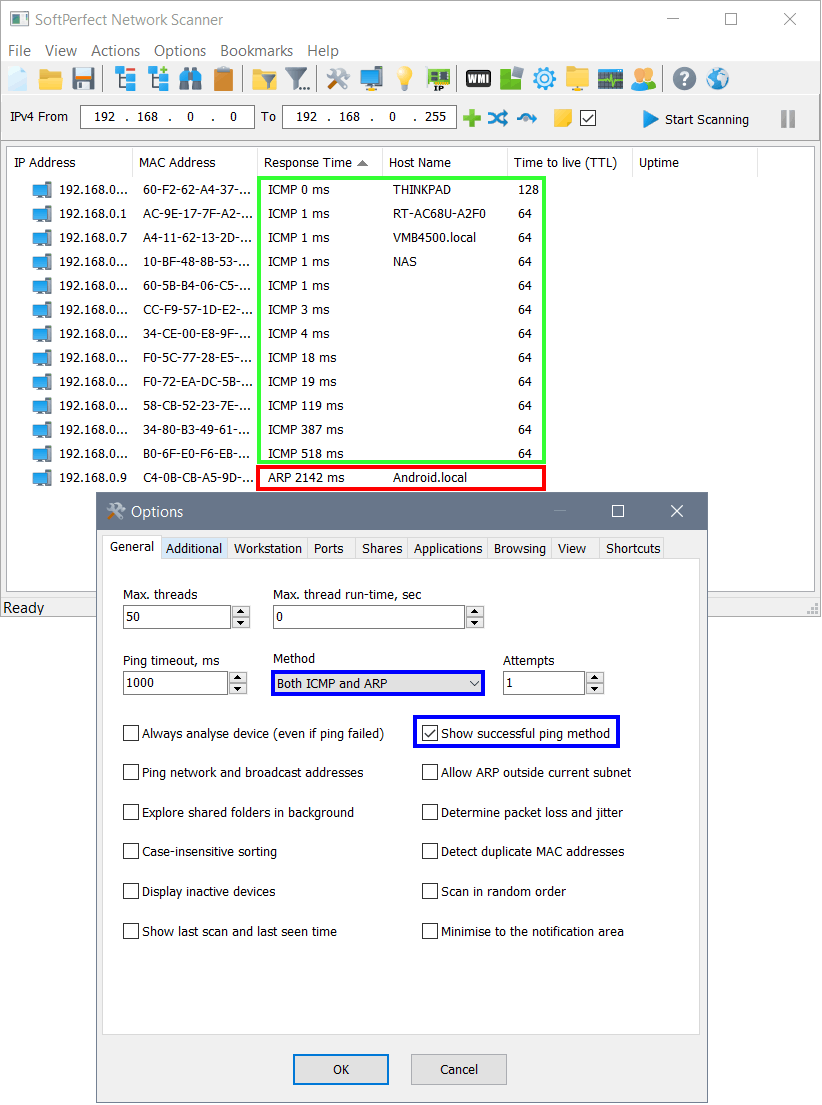
Normally you would not get TTL for ARP-based ping because ARP packets don't carry time-to-live. Below is a screen shot where you can see the difference. Please check the settings highlighted in the screen shot, i.e. whether ICMP ping is enabled and which type of ping succeeds.
Update: we have done more testing and found there was a bug in 64-bit builds that prevented TTL from being displayed. The 32-bit builds were not affected.
So if the above recommendations did not help, please download the fixed build here. Thank you for reporting this issue.