Shared folders missing from CSV export
2 posts · Closed
James Guest
I use your NetScanner product to search for shared folders on the local network. It is very good to use.
But when I export to a CSV file, I cannot see the list of shared folders. Why?
Ann SoftPerfect
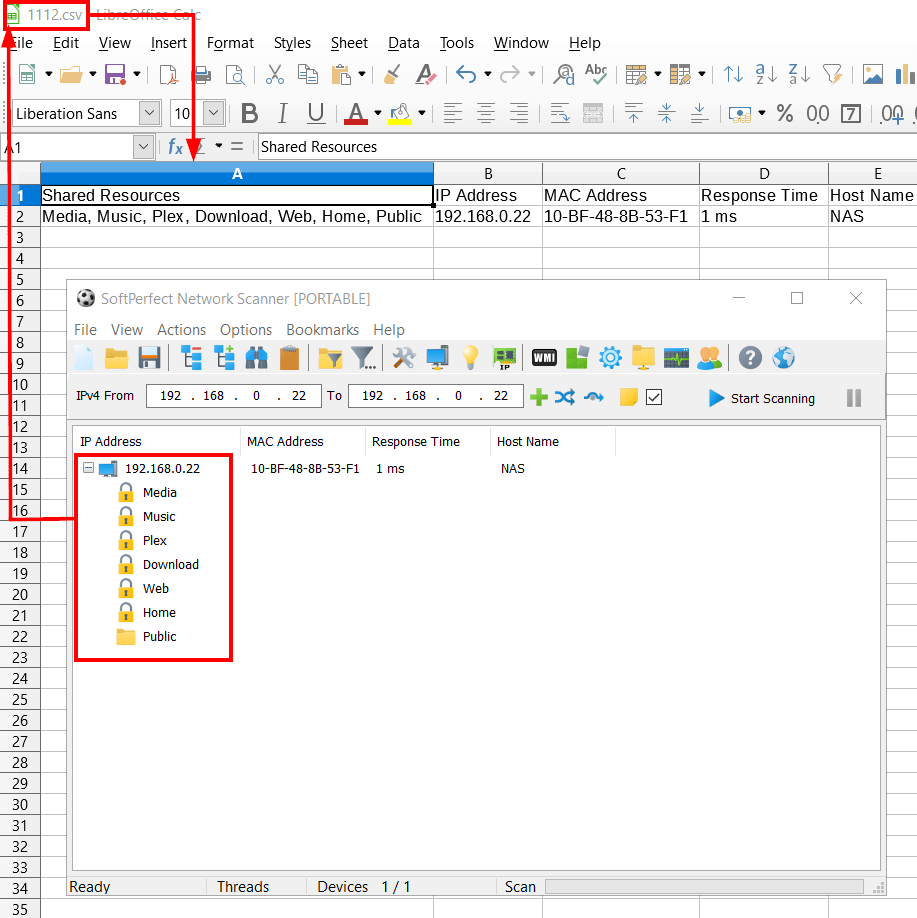
It is hard to tell why you don't see them. I have just checked this, and the shared folders are correctly displayed in the Shared Resources column, as shown in the screen shot below.
Perhaps you didn't notice that all shared folders were placed in one cell? CSV format has one item per row, so the list of shares is displayed as comma-separated line.
This topic is closed.
It has had no new posts for over a year, so the software versions it talks about may be out of date.
Start a new topic in Network Scanner if you have a similar question.