Displaying custom command output in a column
3 posts · Closed
For example, how would I set up the command (under the applications tab) "nmap.exe -p 443 --script ssl-cert %0" to display its result (or a portion of its result) in a custom column?
A typical response from this might be:
Nmap scan report for a#-#-#-#.deploy.static.akamaitechnologies.com (#.#.#.#)
Host is up (0.23s latency).

PORT    STATE SERVICE
443/tcp open  https
| ssl-cert: Subject: commonName=www.xxxxx.com/organizationName=xxx xxxxxxxx, S.A de C.V./countryName=MX
| Subject Alternative Name: DNS:www.xxxxx.com, DNS:xxxxx.com
| Issuer: commonName=DigiCert SHA2 Extended Validation Server CA/organizationName=DigiCert Inc/countryName=US
| Public Key type: rsa
| Public Key bits: 2048
| Signature Algorithm: sha256WithRSAEncryption
| Not valid before: 2020-02-17T00:00:00
| Not valid after:  2022-05-18T12:00:00
| MD5:   561f b7e8 ac0a 1559 5dd4 33e5 50b9 5618
|_SHA-1: 832a 4602 2e54 9e9a f2ec 505b 8ba9 9e17 9cd4 85a7
For example, is it possible to simply have "Subject: commonName=www.xxxxx.com/organizationName=xxx xxxxxxxx, S.A de C.V./countryName=MX" show up in a column?
Generally there would be two ways of doing this:
First method: NMap Integration
Go to Options - Integration with NMap and add a new scan item like this:
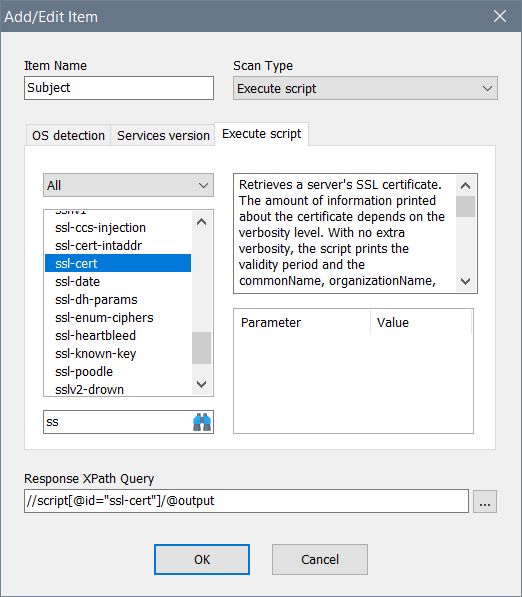
Run your scan and Nmap will launched against devices and its XML output will be captured and parsed. If this takes too long, that may be because it's launched with -F and there is no way to pass -p to specify ports at the moment. We will add this feature in the future. In that case, use the method below.
Second method: VB Scripting and XML parsing
Go to Options - Remote Scripting and add a new scan item like this:
'Create process object and execute nmap
Set proc = Internal.CreateObject("process")
proc.execute("C:\path-to-nmap\nmap.exe -oX - --no-stylesheet -p 443 --script ssl-cert " & Input.Current)

'Check nmap exit code
If proc.ExitCode = 0 Then

    'Traverse output lines
    xml = ""
    For Each line in proc.output
        xml = xml & line
    Next

    'Setup a XML object
    Set doc = CreateObject("MSXML2.DOMDocument")
    doc.validateOnParse = FALSE
    doc.loadXML(xml)
    If doc.parseError.ErrorCode = 0 Then
        Set query = doc.documentElement.selectNodes("//script[@id=""ssl-cert""]/@output")
        For Each row In query
            Output.Write row.text
        Next
    Else
        Output.Write "Error parsing XML"
    End If
Else
    Output.Write "Exit code " & proc.ExitCode
End If
This will launch Nmap, capture its XML output and parse with the XPath expression. This method is more flexible as you can add any custom parameters to the Nmap's command line and further process the output.
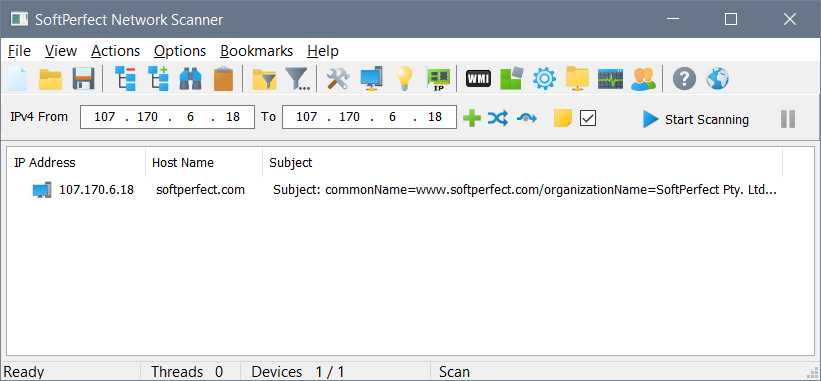
Sample output:
Perfect, thanks.