Write timestamp per record to CSV file
4 posts · Closed
Hi,
Is it possible to write the timestamp per record to a file? So that the CSV result looks like this:
"TIMESTAMP";"10.111.55.71";"Testversion";"Testversion";"Testversion"
"TIMESTAMP";"10.111.55.79";"Testversion";"Testversion";"Testversion"
"TIMESTAMP";"10.111.55.86";"Testversion";"Testversion";"Testversion"
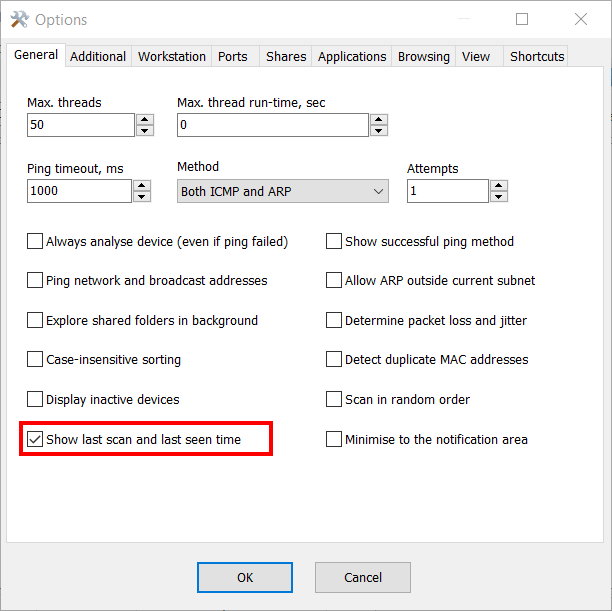
You can enable the Show last scan and last seen time in Options - General tab, as shown in the picture below. After you do that, there will be two extra columns with time stamps, which will be also exported to a CSV file.
We do not want to use the GUI. We want to call netscan.exe via commandline and have the timestamp of each found asset displayed in the resulting CSV file. Then we can later see which computer was switched on when in the company :-)
In that case, still enable the Show last scan and last seen time option highlighted in the screen shot above, and optionally export the configuration to a file. Use that configuration file with your command-line scanning, and the 'Last scan' column will essentially be the time stamp:
netscan.exe /auto:"z:\output.csv" /config:z:\last-scan-on.xml
The output will be like this:
"IP Address","MAC Address","Response Time","Host Name","Last Scan","Last Seen"
"192.168.0.1","AC-9E-07-7F-A2-F0","1 ms","RT-AC68U","24/09/2020 9:40:58 AM","24/09/2020 9:40:58 AM"
"192.168.0.8","B4-01-62-13-2D-DF","3 ms","VM-2","24/09/2020 9:41:10 AM","24/09/2020 9:41:10 AM"
It is possible to have a different time stamp type, e.g. UNIX time. If that's the case, let me know and I will explain how to do that.