Network Scanner version 8: User feedback
42 posts · Closed
Following several months of work, we are happy to announce Network Scanner v8.0. Its main theme is macOS support. Now both macOS and Windows versions are built from the same code and share more features.
There aren't many new features for the Windows version other than a new option to use built-in SMB library instead of the Windows implementation. Under the hood, however, the application has undergone a lot of changes and optimisations and it now starts much faster. A few user-supplied items may need to be updated:
- Options - Remote JSON: The new JSON Path engine requires explicit $ as the JSON root element. For example BiosVersion becomes $.BiosVersion.
- Options - Remote XML and NMap: The new XML engine supports slightly different syntax when selecting a single element in a group. For example (//osclass/@type)[1] becomes //osclass/@type[1].
- Regular expressions run on a new cross-platform engine as well. While the new engine should be compatible with the old, some complex expressions may stop working or change their behaviour. In this case they will need to be adjusted on case-by-case basis.
For macOS users, it is an entirely new product, very close in functionality to its Windows kin. We did a lot of testing, so version 8 is expected to be stable, though small bugs may still be present. If you encounter any bugs, please let us know!
Everyone is very welcome to download the latest version of Network Scanner and share your feedback ;-)
Wonderful news!!
Thank you team Softperfect! You are the best!
Dear All,
If you try to open a device with an IPv6 address, the Network Scanner tries to invoke an address like this:
http://aaaa::bbbb:cccc:dddd:eeee
which fails. The IPv6 address needs to be enclosed in square brackets, like this:
http://[aaaa::bbbb:cccc:dddd:eeee]
PS: I am using Chrome as browser
Thank you for reporting the issue with IPv6.
We have just fixed it in the latest build, and from today onwards IPv6 addressees are enclosed in square brackets.
That was quick :-)
Thanks a lot
Hi,
I just upgraded to v8 and 'Friendly Names' do not appear to be available any longer.
When I go to Friendly Names - Mapping, there is no option for MAC-address mapping. Is this a bug or am I missing something?
Thanks a lot
My OS: Windows 10
It could be a bug, or you could be missing something. It is hard to tell without seeing a screen shot from your computer.
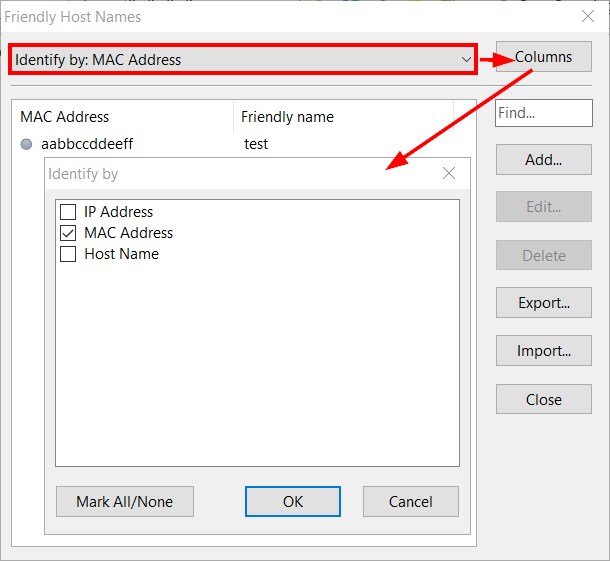
Normally you need to choose Identify by from the drop-down list, then click Columns and choose what columns you want to use as the key. Those columns must be enabled and visible to show up in this dialog:
Excellent work on version 8, thanks!
Just to let you know that on Remote JSON Windows, specifically if trying to adjust (expand) the second column, the first column contract.
Same behavior on Remote XML.
Also, in my case Application Hotkeys are not functioning.
Thank you for the feedback.
We have just fixed the resizing issue and the non-working application hot keys. Download the new builds and if you encounter any more bugs, please let us know.
It works. I did not hit the Columns button after I hit the drop-down. Thanks!
Hands down the best network scanner out there. I have tried them all.
Hi again,
Some applications are not working, maybe this has something to do with the issue of having each one duplicate every time I do a right mouse click over a workstation to display them.
Thanks.
Yes, sorry this was related to a bug we have fixed a couple of days ago. Please download the freshest build and both issues should be gone.
Hi Andrew,
I noted that the last snapshot version posted was for 7-Feb-2021. That's the same version I tested (but I downloaded again). On that version the duplicates issue remain unfixed.
Sorry we can't reproduce that.
Does it happen right after the application starts? After opening/closing settings?
May be it's worth checking what items are listed under Options - Applications.
Hi Andrew.
In the process to minimize the range of applications to submit you a sample of my applications, this is what i did and the error that followed:
a) Export bookmarks, variables, applications
b) Reset to default the running configuration
c) Import back the applications file
d) Check to see if the error of duplicates remain (And yes, it remain)
e) Identify a small portion of the whole list of applications where the duplicates are visible
f) Erase the rest to submit just the selected part ( In my case i selected letter w definitions, specifically wsus)
(Trying to delete one single item - first time - invalid type cast
trying to delete multiple items - first time - access violation
trying to delete multiple items - second time - invalid type cast
Then the error of invalid type cast persist on every botton pushed
Settings have not been saved due to the error: Access violation)
g) Edit manually the exported applications file to just include wsus
h) Reset again (To my surprise after the reset i checked the application list and as expected it has just the default two - Computer Management and Remote Desktop but after scanning and right click over an ip address to choose an application it appear my whole list of applications, this is after the reset and without importing yet. It appear like the whole list is active somehow on memory)
If the program close for several minutes before opening it again the issue of presenting whats already delete or eliminated from the original list does not appear. But if you import a file and latter you press the File - Current Config - Reset to Default option the program erase all applications to default but with the right click present the imported list.
Another error - Unable to read config: Access violation
Thank you for the detailed steps. I believe we have finally fixed it in the builds from 11th of February. Please download the freshest build and let us know if any bugs remain.
Running NetScan with the following:
/auto: /config:"%NetScan_App_Folder_Path_VAR\Xtras\Backups\Configurations\IP_RANGE_SCAN\D\scan.xml" /range:{Enter First IP To Scan:192.168.170.1}-{Enter Last IP To Scan:192.168.170.254}
Throws the following error: "No address to scan"
***Note: a) From the Options window - Applications - Trying to resize second column close first one - Scroll bar is hidden
Sorry, this doesn't seem to be reproducible. Perhaps there is some extra spacing or other characters?
Try changing your command line to the following and see what it prints:
[b]cmd.exe /k echo[/b] /auto: /config:"%NetScan_App_Folder_Path_VAR\Xtras\Backups\Configurations\IP_RANGE_SCAN\D\scan.xml" /range:{Enter First IP To Scan:192.168.170.1}-{Enter Last IP To Scan:192.168.170.254} The IP address input field is now different. The numbers have moved to the left side of the field, and the address cannot be entered with a space. In the previous version it was better.
This is a trade-off we had to make to enable the functionality on macOS.
Since macOS does not have an IP address input like Windows, we had to use a custom control that works on both platforms.
Sorting is not working properly in Options - Applications - Sort - (First) Name Column and From the Options window - Applications - Trying to resize second column close first one - Scroll bar is hidden
Thank you, the new builds should have fixed these issues.
Hi Andrew,
Just to let you know that on Visible Columns Windows, specifically if trying to adjust (expand) the second column, the first column contracts.
Thanks
Thanks, fixed in the latest builds.
I am using NetScan version v8.0.1 x64 bit, and I think I found a two small bugs:
1) A typo in "minimiSe to the notification area".
2) When I activate the "hide to tray" function, after calling the program from the tray, some unsaved settings disappear. For example, the added IP ranges or created filters disappears.
Thank you for reporting the issues.
Regarding "minimise", it is the British spelling that is also used here, in Australia. The United States spell it "minimize". In other words, this is just a minor difference between two English dialects.
Regarding settings disappearing upon hiding the application into the tray icon, that was indeed a bug. We have just fixed it and uploaded the new builds here.
Thanks for the quick fix. And thanks for your unique software.
Thank you for this release! Softperfect Netscanner has been my MUST-HAVE TOOL for many years. I was using it extensively on Windows machines until now, but with this release Macs are well covered too! Excellent job!! It is very refreshing and uncommon to see a great software product that is well established, and affordable, and is in active development, and has highly skilled support that is still helping users and answering questions. Too many good products either get abandoned, or become too expensive, or get swallowed by larger corporations where nobody cares about individual users anymore. I am so glad to see that Softperfect company is still true to its superb business model. Please don't ever change, you are PERFECT!
It appears that the "Retrieve Computer Uptime" option on the "Workstation" tab of program options is calculating remote system uptime relative to my local PC's offset from GMT.
I am on the west coast of the USA (presently GMT -07), all scanned computers show at least 7 hours uptime, even when rebooted seconds ago.
Also, if the Network scanner window is placed at the top of my screen but not maximized, if I open program options or the Import IP window, the top part of the window is off the top of the screen. (NetScan_v8_Options.jpg)
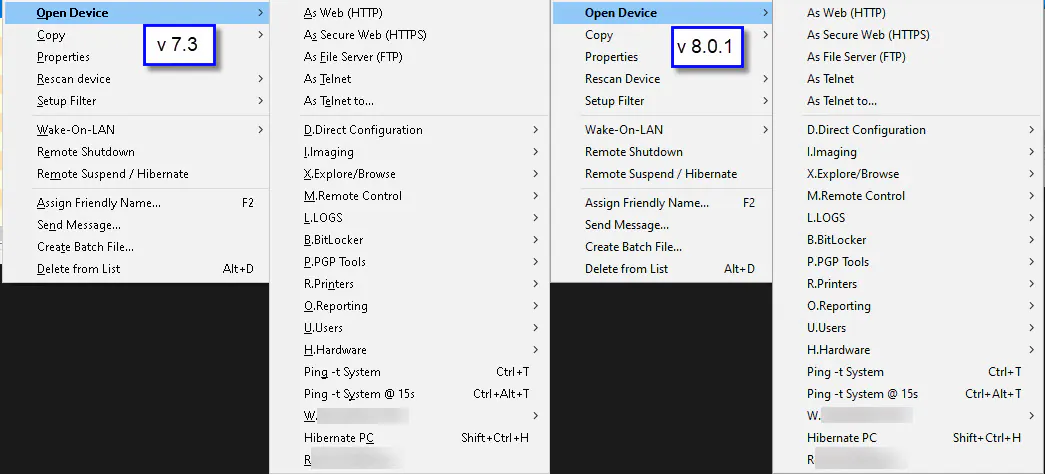
It seems like many of the hotkeys for various menus have stopped working in this version, and the hotkey for menu items is not underlined anymore. (NetScan_v7v8_Menus.jpg)
Right-click on a PC and press 'E' to open the Remote Shutdown dialog.
Alt, F, U, S no longer opens File > Current Config > Save.
CTRL+TAB does not change tabs in Program Options.
Is there any way to get this functionality back?
I managed to get my REGEX fixed and everything else is humming along well. The new version is certainly faster than 7.3.
Thank you for all your hard work. This program has become a cornerstone of my daily work.
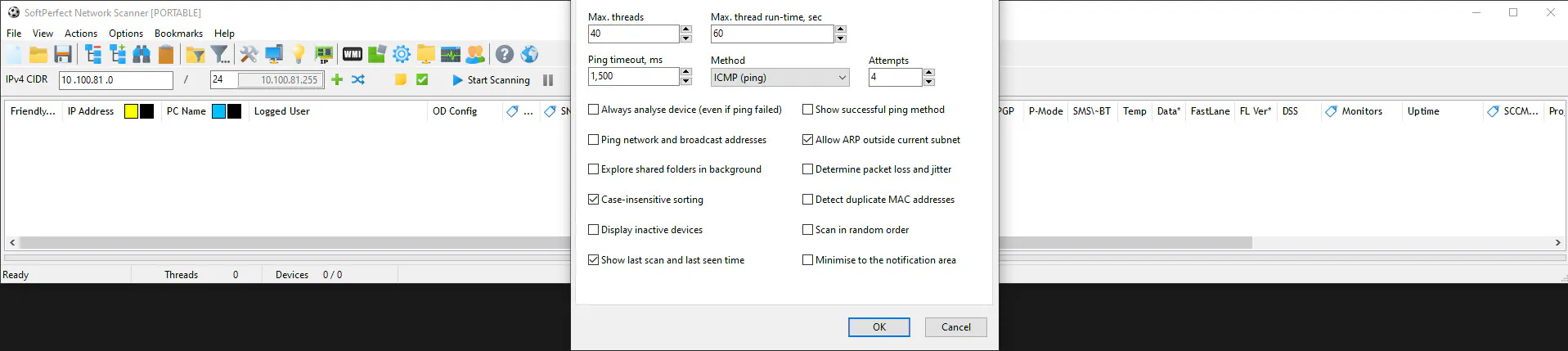
Sorry, we weren't able to reproduce the time zone issue. It may be that some systems return local time while others return GMT time.
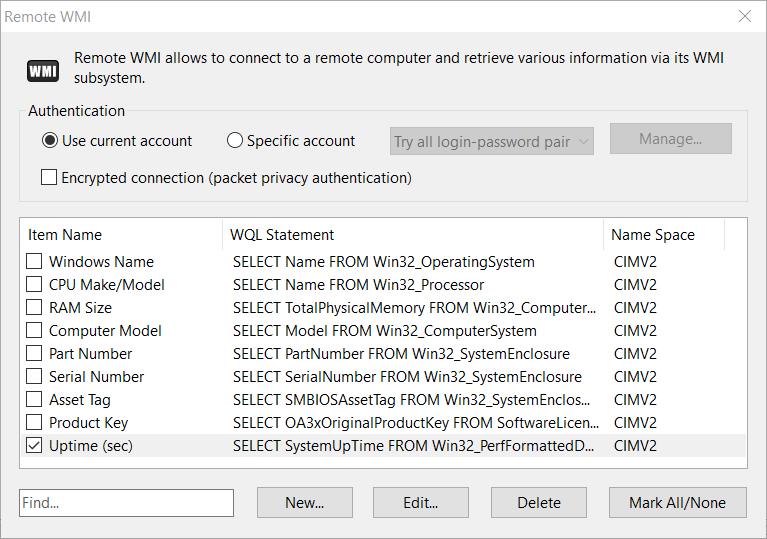
Instead, try using the uptime item from WMI, as it does not depend on time zones:
Regarding the settings/import windows showing above the upper edge, this probably has something to do with the component library the application was built upon. In order to achieve a cross-platform product, that is to run Network Scanner on macOS we had to use a different GUI library and development tools. The behaviour of the library, i.e. windows, buttons, menus is similar but not identical to the old one.
The same applies to the menu shortcuts: the new library is not capable of automatic generation of menu hot keys. You can however assign a dedicated hot key to any frequently used items. For example below I have assigned Shift + Ctrl + S to invoke the save config dialog:
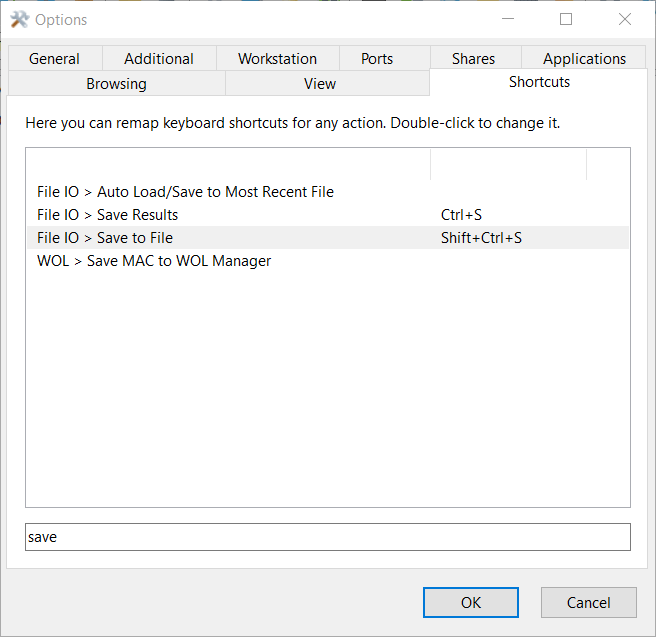
Hopefully this helps.
Two small issues with V8:
1. Please consider making it so that pressing "." will not advance to the next IP address octet if the current octet is empty.
For an example of this behaviour you can look at the IP address entry field in Windows network adapter properties. This makes the IP address entry field more intuitive and idiot proof because you simply place a "." between each octet when typing the address, and it is entered correctly regardless of whether or not the octet has 2 or 3 digits in it. Currently in Netscan if you type for instance 172 and then press ".", your first octet is filled, second octet is skipped, and the cursor is sitting in the third octet. Making the . only advance octets when the current one is non-empty seems like it would solve this and make it easier to use.
2. "Find" performance seems much slower than in previous versions.
My saved scan files are about 1600KB. I have about 20 columns. Using Ctrl-F to search results in about a 6 second delay before the first search result is found. The performance seems to depend directly on how many records are traversed, for example if the first search result is nearer to the top of the scan results than the search only takes about 3 seconds. In previous versions of Netscan the search was basically instantaneous for me, I did not have this several second delay.
Been using this software for many years and always find it handy, so thanks!
Thank you for pointing these issues out.
- Regarding the "." symbol for advancing octets. Unfortunately the current behaviour comes from the underlying control we are using. In version 7, it was the native Windows IP address input. In version 8, we had to resort to a cross-platform solution that works on both Windows and macOS. Having said that, we have modified its behaviour so that the cursor does not advance unless the current octet is filled.
- Regarding the search performance, we have improved it as well. Now it should search any number of rows instantaneously, like version 7 did.
Please download the new builds and let us know how it works for you.
I tested out the new build you linked and both the IP address entry and search are working great now. Thanks!
Long time licensed user. When you copy and paste 172.29.112.1 in the start IP range box and then paste 172.29.112.5 in the end range box, you get 172.291.121. and 172.291.125. Which is unusable. We use copy paste in our daily operations and this has almost completely crippled the use of this software. We have tried to work around it, but it is just so frustrating, years and years of copy paste habit is impossible to break. Would you look into a fix soon. Many Many Thanks. :-)
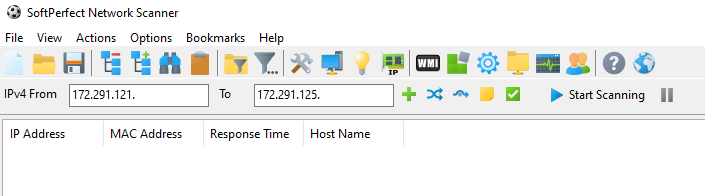
Regardless of this being a habit, it is clearly a bug, as pasting an IP address should result in getting exactly that address. Thank you for reporting it!
We have just fixed it and you can download the new builds here.
1) I believe that the app icon broke with the last fix. I open the Scanner and it works fine, but there's a blank icon on the taskbar.
2) Is there any way to just scan for printers?
Thank you, the icon issue was just fixed. Not sure how it happened as it's got back by itself after a rebuild.
Regarding scanning for printers, I don't think there is a reliable way to say whether a specific device is a printer. You can scan for devices with certain ports open. Alternatively, employ the Nmap integration and scan for all devices. Then filter out those with the device type being printer:
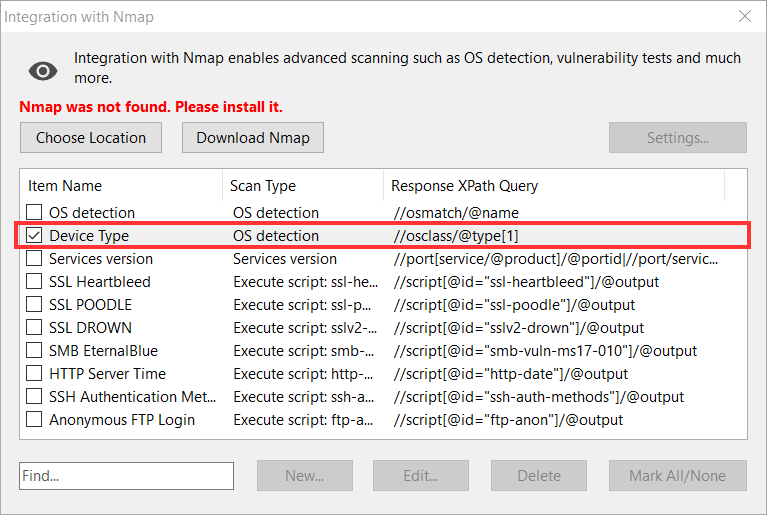
Update: turns out there is a protocol called WS-Discovery. I will check if we can implement this within our Network Scanner. If so, then it can discover specific device types on demand.
Guys, you absolutely rock! Your Netscanner is the best. Not just for macOS, but of all of them.
Hi Andrew,
WS-Discovery sounds great!!!
There are some issues I want to submit:
1) Favorites Filter doesn't seem to be working.
I created and saved a configuration file to look for the printers (in the meantime if WS-Discovery possible) with a filter for TCP ports (9100, 515, 631) not empty, and reopening netscan with the config file does present the filter in the list. But if I try to use it does not work, and if I try to mark it as favorite does not bring it to the favorites list. I have to redo the filter.
2) After a new application item is created, sorted, and the config saved, it did not appear in the corresponding sorted place. I have to open applications again, sort again and save for it to appear in the correct position.
3) Maybe related to the previous one. After the first sort if I select, on a host, with the mouse right menu, the item for the newly created application option it did not bring that application but another one.
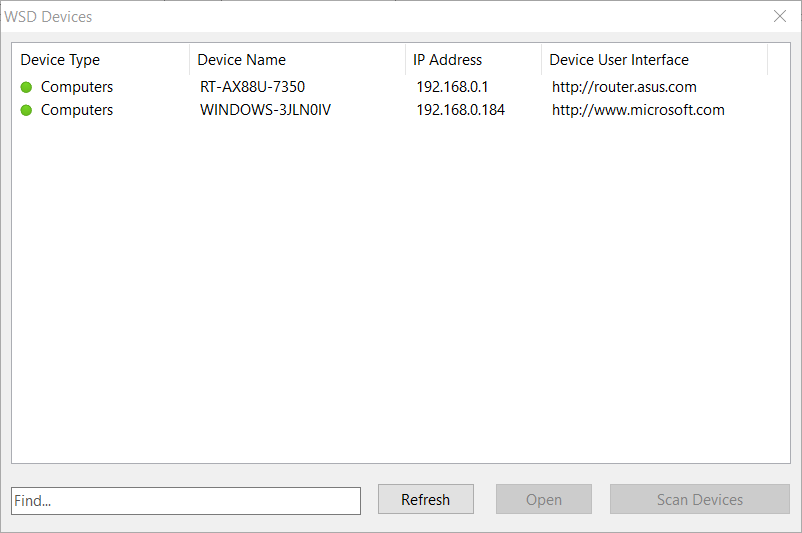
Thanks for the feedback. I am happy to advise that we have implemented Web Services for Devices (WSD) discovery in the latest builds.
You can find it under Actions - WSD Device Discovery. It should detect all WSD-capable devices, of which you can select printers and click Scan Devices to scan them in the main window.
The bugs with filters and applications have been fixed as well.
I don't like the new IP address input field because it is tricky
Before : I could type "1" "9" "2" "dot" "1" "6" "8" "dot" > 192.168.
Now : with the same input > 192. .168.
So, no need to type "dot"? > No because when there is only two numbers it goes wrong if you don't use the dot
We have fixed this IP input behaviour on 7 April 2021. Now, entering the dot will only advance the position if there is a filled octet. Therefore typing 192 (dot) 168 (dot) will enter 192.168.
It is likely that you have an earlier build, in which case please download the latest builds.