Missing sort icons in column names
2 posts · Closed
Eric Guest
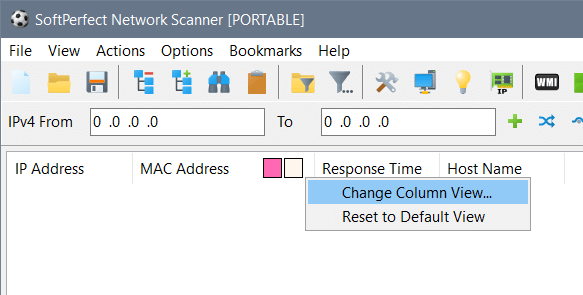
I have Network Scanner on two identical PCs, but one of them has white and black squares/boxes in the column names which can be used to sort the columns, and the other PC doesn't have the boxes. I looked in the settings and can't find anything to turn the boxes on. How do I do that?
Thanks
Ann SoftPerfect
Those boxes are not related to sorting. They are showing if any custom colours for text and background were set.
Simply right-click any column, then choose Change Column View... in the menu, and you will be able to select any colours, or you can reset those to the default values.
This topic is closed.
It has had no new posts for over a year, so the software versions it talks about may be out of date.
Start a new topic in Network Scanner if you have a similar question.