NetWorx trial crashes on macOS 12.2.1 Apple Silicon
16 posts · Closed
I downloaded the NetWorx trial for my macOS 12.2.1 (Apple Silicon) and it randomly closes/crashes (icon disappears from Menu Bar) after a few minutes and stops logging network activity. Is there a way to stop this from happening? I'm quite sure this is a bug because I have been using the old NetWorx freeware version on Windows for a couple of years and never had this happen to me.
It's probably a bug. Please confirm which monitoring mode you are using: adapter or applications, as shown below?
These two options use different data collection methods, so we will know where to look for the bug.
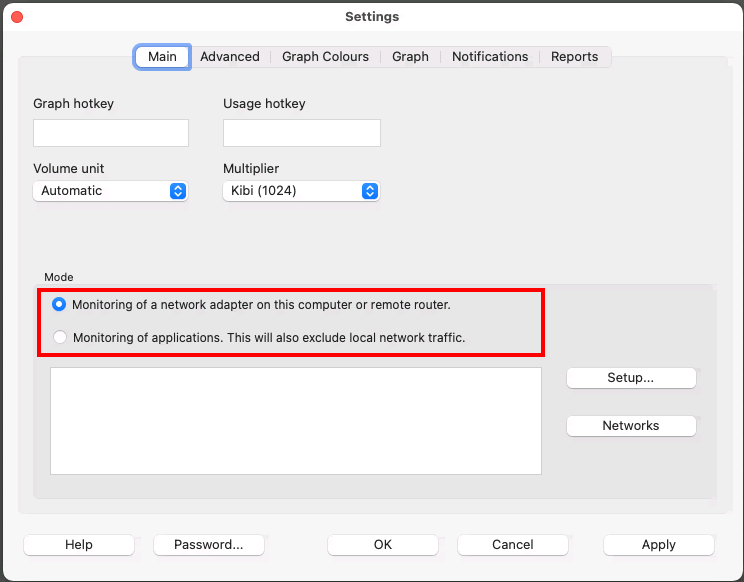
I have the mode set to Monitoring of applications.
I also have another question, is there a way to configure the app to open on startup like in the Windows version? Can't seem to find the option in settings on the MacOS version.
I can confirm we were able to reproduce this issue. NetWorx randomly crashes on macOS 12.2.1 within minutes to hours when monitoring apps. It is using undocumented Apple's private framework, so this may take some time to investigate. I will post an update here once we have found a solution.
Regarding starting NetWorx automatically, we will later add a setting for this into the app itself. At the moment you can create a so-called Login Item with macOS, please see this article for details.
Wondering if a fix/workaround is coming for this issue. See it happening only when Application Monitoring is enabled, but not when Adapter Monitoring is enabled.
May I know if an update with the issue fixed will be coming soon? It has been nearly a month and my trial period is coming to an end. I do not want to pay for a license until the issue is fixed as this is a major issue for me. Is it possible to extend the trial until it is fixed so that I can test it and verify that the issue has been fixed before making a purchase?
Sorry for the delays. We believe we have found and fixed what was causing this. Currently we are testing it. If it doesn't crash in another couple of days, we will publish the update.
The latest build from the 10th of March should no longer crash randomly. Please download the updated build and let us know how it performs for you.
I don't know how it is going for the others, but for me the update is working Ok so far.
Thank you for your support (tu) I wish that other software companies were like you, listened to their users and reacted with meaningful answers.... ;-)
Downloaded the latest build and it seems that the crashing issue has been fixed. Will update here if it happens again. Thanks a lot for fixing it and responding.
There is also a little bug with the GUI of the date picker in the Custom and Applications tabs of the usage report. Might want to patch it before pushing out the next release.
I am currently running the trial version of NetWorx on Mac because I'm having connection issues with Xfinity and want to document them for my support request. The app runs less than 5 minutes before it just disappears. So I don't even have a good sense of if the data it collects is useful. Update check reports the latest version of NetWorx. I'm running macOS 12.5.1 I don't want to update to 12.6 while I'm in the middle of some projects. Can anyone provide some advice?
Please try downloading and updating the app to the latest build.
We have recently fixed another issue that caused the app to be randomly terminated. If the issue persists with that version, let us know and we will look into it further.
NetWorx app has been great for the past half a year, but it seems that there are some issues with the latest macOS build of NetWorx that need to be fixed:
- App can randomly crash when accessing and scrolling around the Usage Report window.
- Data usage by kernel_task (and possibly other system apps) does not seem to be logged (I can see on iStatsMenu and Activity Monitor that there is non-local network traffic).
- Calendar Date picker on 'Custom' and 'Applications' tabs of the Usage Report window does not show properly.
- NetWorx icon in Menu Bar turned into greyscale after updating to 7.0.3 version.
Thank you for reporting these issues.
- Unfortunately we have been unable to reproduce this so far.
- Data usage by kernel_task is most likely local, for example it's used for Time Machine backups, and that's what iStat Menu and Activity monitor show. NetWorx on the other hand excludes any local usage and only displays connections to public IP addresses.
- We have just fixed the drop-down calendar appearance on macOS dark theme. Please download the latest build and check it.
- The menu bar icon was made greyscale to better fit with other Apple icons that are mostly greyscale.
Thank you for your swift responses and bug fixes.
- It has not happened to me yet since the new build. Hope it stays that way.
- While it's true that kernel_task is also used for network Time Machine backups, I personally do not have it setup. I have also realised that network usage in Virtual Machines can sometimes be shown as kernel_task, which can lead to inaccuracies in data. However that said, I don't think there is an easy way to differentiate between the two.
- This problem has been fixed.
- Noted the reasoning for the change, was confused as it was not in the change log. I think it would fit even better if the icon only shows the outline.
I also think there should be a [Windows] / [MacOS] / [All] tag in front of every change in the change log to make it clearer as some changes only apply to selected versions.
We are glad that the issue with the calendar got resolved.
Regarding OS tags in the changelog, we normally mention the system for significant changes, where it is important. However, the icon colour seemed a very minor change, so we didn't list it in the log.